I2P Network: Complete Guide to Anonymous Internet Communication
The Invisible Internet Project (I2P) is a fully encrypted anonymous network layer that routes traffic through multiple peers to protect your identity. Unlike VPNs or Tor, I2P creates a self-organizing distributed network where all communication is pseudonymous and secure.
On this page
The Invisible Internet Project — I2P — is a fully encrypted anonymous network layer that lets applications send messages to each other pseudonymously and securely. Unlike traditional internet connections that expose your IP address and location, I2P creates a distributed, self-organizing network where all traffic is encrypted end-to-end and routed through multiple peers before reaching its destination.
I2P works in a fundamentally different way from the surface web. Instead of connecting directly to servers, you communicate through encrypted tunnels that change constantly, making traffic analysis extremely difficult. That architecture makes I2P particularly valuable for journalists, activists, researchers, and anyone who needs stronger privacy than a VPN or Tor can offer.
How I2P Works: Architecture and Routing
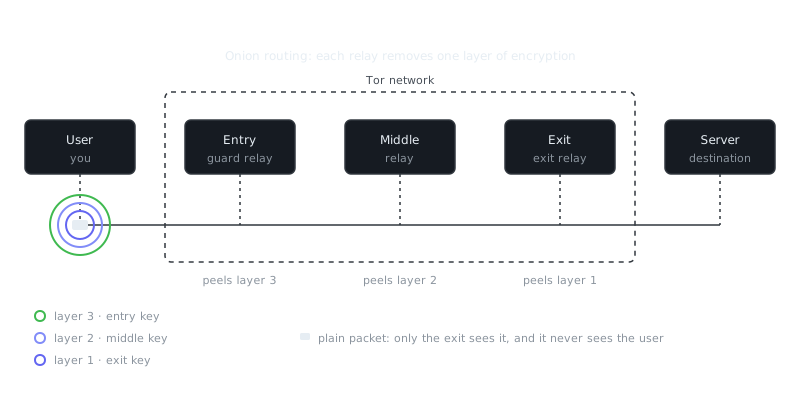
I2P uses garlic routing, an evolution of onion routing that bundles multiple messages together. Each I2P participant (called a router) maintains a local database of network peers and builds encrypted tunnels through those peers for both inbound and outbound traffic.
Here's what happens when you send data through I2P:
- Your router creates an outbound tunnel through 0-3 randomly selected peers (3 by default)
- The message gets encrypted multiple times, once for each hop
- Each router in the tunnel can only decrypt one layer, revealing only the next hop
- The final router delivers the message to the destination's inbound tunnel
- The response travels back through a completely different set of tunnels
Because inbound and outbound tunnels are separate, an observer can't correlate incoming and outgoing traffic at any single router. Tunnels are also short-lived, rebuilding every 10 minutes by default, which shuts down long-term traffic analysis before it can get started.
Garlic Routing vs. Onion Routing
What separates I2P's garlic routing from Tor's onion routing is message bundling. Garlic routing packages multiple messages together in a single "garlic clove," so an observer can't tell how many messages are inside a single transmission. That makes timing attacks significantly harder. It's even more effective when you consider I2P's distributed design, where every participant acts as a potential relay rather than relying on a limited set of volunteer nodes.
Setting Up I2P: Installation and Configuration
Getting started means downloading and configuring the I2P router software. The most common implementation is the Java-based I2P router, though alternatives exist.
Basic Installation
# Debian/Ubuntu
sudo apt-add-repository ppa:i2p-maintainers/i2p
sudo apt-get update
sudo apt-get install i2p

# Start I2P as a service
sudo systemctl enable i2p
sudo systemctl start i2p
For other operating systems, grab the installer from the official I2P website. After installation, access the router console at http://127.0.0.1:7657 in your browser.
Essential Configuration Steps
# Configure bandwidth limits in ~/.i2p/router.config
i2np.bandwidth.inboundKBytesPerSecond=512
i2np.bandwidth.outboundKBytesPerSecond=256

# Set number of tunnel hops (0-3, default is 3)
inbound.length=3
outbound.length=3

# Enable or disable participating traffic
router.participatingTunnels=true
Plan for 30-60 minutes before your router fully integrates into the network and builds a reliable peer database. Performance will be limited during that window while your router learns about other peers and establishes its network profile. Setting realistic bandwidth limits helps the broader network and keeps your own connection from getting saturated.
Privacy Applications and Use Cases
I2P supports multiple applications and protocols, all running within the anonymous network layer. Network-level anonymity protects all your applications at once, so you don't need separate privacy solutions for each one.
Anonymous Communication
I2P includes built-in email functionality through I2P-Bote, which gives you fully decentralized, serverless email with end-to-end encryption. Messages are stored encrypted across the distributed network and only the recipient can decrypt them. It works without any central servers or phone number requirements, which eliminates the metadata that even privacy-focused encrypted messaging apps can leak.
File Sharing and Content Distribution
The I2P network hosts multiple torrent trackers and file-sharing applications. Postman torrent tracker and the built-in I2PSnark client handle anonymous file sharing. Since all traffic stays within I2P, your ISP can't detect torrent activity or throttle your connection based on it.
Anonymous Websites (Eepsites)
I2P hosts websites with .i2p addresses, known as eepsites. These sites are only accessible within the I2P network and provide complete anonymity for both hosts and visitors. Setting one up looks like this:
“Arguing that you don't care about the right to privacy because you have nothing to hide is no different from saying you don't care about free speech because you have nothing to say.”
— Edward Snowden
# Create a tunnel for your webserver in ~/.i2p/i2ptunnel.config
tunnel.type=httpserver
tunnel.i2cpHost=127.0.0.1
tunnel.i2cpPort=7654
tunnel.privKeyFile=eepsite-key.dat
tunnel.targetHost=127.0.0.1
tunnel.targetPort=8080
Cryptocurrency Transactions
I2P works well as a transport layer for privacy-focused cryptocurrency use. Monero has native I2P integration, so you can broadcast transactions over I2P instead of clearnet, hiding even the network-level metadata of when and where a transaction originated.
I2P vs. Tor vs. VPN: Understanding the Differences
| Feature | I2P | Tor | VPN |
|---|---|---|---|
| Primary Use | Hidden services, P2P | Web browsing, hidden services | General privacy, geo-unblocking |
| Routing | Garlic (bidirectional) | Onion (unidirectional) | Single encrypted tunnel |
| Latency | High (300-1000ms) | Medium (200-500ms) | Low (20-100ms) |
| Bandwidth | Moderate | Moderate to High | High |
| Clearnet Access | Outproxy required (limited) | Yes (default use case) | Yes (primary function) |
| P2P Support | Excellent | Poor | Good |
| Anonymity Set | All I2P users | All Tor users | Only VPN subscribers |
| Traffic Analysis Resistance | Excellent | Good | Poor |
| Exit Node Vulnerability | No exit nodes | Yes | VPN provider sees all |
The core difference comes down to what each tool was built for. Tor optimizes for accessing the regular internet anonymously, which makes it the right choice for web browsing and anything requiring clearnet resources. I2P optimizes for peer-to-peer communication within its own network, making it stronger for hidden services, file sharing, and applications where both parties are already inside I2P.
VPNs offer the weakest anonymity but the best performance. They simply move trust from your ISP to the VPN provider. That provider can log everything and must comply with legal requests in their jurisdiction — so you're not really anonymous, you've just changed who's watching.
Security Considerations and Limitations
I2P provides strong anonymity guarantees, but no system is perfect. Knowing the limitations helps you use it appropriately.
Timing Attacks
A sophisticated adversary who can monitor traffic entering and leaving the I2P network could potentially run correlation attacks. If someone can observe both when you send data and when a specific eepsite receives it, they might be able to match the timing patterns. I2P counters this through message batching and random delays, but you should still avoid predictable usage patterns that make correlation easier.
Browser Fingerprinting
Your browser can leak identifying information when you visit eepsites. Use the I2P-optimized Firefox profile or lock down your browser manually:
# Recommended Firefox about:config settings for I2P
privacy.resistFingerprinting=true
webgl.disabled=true
javascript.options.wasm=false
media.peerconnection.enabled=false
Better yet, keep a dedicated browser profile just for I2P browsing and never mix clearnet and I2P usage in the same session.
Network Size and Diversity
I2P's anonymity set is smaller than Tor's — roughly 30,000-50,000 active routers compared to Tor's 2+ million daily users. That means a sophisticated adversary has a better shot at running a meaningful fraction of network nodes. Even so, I2P's architecture makes it harder to compromise even with partial network control.
Outproxy Limitations
Accessing clearnet sites through I2P requires outproxy servers, which work similarly to Tor exit nodes. Your traffic becomes visible at those points, so treat them as trust boundaries. Only use outproxies for non-sensitive browsing and never log into accounts that could identify you.
Summary and Key Takeaways
I2P is a solid anonymous network layer built for hidden services and peer-to-peer communication. Its garlic routing architecture, bidirectional tunnels, and distributed design make it particularly resistant to traffic analysis and network-level attacks.
A few things worth keeping in mind:
- I2P was built from the ground up for server anonymity and P2P, not just as an afterthought
- Give your router 30-60 minutes to integrate before expecting reliable performance
- Match the tool to the job: I2P for hidden services and P2P, Tor for anonymous clearnet browsing, VPNs for geo-unblocking and basic privacy
- Combining I2P with encrypted messaging and privacy coins gives you layered protection across different threat surfaces
- The tradeoff is real: higher latency and more setup complexity in exchange for stronger anonymity
For serious privacy needs, I2P works best as one layer in a broader strategy. Use it for anonymous hosting and P2P, reach for encrypted messaging apps on mobile, and consider privacy coins for financial transactions. Each tool covers different ground, and combining them thoughtfully gives you much stronger defense than any single solution can.
Frequently Asked Questions
What is I2P and how is it different from a regular VPN?
I2P (Invisible Internet Project) is an anonymous network layer that routes your traffic through a distributed network of volunteer-run nodes, making it very difficult to trace back to you. Unlike a VPN, which just hides your traffic from your ISP by routing it through a single server, I2P encrypts data in multiple layers and spreads it across many nodes, so no single point knows both who you are and what you're accessing.
Is I2P the same as Tor, and which one should I use?
I2P and Tor are both anonymity networks but work differently — Tor is better suited for accessing the regular internet anonymously, while I2P is optimized for communication and services within its own internal network (called 'eepsites'). If your goal is private browsing of normal websites, Tor is the more practical choice; if you want to participate in a self-contained private network for messaging, file sharing, or hosting, I2P fits better.
Does using I2P keep me completely anonymous and safe online?
I2P significantly increases your privacy by obscuring your IP address and encrypting your traffic, but it doesn't guarantee complete anonymity. Your behavior, the applications you run on top of I2P, and potential software vulnerabilities can still expose your identity, so it works best as one layer of a broader privacy practice.
Video Resources
Sources & Further Reading
- I2P Project — The Invisible Internet Project's official documentation.
- Tor Project — Official site of the Tor network and Tor Browser.
- Tor Browser Manual — Setup, security levels, bridges and troubleshooting.
- EFF Surveillance Self-Defense — Threat-model based guides from the Electronic Frontier Foundation.
- Privacy Guides — Independent recommendations for privacy-respecting tools.
- Security in a Box — Digital security guides for activists and journalists.
- Tails Documentation — Official documentation for the amnesic live operating system.