VPN vs Tor: Choosing the Right Privacy Tool
VPNs encrypt your connection to a trusted server, while Tor routes traffic through volunteer nodes to hide your identity. Each tool solves different privacy problems—understanding how they work and where they fail helps you choose the right one for your threat model.
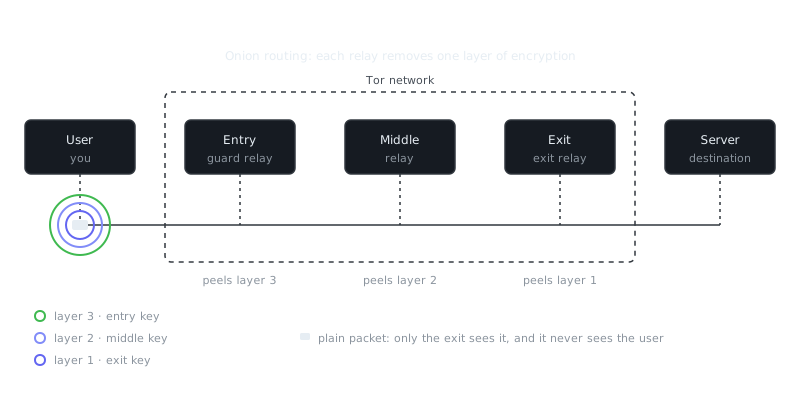
Try it: send a packet through Tor
Your message is wrapped in three layers of encryption. Each relay removes one layer and only learns the next hop; the exit sees the message but not who sent it.
On this page
Privacy tools solve different problems, and picking the wrong one for your situation can leave you exposed in ways you didn't expect. A VPN encrypts your connection to a server you're trusting. Tor bounces your traffic through three volunteer-run nodes to keep your identity hidden. Knowing when to use each comes down to understanding your actual threat — not just which tool sounds more serious.
How VPNs Work
A VPN creates an encrypted tunnel between your device and a server the VPN provider controls. Your ISP sees only scrambled traffic heading to that server. Websites see the server's IP address instead of yours.
When you connect, your VPN client authenticates with the server and builds an encrypted session using a protocol like WireGuard or OpenVPN. Every bit of traffic from your device travels through that tunnel before it touches the open internet.
# Example: Connecting to a VPN using WireGuard
sudo wg-quick up wg0

# Verify the connection
ip addr show wg0
curl ifconfig.me  # Returns VPN server IP, not yours
Here's the catch: the trust model is completely centralized. Your VPN provider can see everything your ISP could normally see — which sites you visit, when you connect, how much data you move. You're not gaining privacy, you're relocating it. You're swapping one observer for another.
Commercial VPNs run infrastructure across dozens of countries, so you can appear to browse from almost anywhere. That's great for bypassing geo-restrictions, but it does nothing for anonymity against the VPN company itself.
How Tor Works
Tor routes your connection through three randomly selected volunteer nodes: an entry node, a middle node, and an exit node. Each one knows only the hop before it and the hop after it — never the full chain.
Your traffic gets wrapped in three layers of encryption before it leaves your device. The entry node peels off the first layer and passes it along. The middle node removes the second. The exit node strips the last layer and sends your request to the destination. Think of it like a series of sealed envelopes, each one only showing the next address.
# Running Tor Browser on Linux
./start-tor-browser.desktop

# Or using Tor as a SOCKS proxy for command-line tools
curl --socks5-hostname 127.0.0.1:9050 https://check.torproject.org/api/ip
No single node ever knows both who you are and where you're going. The entry node sees your real IP but has no idea what site you're visiting. The exit node sees the destination but has no idea who sent the request. That distributed trust model holds up even against well-resourced adversaries.
The obvious tradeoff is speed. Three hops add real latency, and volunteer bandwidth is limited. Tor is slower than any commercial VPN, full stop.
Threat Models and Use Cases
What are you actually defending against? That question should drive your decision, not a preference for whichever tool sounds more technical.
Against ISP Surveillance
Both tools hide your browsing from your internet provider. A VPN is faster and works fine for day-to-day privacy. Tor is slower but harder to undermine.
If you're worried about government-level surveillance that extends to ISPs, Tor is more resilient because trust gets spread across nodes in different countries and jurisdictions. A VPN requires you to trust one company, one legal system, and one set of executives making decisions under pressure.
Against Website Tracking
Tor Browser includes serious anti-fingerprinting protections. It blocks many tracking techniques and makes all Tor users look nearly identical to websites. This matters because fingerprinting doesn't rely on cookies — websites collect data about your screen resolution, installed fonts, plugins, and hundreds of other browser attributes to build a unique profile tied to your device. Even if your IP changes, your fingerprint doesn't.
VPNs hide your IP. They don't touch fingerprinting at all. A site can still identify and track you across sessions using your browser configuration, canvas fingerprinting, and behavioral patterns.
Against Local Network Monitoring
On a coffee shop or hotel network, both tools encrypt your traffic from anyone snooping on the same connection. A VPN is plenty here. Tor's extra anonymity doesn't add much protection against someone passively sniffing WiFi packets.
For Whistleblowing or Journalism
Tor is the standard tool, and for good reason. It provides solid technical anonymity. But your behavior matters just as much as your tools. An adversary might not try to crack Tor at all — they might identify you through your writing style, the times you post, or metadata baked into documents you share. Operational security is what actually keeps you safe.
A VPN just shifts the trust to your provider. If a government pressures that company legally, your connection logs may surface whether or not the provider promised to delete them.
“Privacy is not something that I'm merely entitled to, it's an absolute prerequisite.”
— Marlon Brando
Performance and Practical Constraints
| Aspect | VPN | Tor |
|---|---|---|
| Speed | Near-native (5-20% overhead) | Slow (often 1-3 Mbps) |
| Latency | Low (10-50ms added) | High (200-1000ms typical) |
| Streaming | Works well | Usually blocked or buffering |
| Torrenting | Allowed by some providers | Forbidden — harms the network |
| Cost | $3-12/month typical | Free |
| Setup | Single app install | Browser download or system config |
VPNs handle video streaming, large downloads, and gaming without much friction. Tor handles web browsing and messaging but falls apart with anything bandwidth-heavy.
Worth knowing: many streaming services block known VPN IP ranges. Tor exit nodes are publicly listed, so they get blocked even more aggressively. Neither is a guaranteed workaround for every geo-restriction.
Combining Approaches and Alternatives
You can route Tor through a VPN, which hides the fact that you're using Tor from your ISP. That's useful if your ISP blocks or flags Tor connections. It doesn't improve your anonymity though — Tor already prevents your ISP from seeing where you're going.
# Connect VPN first, then start Tor
sudo openvpn --config provider.ovpn
tor-browser
Running a VPN through Tor is rarely worth it and introduces new trust problems, since you'd be relying on a Tor exit node to correctly forward your VPN traffic.
If you need to host anonymous services rather than just browse anonymously, I2P is worth looking at. It builds encrypted peer-to-peer tunnels optimized for hidden services rather than reaching the regular internet. It's slower than Tor and has a steeper learning curve, but it's better suited for that specific use case. Most people find Tor more practical for general use.
Privacy Limitations Both Share
Neither tool gives you complete anonymity. Both protect privacy at the network level, but neither one can save you from your own behavior.
Account correlation is a simple example. If you log into your Gmail account through Tor, Google still knows it's you. The network path doesn't matter once you've identified yourself.
Payment tracking trips up VPN users constantly. A VPN subscription paid with your credit card ties your real identity to your account. Cryptocurrency helps, but it's not foolproof without careful handling of the transaction trail.
Application leaks can expose your real IP without you realizing it. Programs running outside your VPN tunnel or Tor Browser can leak through DNS requests, WebRTC connections, or protocol-specific identifiers.
Endpoint compromise is the one that no network tool can fix. If malware is already on your device, the adversary sees your activity before any encryption happens.
Traffic analysis is a more sophisticated threat. An adversary who monitors both the entry and exit points of an anonymity network can sometimes correlate traffic patterns to identify users. It requires significant resources, but well-funded attackers have done it.
Making the Choice
Use a VPN when you want privacy from your ISP, need to access geo-restricted content, or want encrypted traffic on untrusted networks. Pick a provider with a genuine no-logs policy, a jurisdiction outside major surveillance alliances, and ideally a history of audits backing up their claims.
Use Tor when anonymity is the priority, not convenience. When your identity needs to stay hidden from the destination site. When you're accessing sensitive resources. When you can't afford to trust any single organization with your traffic.
Don't treat either tool as a complete solution and stop thinking. Both solve specific technical problems, but neither one cancels out poor operational security, a compromised device, or a determined adversary with real resources.
For most people in most situations, a reputable VPN covers everyday privacy with minimal effort. Tor stays essential for high-stakes anonymity despite the real speed and usability costs. The right call depends on your specific threat model. Pick the tool that fits the problem — not the one that sounds more impressive.
Key Takeaways
- VPNs encrypt traffic to a single trusted provider; fast but centralized trust
- Tor routes through three nodes for distributed anonymity; slower but no single point of trust
- VPNs work for streaming, gaming, and torrenting; Tor works for browsing and messaging
- Neither prevents browser fingerprinting, account correlation, or endpoint compromise
- Choose a VPN for everyday privacy and content access; choose Tor when anonymity is critical
- Combining tools rarely increases anonymity and adds complexity that can introduce mistakes
- Your behavior and operational security matter more than your choice of tool
Frequently Asked Questions
What is the difference between a VPN and Tor?
A VPN routes your internet traffic through a single server run by a company, hiding your IP from websites but requiring you to trust that provider. Tor routes your traffic through three volunteer-run servers (nodes), making it much harder to trace, but significantly slower as a result.
Which one is better for everyday privacy, like streaming or browsing?
A VPN is the better choice for everyday use since it's fast enough for streaming, easy to set up, and keeps your ISP from seeing what you're doing. Tor is too slow for most casual browsing and is often blocked by streaming services.
Does using a VPN or Tor make me completely anonymous online?
Neither guarantees full anonymity. A VPN provider can still log your activity, and if compelled legally, hand it over. Tor is stronger for anonymity but can still be compromised if you log into accounts or download files that reveal your identity.
Video Resources
Sources & Further Reading
- Tor Project — Official site of the Tor network and Tor Browser.
- Tor Browser Manual — Setup, security levels, bridges and troubleshooting.
- Wikipedia: Onion routing — How layered encryption routing works, with history.
- EFF Surveillance Self-Defense — Threat-model based guides from the Electronic Frontier Foundation.
- Privacy Guides — Independent recommendations for privacy-respecting tools.
- Security in a Box — Digital security guides for activists and journalists.
- Tails Documentation — Official documentation for the amnesic live operating system.