Browser Fingerprinting Explained: Tracking Without Cookies
Your browser shares dozens of data points—screen resolution, fonts, timezone, graphics card—that combine to create a unique fingerprint. This digital signature can track you across websites without cookies or your consent, making it one of the most persistent tracking methods on the modern web.
On this page
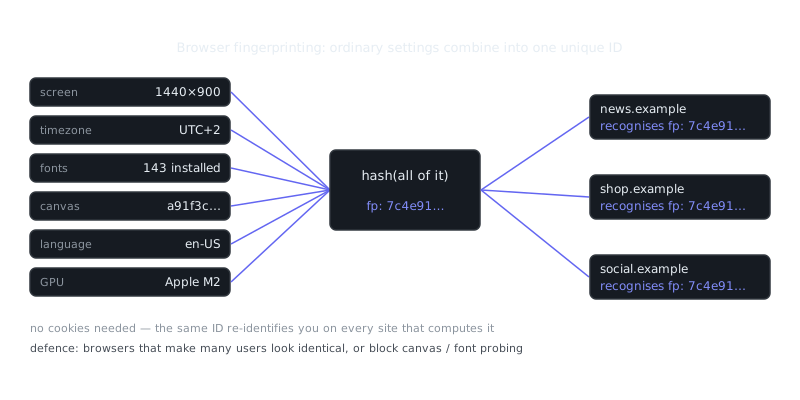
Every time you visit a website, your browser quietly hands over a surprising amount of information about your system: screen resolution, installed fonts, timezone, language preferences, graphics card capabilities, and dozens of other details. Individually, none of these seem like a big deal. Together, they form a unique identifier called a browser fingerprint — a digital signature that can track you across the web without cookies, login credentials, or your knowledge.
This works because modern browsers expose configuration details to websites for legitimate reasons. The problem is that tracking companies collect these scattered attributes and use them to build persistent profiles that follow you from site to site, often more reliably than traditional cookies ever could.
How Browser Fingerprinting Works
When you load a webpage, the site's JavaScript can query your browser for technical specs. Take the Canvas API: it asks your browser to render hidden text and shapes, then reads back the pixel data. Because each combination of operating system, graphics driver, and anti-aliasing settings produces slightly different output, that result becomes part of your fingerprint.
WebGL fingerprinting extends this by rendering 3D graphics and analyzing how your specific GPU handles the computation. The AudioContext API generates sound waves and measures tiny variations in how your hardware processes audio. None of these tests require special permissions — they run silently in the background while you browse.
Your browser also reveals screen resolution, color depth, and pixel ratio. It exposes which fonts you have installed, which varies by operating system and what software you've added over time. HTTP headers like Accept-Language, User-Agent, and Accept-Encoding leak details too. So does your timezone, your hardware's CPU core count, and the types of cameras, microphones, and speakers connected to your machine.
A tracking script collects all of this, hashes it into a unique identifier, and stores it server-side. When you return to any site using the same tracking service — even in private browsing mode or after clearing cookies — your fingerprint gives you away.
Entropy and Uniqueness
Browser fingerprinting relies on entropy, the mathematical measure of unpredictability in your configuration. Research from the EFF's Panopticlick project found that the average browser carries 18.1 bits of identifying entropy — enough to uniquely identify one person among 286,777. Add canvas fingerprinting and that number climbs higher.
Here's the paradox: privacy-conscious users who customize their browsers, install security extensions, or run less common operating systems often create more unique fingerprints, not fewer. A hardened Firefox installation with privacy add-ons stands out far more than a default Chrome browser on Windows 11.
Types of Fingerprinting Techniques
Canvas fingerprinting instructs your browser to draw text with specific fonts and complex shapes using the HTML5 Canvas element. Subtle differences in how rendering engines handle this — shaped by graphics drivers, OS font rendering, and GPU — produce a hash that works as an identifier. Major advertising networks favor this technique because it works across every modern browser without triggering a single permission prompt.
WebGL fingerprinting goes deeper into graphics hardware. A tracking script renders a 3D scene, then extracts data about your GPU model, driver version, and rendering behavior. Because graphics cards implement WebGL specifications slightly differently from one another, the output reveals hardware-specific details that stay consistent across browsing sessions.
Audio fingerprinting uses the Web Audio API to generate oscillator tones and analyze how your browser's audio stack processes them. Variations in audio hardware, drivers, and digital signal processing create signatures that are hard to spoof. This method proved particularly effective because few users suspected their audio subsystem could betray their identity.
“The Internet is a surveillance state.”
— Bruce Schneier
Font fingerprinting maps which fonts your system has installed. JavaScript tests for thousands of fonts by attempting to render text and measuring whether dimensions change. The specific combination of system fonts, Microsoft Office fonts, Adobe fonts, and regional language packs creates a surprisingly distinctive profile.
Browser enumeration rounds things out by collecting configuration data: screen dimensions, timezone offset, language preferences, and enabled features like cookies and local storage. Modern browsers restrict some of these queries, but plenty of data points remain accessible.
Browser Fingerprinting Comparison
| Technique | Stability | Entropy | Browser Support | Detection Difficulty |
|---|---|---|---|---|
| Canvas | High | 5.7 bits | Universal | Very difficult |
| WebGL | Very high | 4.8 bits | Universal (desktop) | Very difficult |
| Audio | High | 3.5 bits | Universal | Extremely difficult |
| Fonts | Medium | 13.9 bits | Universal | Moderate |
| User-Agent | Low | 10.5 bits | Universal | Easy |
| Screen resolution | Medium | 4.8 bits | Universal | Easy |
| Timezone | High | 3.4 bits | Universal | Easy |
| Combined | Very high | 18+ bits | Universal | Extremely difficult |
Stability refers to how consistent a fingerprint stays across sessions and browser updates. Entropy measures how much identifying power each technique carries on its own.
Defending Against Browser Fingerprinting
Resisting fingerprinting isn't about maximizing every privacy setting — it's about blending in with the crowd rather than standing out. The more unusual your browser configuration, the easier you are to track.
Tor Browser offers the strongest protection by standardizing all detectable attributes across users. Every Tor Browser instance reports identical screen dimensions, timezone (UTC), fonts, and canvas output. WebGL is blocked by default and font enumeration is resisted. The tradeoff is real though: Tor's anonymity network noticeably slows browsing and breaks some sites.
Firefox with privacy hardening is a solid middle ground. Setting privacy.resistFingerprinting to true in about:config enables strong protections:
privacy.resistFingerprinting = true
privacy.resistFingerprinting.letterboxing = true
webgl.disabled = true
This configuration spoofs your timezone to UTC, limits font access, rounds screen dimensions, and blocks canvas read attempts. The letterboxing feature adds margins to your browser window so sites can't use viewport size as a tracking signal.
Brave Browser takes a different approach by randomizing canvas, WebGL, and audio fingerprints per domain and session. Rather than blocking these APIs outright — which breaks legitimate sites — Brave adds subtle noise that prevents consistent identification while keeping functionality intact.
Browser extensions like CanvasBlocker and Privacy Badger add another layer for users who prefer other browsers. CanvasBlocker can block or randomize canvas fingerprinting, though aggressive settings may break sites that use canvas for legitimate purposes like rendering charts or images.
Practical Configuration
For most people, moderate privacy settings offer the best balance between protection and a browsing experience that actually works.
- Use Firefox or Brave with default privacy protections enabled
- Disable WebGL unless you need it for specific sites:
webgl.disabled = true - Install uBlock Origin to block tracking scripts before they run
- Limit
Frequently Asked Questions
What is browser fingerprinting?
Browser fingerprinting is a tracking technique where websites collect details about your browser and device — like your screen size, installed fonts, and browser version — to create a unique profile that identifies you. Unlike cookies, it doesn't store anything on your device, making it harder to detect or block. Advertisers and analytics companies use it to track you across websites even after you clear your cookies.
Is browser fingerprinting illegal?
In most countries it isn't outright illegal, but privacy laws like GDPR in Europe and CCPA in California require websites to disclose its use and, in some cases, get your consent. Whether a site complies with those rules varies widely. If you're in a region covered by these laws, you have some rights around how your data is collected and used.
How can I protect myself from browser fingerprinting?
Using a privacy-focused browser like Firefox or Brave helps, since they include built-in fingerprinting protection that makes your profile blend in with other users. Browser extensions like uBlock Origin or Privacy Badger can also reduce tracking. No solution blocks fingerprinting completely, but these steps make you significantly harder to identify uniquely.
Video Resources
Sources & Further Reading
- Tor Project — Official site of the Tor network and Tor Browser.
- Tor Browser Manual — Setup, security levels, bridges and troubleshooting.
- EFF Surveillance Self-Defense — Threat-model based guides from the Electronic Frontier Foundation.
- Privacy Guides — Independent recommendations for privacy-respecting tools.
- Security in a Box — Digital security guides for activists and journalists.
- Tails Documentation — Official documentation for the amnesic live operating system.
- Whonix Documentation — Wiki for the Tor-based Whonix operating system.