Hot vs Cold Cryptocurrency Wallet Storage: What You Need to Know
When it comes to cryptocurrency security, how you store your private keys matters as much as what you own. Hot wallets offer convenience but come with online risks, while cold storage keeps your keys offline and out of reach. Understanding the tradeoffs is the most important security decision any crypto holder can make.
On this page
Introduction
When you own cryptocurrency, what you actually own is a private key — a cryptographic secret that proves your right to spend funds on a blockchain. A wallet doesn't store coins; it stores keys. How and where you store those keys determines your exposure to theft, loss, and failure. The distinction between hot and cold storage is the most fundamental security decision any crypto user makes, whether they're holding $500 in Bitcoin or running a treasury worth millions.
“Bitcoin is a technological tour de force.”
— Bill Gates
This article breaks down what hot and cold wallets are, how they work technically, and how to choose the right approach for your situation.
How Cryptocurrency Wallets Actually Work
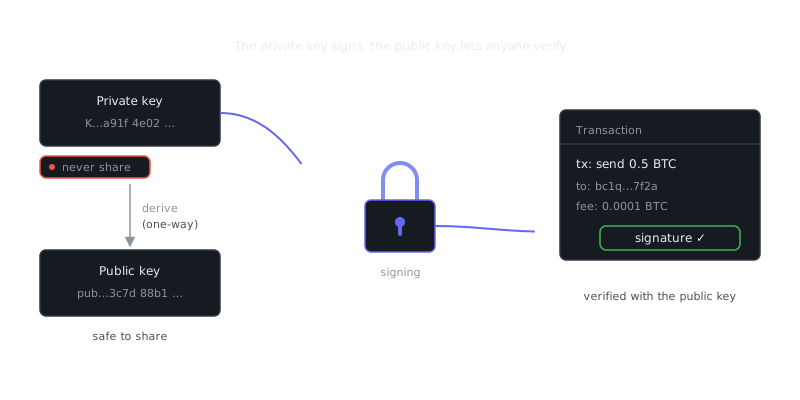
A wallet generates a key pair: a private key and a corresponding public key. The public key gets hashed into your wallet address, which you share freely. The private key signs transactions and must never be exposed.
Most modern wallets use a seed phrase (also called a mnemonic phrase) — a human-readable version of your master private key, typically 12 or 24 words derived from the BIP-39 standard. From that single seed, a hierarchical deterministic (HD) wallet can generate millions of key pairs.
# Example: generating a BIP-39 seed phrase with Python (educational only)
from mnemonic import Mnemonic

mnemo = Mnemonic("english")
seed_phrase = mnemo.generate(strength=256)  # 24-word phrase
print(seed_phrase)
# Output: "witch collapse practice feed shame open despair creek road ..."
The security question is simple: where does this seed live, and is it connected to the internet?
Hot Wallets: Always On, Always Accessible
A hot wallet is any wallet where the private keys live on an internet-connected device. That includes browser extensions, mobile apps, desktop software, and exchange-custodied accounts.
Types of Hot Wallets
Software wallets like MetaMask, Trust Wallet, and Exodus store keys locally on your device, encrypted by a password. They're non-custodial, meaning you control the keys. The tradeoff is that your device is a potential attack surface — malware, phishing, clipboard hijackers, and browser exploits are all real threats, not theoretical ones.
Exchange wallets (Coinbase, Binance, Kraken) are custodial. The exchange holds your keys on your behalf. Convenient, yes, but that introduces counterparty risk. The collapse of FTX in 2022 erased billions in user funds that were sitting in custodial accounts. That's not ancient history.
When Hot Wallets Make Sense
Hot wallets work well for small amounts you're actively trading or spending, for interacting with DeFi protocols, NFT marketplaces, or dApps, and for frequent transactions where signing speed matters.
Layer 2 solutions like the Lightning Network on Bitcoin and Arbitrum or Optimism on Ethereum are built for high-frequency, low-value transactions, and hot wallets are the natural interface for those. Most active users keep a small "spending balance" in a hot wallet while the bulk of their holdings sit in cold storage. That's the standard operating model for a reason.
Cold Wallets: Offline and Air-Gapped
Cold storage means the private key has never touched an internet-connected environment, or was generated and signed transactions exclusively in an air-gapped state. It can't be exfiltrated over a network because it's never on one.
Hardware Wallets
Hardware wallets like Ledger, Trezor, and Coldcard are dedicated devices that store private keys in a secure element chip. When you initiate a transaction, the unsigned transaction data goes to the device, gets signed internally, and the signed transaction is broadcast. The private key never leaves the hardware.
# Interacting with a Trezor via trezorctl (Linux/macOS)
pip install trezor

# Check connected device
trezorctl list

# Get a receiving address
trezorctl get-address --coin Bitcoin --path "m/84'/0'/0'/0/0"
These devices cost between $60 and $200 and they're the most practical cold storage solution for most people.
Paper and Air-Gapped Wallets
A paper wallet is a printed document containing your public and private keys, usually as QR codes. Generate it on an offline machine, never digitize it again, and it's theoretically impenetrable remotely. The problem is physical fragility. Fire, water, fading ink, poor storage — these aren't edge cases, they're how paper wallets fail.
Air-gapped computers take things further. Tools like Electrum can run on a permanently offline machine. You generate transactions on a watch-only wallet connected to the internet, transfer the unsigned transaction via USB or QR code to the offline machine, sign it there, then broadcast the result. Projects with large treasuries and privacy-focused users — including those using Monero, where transaction graph privacy and key security are both critical — often operate this way. Monero's air-gapped signing workflow adds plausible deniability and operational security that complements its on-chain privacy features.
Multisignature (Multisig) Setups
Multisig requires multiple private keys to authorize a transaction. A 2-of-3 setup, for example, means any two of three keys must sign. Those keys can sit across hardware wallets in different physical locations, across trusted parties, or across different signing algorithms. It eliminates single points of failure and it's the standard for institutional custody.
# Creating a 2-of-3 multisig wallet with Bitcoin Core
bitcoin-cli createmultisig 2 '["pubkey1", "pubkey2", "pubkey3"]'
Hot vs Cold Storage: Direct Comparison
| Feature | Hot Wallet | Cold Wallet |
|---|---|---|
| Internet connectivity | Always connected | Offline / air-gapped |
| Convenience | High | Low to medium |
| Transaction speed | Instant | Requires physical access |
| Security | Lower (attack surface) | Higher |
| Custodial risk | Possible (exchange wallets) | None (self-custody) |
| Cost | Free to low | $0 (paper) to ~$200 (hardware) |
| Recovery method | Seed phrase | Seed phrase / backup device |
| Best use case | Active trading, DeFi, L2 | Long-term holding, large sums |
| Example tools | MetaMask, Coinbase, Trust Wallet | Ledger, Trezor, Coldcard, paper |
Choosing a Storage Strategy
The right approach depends on your holdings, how often you transact, and your threat model.
For Casual Users
A reputable exchange wallet is acceptable for small, actively traded amounts — as long as you understand you don't control the keys. For any amount you'd genuinely be upset to lose, move it to a non-custodial hot wallet at minimum, or a hardware wallet if the value justifies the $60-$200 cost.
For Long-Term Holders
If you're holding crypto for months or years without touching it, cold storage is the right default. A hardware wallet with its seed phrase backed up on engraved metal (not paper) in a secure physical location covers the vast majority of use cases. Your threat model shifts here — it's less about remote hackers and more about physical theft and disaster recovery.
For Advanced Users and Institutions
Multisig cold storage with geographically distributed key shards is the standard approach. Some institutional setups integrate with Proof of Stake validator infrastructure, where signing keys have to be hot to participate in consensus but withdrawal keys stay cold. Ethereum explicitly designs for this distinction to reduce validator risk. Proof of Work mining operations face a different profile since the relevant security concern is the payout address rather than a staking key, but the same cold storage principles apply to treasury management.
Operational Security Practices
Regardless of wallet type, a few practices are non-negotiable. Never enter your seed phrase into any website or software that asks for it. Store seed phrase backups in multiple physical locations. Use a passphrase (the BIP-39 optional 25th word) for an extra encryption layer. Test your recovery process before you actually need it. And keep separate wallets for separate purposes — a wallet you use for DeFi interactions shouldn't be the one holding your savings.
Summary and Key Takeaways
Hot vs cold is fundamentally a security-convenience tradeoff. Hot wallets are fast and flexible but expose your keys to networked threats. Cold wallets eliminate remote attack surfaces but require deliberate physical access to sign transactions.
Key takeaways:
- A wallet stores private keys, not coins. Whoever controls the keys controls the funds.
- Hot wallets (MetaMask, exchange accounts) suit active use; cold wallets (hardware devices, air-gapped setups) suit long-term holding and large sums.
Frequently Asked Questions
What is the difference between a hot wallet and a cold wallet?
A hot wallet is connected to the internet, making it convenient for frequent transactions but more vulnerable to hacks. A cold wallet stores your crypto offline — on a hardware device or paper — which makes it much harder for attackers to access. Most beginners use hot wallets for small amounts and cold wallets for long-term savings.
Which type of wallet is safer for storing cryptocurrency?
Cold wallets are generally considered safer because they are not connected to the internet, so they can't be remotely hacked. Hot wallets are more convenient but carry higher risk since they rely on online services that can be compromised. If you're holding a significant amount of crypto, a cold hardware wallet is the recommended choice.
Do I need to buy a hardware device to use cold storage?
Not necessarily — a paper wallet, which is just your keys printed or written down and stored offline, is a free form of cold storage. However, hardware wallets like Ledger or Trezor are purpose-built devices that make cold storage easier and more secure than paper. For most people, a hardware wallet is worth the small upfront cost for the added protection.
Video Resources
Sources & Further Reading
- Bitcoin Whitepaper — Satoshi Nakamoto's original nine-page design of Bitcoin.
- Bitcoin.org — Community-maintained introduction, wallet guidance and developer docs.
- Ethereum.org — Official Ethereum documentation and learning hub.
- CoinGecko — Market data, exchange listings and asset profiles.
- Messari Research — Research reports and asset fundamentals.
- Bitcoin Wiki — Long-running technical wiki covering protocol details.
- Mastering Bitcoin (open book) — Andreas Antonopoulos's free technical book on how Bitcoin works.