Complete Cold Storage Setup Guide for Digital Assets
Cold storage keeps your private keys on devices that never connect to the internet, offering the strongest defense against remote attacks. This guide covers hardware selection, secure key generation, and operational security practices to protect your digital assets with an attack surface limited to physical access only.
On this page
Cold storage means keeping private keys or sensitive cryptographic material on a device that has never touched the internet. It's the most effective defense against remote attacks, and when set up correctly, the only way an attacker can reach your keys is by physically standing in front of your hardware. This guide walks through the full process, from picking the right hardware to the habits that keep everything secure day to day.
Why Cold Storage Matters
Hot wallets and cloud-based key management are convenient. But that convenience has a real cost. Connected systems are exposed to malware, phishing, supply chain attacks, and server breaches that you have no control over.
Look at what happened during the 2022 Slope wallet incident: private keys were being logged to remote servers without users knowing. People who held their assets in cold storage? Completely unaffected. When your keys never touch a networked device, remote attackers have nothing to reach. There's no vector.
Cold storage isn't just for crypto, either. Security professionals use air-gapped machines to store GPG master keys, certificate authority private keys, and backup encryption keys. The same principles apply across all of those use cases.
Choosing Your Hardware
The right hardware depends on your threat model and how often you need to sign transactions or decrypt data.
Dedicated Hardware Security Keys
Purpose-built hardware wallets like Ledger, Trezor, and Coldcard are designed specifically for this. They run minimal firmware, expose a limited attack surface, and require physical confirmation for every signing operation.
| Device | Open Source Firmware | Air-Gap Support | Price Range | Best For |
|---|---|---|---|---|
| Trezor Model T | Yes (fully) | No (USB only) | ~$180 | General use, beginners |
| Coldcard Mk4 | Yes (fully) | Yes (PSBT via SD) | ~$150 | Bitcoin, advanced users |
| Ledger Flex | Partial | No | ~$250 | Multi-asset, convenience |
| Foundation Passport | Yes (fully) | Yes (QR + SD) | ~$260 | Privacy-focused users |
| Keystone Pro | Yes (fully) | Yes (QR codes) | ~$170 | Air-gap purists |
Fully open-source firmware matters because you can actually verify the code running on the device. Closed-source firmware means you're trusting the manufacturer — and in a serious threat model, that's a meaningful assumption to make.
Air-Gapped Computers
For managing GPG keys, certificate authorities, or high-value signing operations, a dedicated air-gapped computer gives you more flexibility than a hardware wallet. A refurbished laptop with Wi-Fi hardware physically removed (not just disabled in software) running Tails OS or a minimal Debian install is a solid, practical choice.
Never connect this machine to the internet. Not even once. "Air-gapped" means exactly that — a physical gap between the machine and any network.
Setting Up an Air-Gapped System
Preparing the Machine
Start with a machine that has never been networked, or one you're willing to wipe completely.
# Verify the Tails ISO signature before writing to USB
gpg --keyserver hkps://keyserver.ubuntu.com --recv-keys A490D0F4D311A4153E2BB7CADBB802B258ACD84F
gpg --verify tails-amd64-6.x.img.sig tails-amd64-6.x.img

# Write to USB on Linux
sudo dd if=tails-amd64-6.x.img of=/dev/sdX bs=4M status=progress && sync
Boot from the USB, select "Persistent Storage" during setup, and enable encrypted persistence for your keyring.
Generating Keys Offline
Once you're booted into the air-gapped environment, generate your keys with maximum entropy. On Tails, the entropy pool is well-seeded by default.
# Generate a GPG master key (offline, air-gapped)
gpg --full-generate-key --expert

# Choose: (8) RSA (set your own capabilities)
# Disable Sign and Encrypt, keep only Certify for the master key
# Key size: 4096
# Expiry: 2y (rotate regularly)

# Export the public key for use on networked machines
gpg --export --armor [email protected] > public-key.asc

# Export subkeys to a separate encrypted USB for daily use
gpg --export-secret-subkeys --armor [email protected] > subkeys.asc
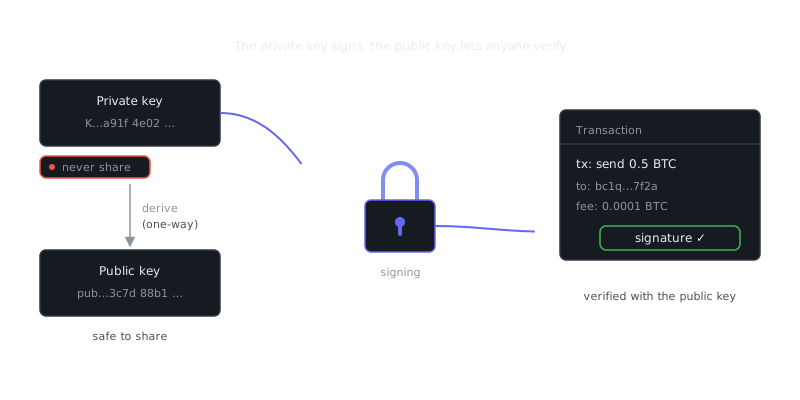
The master key stays on the air-gapped machine. Subkeys go onto a YubiKey or encrypted USB for daily signing. This mirrors how certificate authorities work: the root CA signs subordinate CAs offline, and those subordinate CAs handle day-to-day operations.
Transferring Data Safely
Data transfer between the air-gapped machine and a networked machine should happen only via QR codes or physical media you've verified. Don't use USB drives that have touched both environments without scanning them first.
For signing Bitcoin transactions with a Coldcard, the workflow looks like this:
- Create an unsigned transaction (PSBT) on your networked machine
- Copy the
.psbtfile to a microSD card - Insert the card into the Coldcard, review, and sign
- Return the signed
.psbtto the networked machine for broadcast
It's a one-way trust boundary. The air-gapped device signs; the networked device broadcasts. The two never communicate directly.
Backup and Recovery
Cold storage with no recovery path isn't security — it's a way to permanently lose access to your own assets. Hardware fails. Physical media degrades. You need a backup strategy that's both secure and actually recoverable.
Seed Phrase Storage
For hardware wallets, the 12 or 24-word BIP39 seed phrase is everything. Store it on stamped metal (Cryptosteel, Bilodeau, or similar) rather than paper, which burns and degrades over time. Keep at least two copies in geographically separate locations.
Don't store the seed phrase digitally. Don't photograph it. Don't type it into any device. This is where most losses happen — people "temporarily" drop seeds into a password manager or cloud notes app, those accounts get compromised, and the damage is done.
On that note: tools like Bitwarden, 1Password, and KeePassXC are great for managing service credentials, but they're not appropriate for cold storage seed phrases. The threat models are fundamentally different. A password manager lives online; a seed phrase must not.
Shamir's Secret Sharing for Advanced Users
For high-value setups, Shamir's Secret Sharing splits a secret into N shares where any M of them reconstruct the original. Trezor's SLIP-39 standard implements this natively.
Example: 3-of-5 split
- Share 1 → Safety deposit box, Bank A
- Share 2 → Trusted family member, City B
- Share 3 → Home safe
- Share 4 → Lawyer (sealed envelope)
- Share 5 → Secondary home safe

Any 3 shares recover the full secret.
No single location compromise is catastrophic.
Operational Security
Hardware and software controls only get you so far. How you actually behave around your cold storage determines whether any of it holds up under real-world conditions.
Physical Security
The air-gapped machine and hardware wallets should live in a locked, tamper-evident container when not in use. Think carefully about whether your threat model includes physical coercion. If it does, plausible deniability becomes important — some setups use a hidden volume or a decoy wallet with a small balance that looks convincing under inspection.
This connects to the ideas behind steganography, where the goal isn't just to encrypt data but to conceal that sensitive data exists at all. A decoy wallet visible under one PIN and a real wallet under another achieves something similar at the physical layer.
Signing Ceremony Best Practices
When you actually need to use the cold storage device, keep it disciplined. Work in a private space with no cameras visible. Don't photograph the device screen. Always verify the receiving address on the device screen itself, not just what the software interface shows you. And only reconnect the networked machine after the air-gapped signing is complete.
These steps follow the same logic as good endpoint security: minimize exposure windows, verify out-of-band, and treat every interaction with a high-value system as a potential attack surface.
Periodic Verification
“The only secure computer is one that's unplugged, locked in a safe, and buried 20 feet under the ground in a secret location.”
— Dennis Hughes
Test your recovery process at least once a year. Restore
Frequently Asked Questions
What is cold storage and why do I need it for security?
Cold storage means keeping your private keys or sensitive data on a device that is never connected to the internet, which makes it much harder for hackers to access. It is commonly used for cryptocurrency wallets and sensitive credentials. If your threat model includes online attacks, cold storage is one of the most effective protections you can use.
What hardware do I need to set up cold storage?
At a minimum you need a dedicated device — such as a hardware wallet, an old laptop, or a USB drive — that you will keep permanently offline after setup. For extra protection, many people use an air-gapped computer that has never been connected to the internet. You should also have a secure physical location, like a safe, to store the device when not in use.
How do I safely back up my cold storage so I don't lose access?
Write down your recovery phrase or private key on paper (or stamp it into metal for durability) and store it in a separate secure location from the device itself. Never store your backup digitally or take a photo of it, as that defeats the purpose of cold storage. Keeping two copies in different physical locations protects against loss from fire, theft, or natural disaster.
Video Resources
Sources & Further Reading
- EFF — Digital rights organisation with security explainers.
- OWASP — Open standards and cheat sheets for application security.
- NIST Cybersecurity Framework — Reference framework for identifying, protecting and responding to threats.
- GnuPG Documentation — Manuals and how-tos for GPG key management and encryption.
- CISA — US cybersecurity agency guidance for individuals and organisations.
- Have I Been Pwned — Check whether an email or password appeared in a known breach.
- Wikipedia: Pretty Good Privacy — Background on PGP, OpenPGP and the web of trust.