Ledger vs Trezor: Which Hardware Wallet Should You Choose?
Hardware wallets are the gold standard for securing cryptocurrency offline. This comparison breaks down Ledger and Trezor across security, usability, and supported assets so you can choose the right cold storage device for your needs.
On this page
Introduction
A hardware wallet is a physical device that keeps your private keys completely offline, cut off from any internet-connected system. That isolation — called cold storage — removes the attack surface that software wallets and exchanges leave wide open. If you're holding a meaningful amount of crypto, whether Bitcoin, Ethereum, or a stack of DeFi tokens, a hardware wallet is the most practical way to stay in control of your own funds without needing a security degree.
Two brands have owned this space for years: Ledger and Trezor. Both launched during the early days of consumer crypto security, both have earned loyal followings, and both have made the news — for very different reasons. Here's how each one works, where they diverge, and how to figure out which fits your situation.
How Hardware Wallets Work
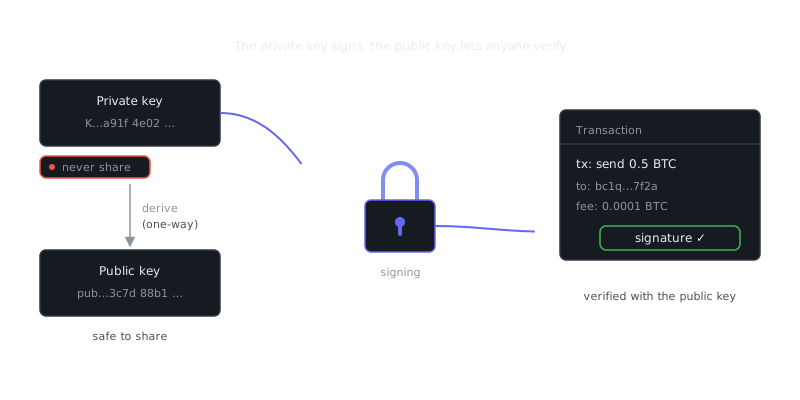
Your private key never touches the connected computer. When you send a transaction, the unsigned data travels to the device, gets signed internally using the stored key, and the signed version comes back to your computer for broadcast. The key itself stays on the chip the entire time.
This matters a lot when you're working with Ethereum and smart contracts. A compromised computer could show you a perfectly normal-looking transaction while quietly submitting a malicious contract interaction in the background. The hardware wallet's screen lets you verify the actual parameters — recipient address, amount, contract address — before you confirm anything. That on-device verification is what separates a hardware wallet from running MetaMask alone in your browser.
Setup works the same way on both devices:
1. Initialize the device
2. Generate a 24-word BIP-39 seed phrase
3. Write the seed phrase on paper (never digitally)
4. Set a PIN
5. Install companion software (Ledger Live or Trezor Suite)
6. Add coin accounts and receive addresses
Those 24 words are your master backup. Anyone who gets hold of them can reconstruct your entire wallet on any compatible device. Keep the seed phrase offline, ideally stamped into metal backup media, and never photograph it.
Ledger: Architecture and Features
Ledger devices run on a Secure Element (SE) chip — the same class of hardware you'll find in passports, SIM cards, and credit cards. It's built to resist physical attacks like voltage glitching, side-channel analysis, and direct probing. The proprietary OS running on it, BOLOS (Blockchain Open Ledger Operating System), keeps each installed application isolated from the others.
Current Models
Ledger's main lineup includes:
- Nano S Plus — entry-level, USB-C, supports over 5,500 coins and tokens
- Nano X — adds Bluetooth for mobile use, larger storage for more apps
- Stax — touchscreen interface, premium form factor
Ledger Live
Ledger's companion app handles account management, firmware updates, and direct swaps. It connects to DeFi protocols and supports staking for assets like ETH and SOL. The interface is polished and gets updated regularly.
The 2023 Recover Controversy
In 2023, Ledger announced an opt-in service called Ledger Recover. The idea was to let users back up their seed phrase by splitting it into encrypted shards sent to third-party custodians. The backlash was immediate, because the announcement made clear that Ledger's firmware architecture could — in principle — extract and transmit the seed phrase from the device. That contradicted what the company had previously told users. The service is optional and requires your explicit consent, but it permanently changed how security-conscious users think about the platform.
Trezor: Architecture and Features
Trezor, built by SatoshiLabs, went a different direction. Their devices use a general-purpose microcontroller rather than a Secure Element. That tradeoff is intentional: the firmware is fully open source, so anyone can audit the code. Trezor's position is that transparency offers stronger security guarantees than proprietary hardware you simply have to trust.
Current Models
- Trezor Model One — entry-level, limited display, supports major coins
- Trezor Model T — touchscreen, microSD slot for encrypted storage, broader coin support
- Trezor Safe 3 — adds a Secure Element alongside open-source firmware, a hybrid approach
- Trezor Safe 5 — latest flagship, color touchscreen, SE chip, full open-source stack
Trezor Suite
Trezor Suite is the desktop and browser-based companion app. It covers portfolio tracking, coin control (useful for Bitcoin privacy), Tor integration for network privacy, and fiat on/off ramps. The Tor feature is a real differentiator — most casual users won't find that built into a wallet app anywhere else.
Physical Attack Surface
Because Trezor's older models don't have a Secure Element, a skilled attacker with physical access to the device could potentially extract the seed through voltage glitching. Trezor's answer to this is the passphrase feature — essentially a 25th word you enter in the companion app that never gets stored on the device. Even if someone steals your Trezor and knows your PIN, they still can't touch any funds protected by a passphrase they don't have.
Side-by-Side Comparison
| Feature | Ledger Nano X | Trezor Model T |
|---|---|---|
| Chip type | Secure Element (ST33) | General microcontroller + optional SE (Safe 3/5) |
| Firmware | Closed source (partially) | Fully open source |
| Bluetooth | Yes | No |
| Touchscreen | No (buttons) | Yes |
| Companion app | Ledger Live | Trezor Suite |
| Coin support | 5,500+ | 1,800+ |
| Passphrase support | Yes | Yes |
| Tor integration | No | Yes (Trezor Suite) |
| Open source hardware | No | Yes |
| Price (approx.) | $149 | $179 |
| Notable concern | Recover firmware capability | Physical extraction risk (older models) |
Use Cases and Practical Scenarios
Long-Term Bitcoin Holders
If you're stacking Bitcoin and have no interest in DeFi, a Trezor Model One or Safe 3 gives you a minimal, fully auditable setup. Pair it with the passphrase feature and a paper seed backup and you've got solid cold storage. Trezor Suite also integrates with atomic swap protocols — trustless peer-to-peer exchanges between blockchains — so you can swap BTC for other assets without touching an exchange.
DeFi and Multi-Chain Users
Actively managing Ethereum smart contract interactions, ERC-20 tokens, or positions in DeFi protocols with governance tokens and liquidity pools? Ledger's broader app ecosystem and WalletConnect support make it more practical for daily use. The Nano X's Bluetooth is a genuine convenience if you're doing mobile DeFi sessions.
Privacy-Focused Users
Trezor Suite's built-in Tor routing for transaction broadcast is a concrete advantage here. It stops your IP address from being tied to your wallet activity at the network level. Ledger Live doesn't offer this natively.
Institutional or High-Value Storage
For large holdings, you should combine either device with a multi-signature setup that requires multiple devices to sign any transaction. Both Ledger and Trezor support multisig, and tools like Sparrow Wallet (for Bitcoin) and Safe — formerly Gnosis Safe, for Ethereum — let you build serious multisig configurations using hardware wallets from either brand.
Security Best Practices for Either Device
No matter which device you choose, the same rules apply:
DO:
  - Buy directly from the manufacturer
  - Verify the device wasn't tampered with during setup
  - Store seed phrase on metal (Cryptosteel, Bilodl, etc.)
  - Use a passphrase for high-value wallets
  - Keep firmware updated

DON'T:
  - Buy from third-party resellers on Amazon or eBay
  - Store seed phrase digitally (cloud, photos, notes apps)
  - Enter seed phrase on any computer or website
  - Ignore firmware update notifications
  - Use the same PIN as another device
One rule with zero exceptions: if anyone online asks for your seed phrase — support staff, developers, community members, anyone — it's a scam. No legitimate service ever needs it.
Summary and Key Takeaways
“The root problem with conventional currency is all the trust that's required to make it work.”
— Satoshi Nakamoto
Both Ledger and Trezor are serious, battle-tested devices that will protect your crypto when used correctly. The right choice comes down to your priorities. If you want auditable, open-source software and don't mind the physical attack tradeoff on older models, Trezor is the cleaner option. If you need broad coin support, mobile connectivity, and a polished app experience, Ledger delivers — just go in clear-eyed about what the Recover controversy revealed about its architecture. Either way, using a hardware wallet is a dramatically better position than leaving funds on an exchange or in a browser extension wallet.
Frequently Asked Questions
What is the main difference between Ledger and Trezor hardware wallets?
Both are hardware wallets that store your crypto offline, but they differ in a few key ways. Ledger uses a secure chip (similar to what's in passports) for added protection, while Trezor is fully open-source, meaning anyone can audit its code. For most beginners, either is a solid choice — the bigger win is simply using a hardware wallet over a software one.
Which hardware wallet is easier to set up for a beginner, Ledger or Trezor?
Trezor is generally considered slightly more beginner-friendly because its setup process is straightforward and most of it happens in a browser without extra software. Ledger requires installing the Ledger Live app, but the app is polished and walks you through each step clearly. Both can be set up by a complete beginner in under 30 minutes.
Are Ledger and Trezor wallets safe to buy, and where should I get one?
Yes, both are reputable and widely trusted in the crypto community, but you should only buy directly from the official Ledger or Trezor websites. Buying from third-party sellers like Amazon or eBay carries a risk of receiving a tampered device that could steal your funds. Always verify the packaging seal is intact when your device arrives.
Video Resources
Sources & Further Reading
- Bitcoin Whitepaper — Satoshi Nakamoto's original nine-page design of Bitcoin.
- Bitcoin.org — Community-maintained introduction, wallet guidance and developer docs.
- Ethereum.org — Official Ethereum documentation and learning hub.
- CoinGecko — Market data, exchange listings and asset profiles.
- Messari Research — Research reports and asset fundamentals.
- Bitcoin Wiki — Long-running technical wiki covering protocol details.
- Mastering Bitcoin (open book) — Andreas Antonopoulos's free technical book on how Bitcoin works.