Seed Phrases and Private Key Security: A Complete Guide
Cryptocurrency ownership puts you in full control — but that means full responsibility. Your assets are protected by cryptographic keys, and losing them means losing access forever. This guide explains how seed phrases and private keys work and how to keep them safe.
On this page
Cryptocurrency ownership works nothing like traditional finance. There's no bank to call if you lose access, no password reset email, and no customer support to verify your identity. Your assets are secured by cryptographic keys, and understanding how those keys work — and how to protect them — is the foundation of safe crypto ownership.
How Private Keys and Seed Phrases Work
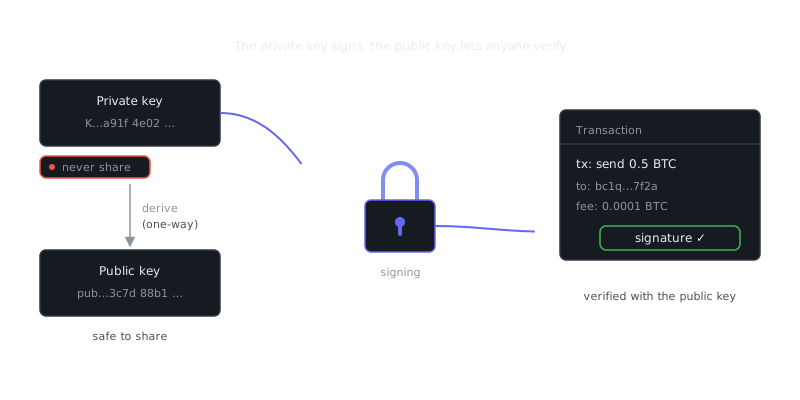
At the core of every cryptocurrency wallet is a private key: a 256-bit number, typically represented as a 64-character hexadecimal string. This key proves ownership and authorizes transactions. Anyone who holds your private key controls your funds. No exceptions.
Example private key (never use this):
a1b2c3d4e5f6a1b2c3d4e5f6a1b2c3d4e5f6a1b2c3d4e5f6a1b2c3d4e5f6a1b2
Because raw private keys are unwieldy, the industry standardized on BIP-39 seed phrases: a sequence of 12 or 24 common English words that encodes the same cryptographic material in a human-readable format. One seed phrase can generate an entire tree of private keys and wallet addresses across multiple blockchains, following the BIP-32/BIP-44 hierarchical deterministic (HD) wallet standard.
Example 12-word seed phrase (never use this):
witch collapse practice feed shame open despair creek road again ice least
When you create a wallet on MetaMask, a Ledger, or any BIP-39-compatible software, that seed phrase is the single source of truth for everything inside it. Lose it, and your funds are permanently inaccessible. Share it, and your funds are permanently gone.
The Derivation Path
From one seed phrase, a wallet derives keys using a derivation path. For Ethereum and smart contracts, the standard path is m/44'/60'/0'/0/0. For Bitcoin it's m/44'/0'/0'/0/0. That's why the same 12-word phrase can restore your Ethereum wallet on one app and your Bitcoin wallet on another — both are mathematically derived from the same root.
Common Threat Vectors
Knowing how funds actually get stolen is more useful than abstract security advice.
Phishing and Fake Wallets
The most common attack is straightforward: a fake website or app tricks you into entering your seed phrase. Legitimate wallets never ask for your seed phrase to "verify" or "sync" an existing wallet. If any interface asks for it, stop immediately.
Clipboard Hijacking
Malware can monitor your clipboard and silently replace a copied wallet address with the attacker's. Always verify the first and last several characters of an address before confirming a transaction, especially for large amounts. It takes five seconds and has saved people from losing everything.
Cloud Storage Leaks
Storing a seed phrase in Google Drive, iCloud Notes, or a camera roll screenshot is one of the most dangerous things you can do in crypto. Cloud accounts get compromised, and the metadata trail — file names, sync logs — can expose sensitive data even when the account itself isn't directly breached.
Social Engineering
Attackers pose as support staff on Discord, Telegram, or Reddit. They manufacture urgency ("your wallet is at risk") and guide victims to a site that harvests the seed phrase. No legitimate protocol, exchange, or wallet developer will ever ask for your seed phrase. Ever.
Secure Storage Methods Compared
Different storage approaches trade off security against accessibility in different ways.
| Method | Security Level | Accessibility | Cost | Best For |
|---|---|---|---|---|
| Hardware wallet (Ledger, Trezor) | High | Medium | $50–$200 | Most users with significant holdings |
| Paper backup (offline, laminated) | High (if stored well) | Low | Negligible | Long-term cold storage |
| Metal backup (Cryptosteel, Bilodeau) | Very High | Low | $50–$150 | Disaster-proof archival storage |
| Password manager (Bitwarden, 1Password) | Medium | High | $0–$36/yr | Small amounts, convenience-focused use |
| Brain wallet (memorized) | Very Low | High | None | Not recommended |
| Cloud/email/SMS | Very Low | High | None | Never recommended |
Hardware wallets keep the private key isolated from internet-connected devices. When you sign a transaction, the key never leaves the device — the hardware wallet performs the signing internally and returns only the signed transaction. That makes them resilient against malware and remote attacks in a way that software wallets simply can't match.
Practical Setup: What Good Security Looks Like
Generating a Wallet Securely
Use a reputable, open-source wallet. For hardware wallets, buy directly from the manufacturer — never from third-party marketplaces where devices can be pre-compromised. When initializing, verify the device hasn't been tampered with using the manufacturer's authenticity check.
For software wallets, generate keys on an air-gapped machine where possible, or at minimum make sure no screen-capture software, remote desktop sessions, or untrusted browser extensions are active.
“Blockchain is to trust what the internet was to communication.”
— Unknown
Writing Down Your Seed Phrase
Write the seed phrase on paper immediately, in order, using a pen (not pencil). Number each word. Store the paper somewhere dry, fireproof, and waterproof — or transfer it to a metal backup. Create at least two physical copies in geographically separate locations, like a home safe and a safety deposit box.
Don't photograph the seed phrase. Don't type it into any device unless you're actively recovering a wallet on trusted hardware.
Testing Your Backup
After securing the backup, verify it actually works. On a hardware wallet, use the device's built-in recovery check to confirm each word without performing a full restore. On a software wallet, restore into a fresh wallet instance to verify the correct addresses are derived, then delete that instance. Discovering a transcription error after you need the backup is not a situation you want to be in.
Seed Phrases in Context: Exchanges, Inheritance, and Smart Contracts
Cryptocurrency Exchanges
Exchanges like Coinbase, Kraken, and Binance hold private keys on your behalf. That's custodial storage — you don't control the keys. "Not your keys, not your coins" applies directly here. Exchanges can freeze accounts, get hacked, or go insolvent, as FTX demonstrated in 2022 when roughly $8 billion in customer funds disappeared. For any amount you can't afford to lose, self-custody with proper key management is the responsible approach.
Even the most reputable platforms differ on insurance coverage, proof-of-reserves transparency, and jurisdiction. Using exchanges for active trading is reasonable; using them as long-term storage isn't.
Ethereum and Smart Contracts
When interacting with Ethereum and smart contracts, your private key signs every transaction, including approvals that grant smart contracts permission to spend your tokens. A malicious or vulnerable contract with an unlimited token approval can drain your wallet. Tools like Revoke.cash let you audit and revoke active approvals. The underlying principle is the same as general key security: minimize exposure, audit permissions, and use a hardware wallet for high-value interactions.
Cryptocurrency Inheritance Planning
This is an underappreciated problem. If you die or become incapacitated, your heirs have no recourse without your seed phrase — the blockchain doesn't care about probate court. A few approaches worth considering:
A sealed, notarized letter to your estate with seed phrase instructions, held by a trusted attorney, is the simplest option. Shamir's Secret Sharing splits the seed into multiple shares (for example, 3-of-5) where any three parts reconstruct the full phrase and no single party holds the complete key. A time-locked multi-signature wallet can grant a trusted party access only after a defined period of inactivity.
Shamir's Secret Sharing is supported natively by the Trezor Model T and can be run in software:
# Using the ssss tool on Linux to split a secret into 3-of-5 shares
echo "your seed phrase here" | ssss-split -t 3 -n 5
Each share is meaningless alone. Store shares with different trusted individuals or in separate secure locations.
Summary and Key Takeaways
Private keys and seed phrases are the irreplaceable credentials of cryptocurrency ownership. Unlike passwords, they can't be reset, and unlike bank accounts, there's no institution to appeal to. The security model shifts responsibility entirely onto you.
Key takeaways:
- A seed phrase is a human-readable encoding of your root private key. Whoever holds it owns the funds.
- Hardware wallets are the practical gold standard for most users — they keep keys offline and sign transactions without ever exposing the key to internet-connected software.
Frequently Asked Questions
What is a seed phrase and why is it important?
A seed phrase (also called a recovery phrase) is a set of 12 to 24 random words generated when you create a crypto wallet. It acts as a master backup that can restore access to all your funds if you lose your device or forget your password. Anyone who has your seed phrase has full control of your wallet, so it must be kept secret.
Where is the safest place to store my seed phrase?
Write your seed phrase on paper and store it somewhere physically secure, like a fireproof safe or safety deposit box. Never save it in a photo, text file, email, or cloud storage, since those can be accessed by hackers. Some people engrave it on metal for extra durability against fire or water damage.
What is the difference between a seed phrase and a private key?
A private key is a long string of characters that controls a single crypto address, while a seed phrase is a human-readable backup that can generate all the private keys in your wallet. Think of the seed phrase as a master key and each private key as the key to one specific account. For most beginners, protecting the seed phrase is sufficient since it covers everything.
Video Resources
Sources & Further Reading
- Bitcoin Whitepaper — Satoshi Nakamoto's original nine-page design of Bitcoin.
- Bitcoin.org — Community-maintained introduction, wallet guidance and developer docs.
- Ethereum.org — Official Ethereum documentation and learning hub.
- CoinGecko — Market data, exchange listings and asset profiles.
- Messari Research — Research reports and asset fundamentals.
- Bitcoin Wiki — Long-running technical wiki covering protocol details.
- Mastering Bitcoin (open book) — Andreas Antonopoulos's free technical book on how Bitcoin works.