Backup Strategies for Crypto Holders: Secure Your Digital Assets
Losing access to cryptocurrency is permanent—there's no customer support to recover your funds. This guide covers practical backup methods for crypto wallets, the tradeoffs between different approaches, and how to build a layered strategy that protects against loss while minimizing security risks.
On this page
Losing access to cryptocurrency is permanent. There's no customer support line, no account recovery process, no regulatory body that can restore your funds. Every year, billions of dollars in crypto become permanently inaccessible because of lost keys, damaged hardware, or backup strategies that failed when it mattered most. What follows is a practical guide to backing up crypto wallets, the tradeoffs between different approaches, and how to build a layered system that survives real-world disasters.
Understanding What You're Actually Backing Up
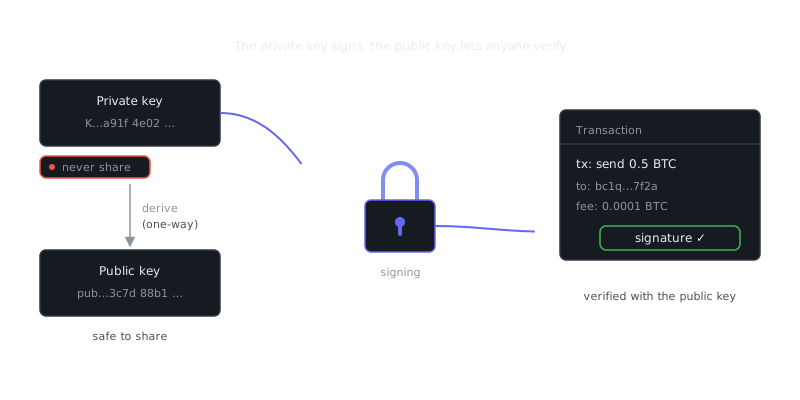
Before choosing a backup method, you need to understand what actually controls access to your funds. Crypto wallets don't store coins — they store cryptographic keys. Two components matter here.
Private key: A 256-bit number that proves ownership and signs transactions.
Seed phrase (mnemonic): A human-readable version of that private key, typically 12 or 24 words following the BIP-39 standard.
Backing up a wallet file or a hardware device isn't enough. If the device is lost or corrupted, you need the seed phrase to recover. That phrase is the master backup. Everything else is secondary.
What a Seed Phrase Looks Like
A standard BIP-39 seed phrase looks like this:
witch collapse practice feed shame open despair creek road again ice least
This 12-word sequence deterministically generates every private key in your wallet. Anyone who gets hold of it has full, immediate access to your funds. Treat it accordingly.
Offline Physical Backups
The most reliable backup is one that can't be hacked remotely. Physical backups keep your seed phrase completely air-gapped from the internet.
Paper Backups
Writing your seed phrase on paper is simple and effective, but paper is fragile. Fire, water, and decay are real threats — especially over a 10 or 20-year horizon. If you go the paper route, write clearly in permanent ink, store it in a waterproof and fireproof container, and make multiple copies kept in separate physical locations.
Never photograph your seed phrase or store it in cloud notes, email drafts, or messaging apps. A single breach of any of those services exposes your funds immediately.
Metal Backups
Metal seed phrase plates are a meaningful upgrade over paper. Products like Cryptosteel or DIY steel washers stamped with each word survive fire, flooding, and physical damage that would destroy paper outright.
For high-value holdings, metal backups distributed across separate locations — a home safe, a bank safety deposit box, a trusted family member's home — provide strong redundancy without any single point of failure.
Digital Backups and Encryption
Sometimes a digital backup makes sense, particularly when managing multiple wallets or coordinating access with a business partner. The hard requirement is that the backup must be encrypted before it touches any network-connected device.
Encrypting Backup Files with GPG
GPG encryption is well-suited for encrypting seed phrase files. Here's a basic workflow:
# Generate a strong GPG key pair if you don't have one
gpg --full-generate-key

# Encrypt your seed phrase file
gpg --encrypt --recipient [email protected] --output seed_backup.gpg seed.txt

# Decrypt when needed
gpg --decrypt --output seed.txt seed_backup.gpg

# Verify the file is encrypted (should show binary output, not plaintext)
file seed_backup.gpg
The encrypted file can live on a USB drive, an external hard disk, or even cloud storage — because without the GPG private key and passphrase, it's unreadable. Store the GPG private key separately from the encrypted backup.
Air-Gapped Computers
For serious holdings, generating and handling seed phrases should happen on a machine that has never touched the internet. A cheap laptop with its WiFi card physically removed, booted from a live Linux USB like Tails OS, is a practical and affordable air-gap setup.
Hardware Wallets and Their Backup Requirements
Hardware wallets like Ledger, Trezor, and Coldcard are the standard recommendation for significant crypto holdings. They keep private keys in a secure element chip and sign transactions without exposing keys to the connected computer.
The common mistake is assuming that owning a hardware wallet means your crypto is backed up. It's not. The hardware wallet is a signing device. The backup is still the seed phrase you generated during setup.
| Backup Method | Fire Resistant | Hack Resistant | Requires Technical Knowledge | Cost |
|---|---|---|---|---|
| Paper (single copy) | No | Yes | No | Negligible |
| Paper (multiple locations) | Partial | Yes | No | Negligible |
| Metal plate | Yes | Yes | No | $30–$100 |
| Encrypted digital (GPG) | Yes | Yes (if key is secure) | Moderate | Free |
| Shamir's Secret Sharing | Yes | Yes | High | Free/Software |
| Hardware wallet + metal seed | Yes | Yes | Moderate | $60–$150 |
Shamir's Secret Sharing
For large holdings or complex access requirements, Shamir's Secret Sharing (SSS) splits a seed phrase into N shares, where any M of them can reconstruct the original. A 3-of-5 split, for example, means any three of five share-holders can recover the wallet, but no two can do it alone.
Trezor Model T supports SLIP-39, a hardware implementation of this scheme. For software-based SSS, the ssss tool on Linux works well:
# Split a secret into 5 shares, requiring 3 to reconstruct
echo "your seed phrase here" | ssss-split -t 3 -n 5

# Reconstruct from 3 shares
ssss-combine -t 3
This approach fits estate planning, business wallets, or any scenario where you want distributed trust rather than a single person holding everything.
Operational Security Around Backups
A strong backup means nothing if your operational security fails. Who could realistically access your backups right now? Physical threats like theft or a malicious guest and digital threats like malware on the machine used to generate keys are both worth thinking through seriously.
Generate keys only on a clean, offline device. Store physical backups in locations only you — and any deliberately trusted parties — know about. Don't discuss holdings or backup locations on social media or in online forums. This sounds obvious until you see how often it goes wrong.
Regular Audit Cycles
A backup you've never tested is a backup of unknown reliability. Run a scheduled audit at least once a year that checks whether physical copies are intact and readable, whether encrypted digital backups can still be decrypted, and whether your recovery instructions are clear enough for a trusted person to follow without your help. Test an actual wallet recovery from seed phrase on a fresh device or in a test environment.
Document the results. A simple checklist with the date, backup locations verified, recovery test performed, and any issues found and resolved is enough.
Inheritance and Emergency Access Planning
Most backup strategies are built entirely around the holder's own access. Few account for what happens when the holder is incapacitated or gone. Crypto with no accessible backup disappears from the economy permanently — it doesn't go to heirs, it doesn't go to anyone.
Practical approaches don't require handing over your seed phrase today. A sealed letter stored with a will or lawyer that explains how to access encrypted backups and where keys are stored is a good start. A trusted executor who holds one share in a Shamir setup, without holding enough shares to act unilaterally, keeps funds accessible without creating unnecessary risk. Whatever you choose, write a step-by-step recovery guide in plain language that doesn't assume technical knowledge.
The goal is making sure the right information becomes accessible under the right conditions — not disclosing everything to everyone right now.
Key Takeaways
Crypto backup strategy isn't a one-time setup. It's an ongoing practice, and the stakes are permanent loss.
The seed phrase is the backup. Hardware devices, wallet software, and account logins are all secondary.
Redundancy requires physical separation. Multiple copies in multiple locations protect against local disasters.
Metal beats paper for long-term storage. Paper degrades; steel doesn't.
“The only secure computer is one that's unplugged, locked in a safe, and buried 20 feet under the ground in a secret location.”
— Dennis Hughes
Encryption makes digital backups safer. GPG-encrypted files can live on networked devices, as long as the encryption key is stored separately and secured properly.
Frequently Asked Questions
What is the safest way to back up my crypto wallet?
Write down your seed phrase (usually 12-24 words) on paper and store it in a secure, offline location like a safe or safety deposit box. Never save it as a screenshot or in a cloud service, since anything connected to the internet can be hacked.
Should I make multiple copies of my seed phrase backup?
Yes, having at least two copies stored in separate physical locations protects you if one is lost, stolen, or damaged by fire or flood. Just make sure each copy is equally secured, since anyone who finds your seed phrase can access all your funds.
What happens if I lose my backup and forget my wallet password?
Without your seed phrase or private key, there is no way to recover access to your crypto — not even the wallet provider can help. This is why creating and safely storing your backup before you ever receive funds is the single most important step for any crypto holder.
Video Resources
Sources & Further Reading
- EFF — Digital rights organisation with security explainers.
- OWASP — Open standards and cheat sheets for application security.
- NIST Cybersecurity Framework — Reference framework for identifying, protecting and responding to threats.
- GnuPG Documentation — Manuals and how-tos for GPG key management and encryption.
- CISA — US cybersecurity agency guidance for individuals and organisations.
- Have I Been Pwned — Check whether an email or password appeared in a known breach.
- Wikipedia: Pretty Good Privacy — Background on PGP, OpenPGP and the web of trust.