Malware Types and Protection: A Comprehensive Guide
Malware threatens billions in organizational losses and millions of personal devices annually. Understanding malware taxonomy and implementing layered defenses separates secure systems from vulnerable ones. This guide examines major malware categories, attack vectors, and practical protection strategies.
On this page
Malware costs organizations billions every year and quietly compromises millions of personal devices. Knowing what you're up against — and building real defenses — is what separates a hardened system from a sitting duck. Here's a plain-language breakdown of the major malware categories, how they spread, and what actually works to stop them.
Understanding Malware Categories
Viruses and Worms
Viruses attach themselves to legitimate files and wait for you to do something: open an email attachment, run a downloaded program, plug in infected media. Once triggered, they inject code into host files, which makes detection tricky when they've buried themselves inside system binaries.
Worms don't need your help at all. They exploit network vulnerabilities and replicate on their own. WannaCry in 2017 is the textbook example — it used the EternalBlue exploit to tear through networks, infecting over 200,000 computers across 150 countries in just a few days. Organizations that hadn't patched the SMBv1 vulnerability watched their entire infrastructure get encrypted within hours.
Trojans
Trojans pretend to be legitimate software. They don't self-replicate like viruses; instead, they rely on tricking you into installing them. Emotet is a classic example — it shows up as an invoice attachment, then quietly pulls down extra modules to steal credentials, spread through your network, and eventually drop ransomware.
Remote Access Trojans (RATs) are especially nasty. They hand attackers full control of a compromised machine: keystrokes, webcam access, file theft, lateral movement. What makes them hard to catch is that they often impersonate normal admin tools, so they blend right into the noise.
Ransomware
Ransomware encrypts your files and demands payment for the key. Modern variants have gotten more aggressive — they steal your data first, then threaten to publish it if you don't pay. That's what made the 2021 Colonial Pipeline attack so damaging. It didn't just lock up files; it disrupted fuel supplies across the eastern United States and showed exactly how much real-world damage ransomware can do to critical infrastructure.
Crypto-ransomware goes after specific file types like documents, images, and databases. Locker ransomware just locks you out of the whole system. The more sophisticated strains delete your shadow copies and backups before encrypting anything, which means unprepared organizations have no path to recovery.
Spyware and Adware
Spyware's job is to watch you. Keyloggers capture every keystroke; screen scrapers grab application content that never touches the keyboard. In corporate espionage campaigns, spyware often sits dormant for weeks or months, activating only when specific conditions trigger it to phone home with your data.
Adware might seem like a minor annoyance, but it's increasingly a stepping stone to something worse. Browser hijackers swap out your search engine and homepage, funneling you toward malicious sites that run drive-by downloads in the background without you ever clicking anything.
Rootkits
Rootkits go deep. They modify operating system components to hide malicious activity from both you and your security tools. Kernel-mode rootkits intercept API calls at the lowest system level, concealing processes, files, and network connections. The Sony BMG scandal in 2005 showed that even legitimate companies would deploy rootkit technology — and in doing so, created vulnerabilities that other attackers immediately exploited.
Bootkit variants go even deeper, infecting the Master Boot Record or UEFI firmware so they load before the OS even starts. Secure Boot addresses this by verifying signatures on boot components before they're allowed to run.
Attack Vectors and Infection Methods
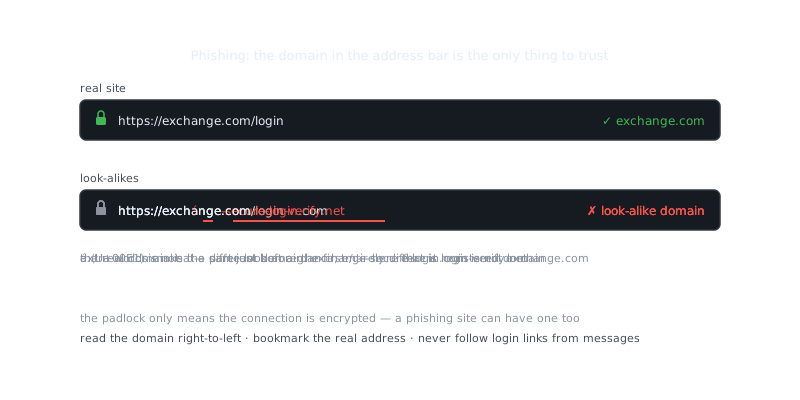
Malware follows predictable paths, which is actually good news — it means you can anticipate them. Email is still the biggest one. Phishing campaigns deliver malicious attachments or links to compromised sites, often impersonating brands you trust and using urgency to push you past your better judgment.
Drive-by downloads exploit browser or plugin vulnerabilities to install malware without you doing anything obvious. Just visiting a compromised legitimate website can trigger an automatic download through a malicious ad or injected script. Keeping your browser and plugins updated is one of the most effective things you can do here.
“Security is always excessive until it's not enough.”
— Robbie Sinclair
Supply chain attacks are more insidious. The SolarWinds incident showed how attackers poisoned legitimate software updates, getting access to thousands of organizations — including government agencies — through code they trusted. Signed software isn't automatically safe when the signing keys are compromised.
Removable media and network shares are also worth watching inside your own organization. USB devices can be configured to emulate keyboards and execute commands the moment they're plugged in, bypassing security software entirely. Network worms scan for vulnerable systems and exploit weak passwords or unpatched services.
Layered Defense Strategies
Endpoint Protection
Modern endpoint security has moved well past signature-based antivirus. Behavioral analysis, machine learning, and automated response are now standard in Endpoint Detection and Response (EDR) tools. These solutions watch for suspicious patterns — unusual file modifications, privilege escalations, connections to known malicious infrastructure — and can respond automatically.
Configure real-time scanning for critical directories:
# Enable ClamAV real-time scanning on Linux
sudo apt install clamav clamav-daemon
sudo freshclam
sudo systemctl enable clamav-daemon
sudo systemctl start clamav-daemon

# Configure on-access scanning
echo "OnAccessIncludePath /home" | sudo tee -a /etc/clamav/clamd.conf
echo "OnAccessIncludePath /var/www" | sudo tee -a /etc/clamav/clamd.conf
sudo systemctl restart clamav-daemon
Network Segmentation and Monitoring
When an attacker gets past your perimeter, segmentation limits how far they can go. VLANs keep user workstations separated from servers. Zero-trust architectures require authentication for every access request, regardless of where on the network it originates.
An Intrusion Detection System (IDS) gives you visibility into what's actually happening on your network. Set up alerts for anomalous behavior — unexpected outbound connections, data exfiltration attempts, internal scanning — so you can respond fast when something's off. Remote workers should connect through encrypted VPN tunnels that your security infrastructure can inspect, rather than exposing internal resources directly to the internet.
Access Controls and Authentication
Give users only the permissions they actually need. Standard accounts that can't install software or modify system files naturally contain malware that requires elevated privileges to do its worst. It's one of those controls that sounds boring but quietly stops a lot of attacks.
Multi-factor authentication adds a second layer that credential theft alone can't defeat. Even if an attacker phishes someone's password, they still can't log in without that second factor — usually a time-based code from an authenticator app or a hardware token.
Be careful about how you configure sudo access on Linux systems:
# Restrict sudo to specific commands
sudo visudo

# Example entry allowing backup operations only
username ALL=(ALL) NOPASSWD: /usr/bin/rsync, /usr/bin/tar

# Require password for all other sudo commands
username ALL=(ALL) ALL
Backup and Recovery
Immutable, offline backups are your best answer to ransomware. The 3-2-1 rule is a solid starting point: three copies, on two different types of media, with one stored offsite. Air-gapped backups on write-once media — or in a physically separate location — ensure that even if ransomware reaches your network, it can't touch your recovery data.
Don't just assume your backups work. Test your restoration process on a regular schedule. A backup you've never restored from is really just hope. Automate the verification step so you're not relying on anyone remembering to check.
Frequently Asked Questions
What are the most common types of malware I should know about?
The most common types are viruses (which spread by attaching to files), ransomware (which locks your files and demands payment), spyware (which secretly monitors your activity), and trojans (which disguise themselves as legitimate software). Each type works differently, but all of them can cause serious damage to your data or privacy. Knowing the differences helps you recognize warning signs early.
How does malware get onto my computer in the first place?
Malware most commonly arrives through phishing emails with malicious attachments or links, downloading software from untrustworthy websites, or clicking on deceptive ads. It can also spread through infected USB drives or by exploiting outdated software that hasn't been patched. Being cautious about what you click and download is your first line of defense.
What's the best way to protect my computer from malware?
Keep your operating system and software up to date, since updates often patch security vulnerabilities that malware exploits. Use a reputable antivirus program and enable real-time scanning so threats are caught before they cause harm. Combine that with safe browsing habits — avoiding suspicious links and only downloading from trusted sources — and you'll cover the vast majority of risks.
Video Resources
Sources & Further Reading
- CISA — US cybersecurity agency guidance for individuals and organisations.
- Krebs on Security — Investigative reporting on breaches, fraud and malware.
- a helpful comparison — Background reading on Torzon Market URL, written from a user's perspective.
- Have I Been Pwned — Check whether an email or password appeared in a known breach.
- EFF — Digital rights organisation with security explainers.
- OWASP — Open standards and cheat sheets for application security.
- NIST Cybersecurity Framework — Reference framework for identifying, protecting and responding to threats.
- GnuPG Documentation — Manuals and how-tos for GPG key management and encryption.