Privacy-Focused Browsers Compared: Which Protects You Best?
Your browser tracks where you go and what you search—then shares that data with advertisers and brokers. Privacy-focused browsers block trackers, prevent fingerprinting, and stop data collection at the source. We compare the leading options to help you choose.
On this page
Your browser knows more about you than most people realize. Where you go, what you search, which products you browse, how long you linger on a page — that data flows to advertisers, data brokers, and analytics platforms by default. Privacy-focused browsers cut that off by blocking trackers, resisting fingerprinting, and reducing what gets collected in the first place.
This guide walks through the leading privacy browsers, what they actually do well, where they fall short, and which one fits your situation.
Why Standard Browsers Fall Short
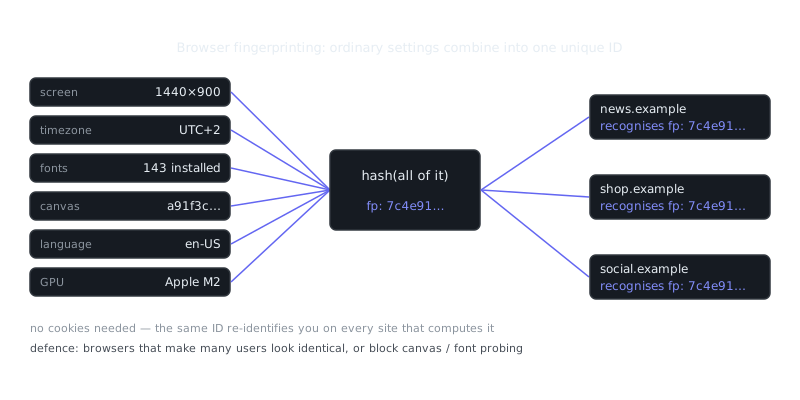
Chrome syncs your browsing history to Google's servers and feeds data into its ad network. Edge sends diagnostic telemetry to Microsoft. Safari is better than most, but it still allows fingerprinting through canvas and WebGL APIs despite all the marketing around privacy.
The real problem is the business model. When your browser is made by an advertising company, data collection isn't a bug — it's the point. Privacy-focused browsers either belong to nonprofits, operate as open-source projects, or make money without selling your attention. That difference shows up in the defaults.
The Major Privacy Browsers
Firefox (Hardened)
Firefox is open-source and maintained by Mozilla, a nonprofit. Out of the box, it gives you moderate privacy through Enhanced Tracking Protection. Spend 20 minutes in the settings and it becomes genuinely strong.
Strengths:
- Full extension support, including uBlock Origin and advanced content blockers
- Deep customization through about:config to disable telemetry, WebRTC leaks, and fingerprinting vectors
- Multi-account containers let you isolate cookies between work, shopping, and personal browsing
Weaknesses: - Default settings still phone home; you have to harden it yourself - Mozilla has partnerships with ad companies and has experimented with sponsored features - Fingerprinting protection isn't as aggressive as Tor or Brave
Hardening example:
about:config adjustments:
privacy.resistFingerprinting = true
privacy.trackingprotection.enabled = true
privacy.trackingprotection.socialtracking.enabled = true
network.cookie.cookieBehavior = 5
geo.enabled = false
media.peerconnection.enabled = false
Firefox with uBlock Origin and container tabs hits a good balance for daily use, especially if you need extension flexibility and want sites to actually work. It's the right pick for people willing to spend some time on setup.
Brave
Brave is built on Chromium with aggressive tracker blocking, fingerprinting resistance, and a built-in ad blocker baked in. It strips tracking parameters from URLs and blocks third-party cookies without you touching a single setting.
Strengths: - Works out of the box with no configuration - Chromium engine means near-perfect website compatibility - Blocks ads and trackers at the network level, faster than any extension - Built-in Tor mode for private tabs when you need it
Weaknesses: - Chromium codebase means you're still riding Google's web standards roadmap - The company has had some controversies — affiliate link injection and cryptocurrency promotions in earlier versions - Fingerprinting protection is good, but not Tor-level
Brave is the easiest switch if you're coming from Chrome. Banking sites, streaming platforms, web apps — they all work without workarounds. If you want real privacy and don't want to think about it, this is where you start.
Tor Browser
Tor routes all traffic through a network of volunteer-run relays, making your IP address invisible to the sites you visit. It's built on Firefox ESR with fingerprinting resistance so strong that every Tor user looks identical to a website.
Strengths: - Maximum anonymity; sites see only the Tor exit node, not you - Disables JavaScript features, canvas access, and hardware APIs that fingerprinters rely on - No persistent storage; close the window and your session disappears entirely
Weaknesses: - Slow — traffic bounces through 3 relays before reaching a site - Many websites block Tor exit nodes or throw endless CAPTCHAs at you - JavaScript restrictions break plenty of interactive apps - Logging into accounts largely defeats the anonymity
“The Internet is a surveillance state.”
— Bruce Schneier
Who actually needs Tor? Journalists working on sensitive stories, whistleblowers, activists operating under authoritarian governments. For casual browsing, the speed penalty and compatibility headaches aren't worth it unless you genuinely need what Tor provides.
Setup on Linux:
# Download and verify Tor Browser
wget https://www.torproject.org/dist/torbrowser/13.0/tor-browser-linux-x86_64-13.0.tar.xz
gpg --verify tor-browser-linux-x86_64-13.0.tar.xz.asc
tar -xf tor-browser-linux-x86_64-13.0.tar.xz
cd tor-browser
./start-tor-browser.desktop
Tor has three security levels: Standard, Safer (disables some JavaScript), and Safest (disables JavaScript entirely). Start at Standard unless your situation calls for more — the higher levels break a lot of sites.
LibreWolf
LibreWolf is a Firefox fork that ships with privacy settings already dialed in. Mozilla telemetry is stripped out, fingerprinting resistance is on by default, and cookies get cleared when you close the browser.
Strengths: - All the Firefox privacy hardening done for you - No telemetry or data collection whatsoever - Comes with uBlock Origin installed
Weaknesses: - Smaller team means updates sometimes lag behind Firefox - Less testing than mainstream browsers - Sites that need persistent cookies can get annoying
Think of LibreWolf as hardened Firefox without the homework. It's less well-known than Brave or Tor, but it's a solid daily driver if you want a privacy-first experience and just want it to work.
Browser Comparison Table
| Browser | Base Engine | Fingerprinting Resistance | Speed | Extension Support | Configuration Needed | Best For |
|---|---|---|---|---|---|---|
| Firefox (Hardened) | Gecko | Moderate | Fast | Full | High | Power users who need extensions |
| Brave | Chromium | Good | Fast | Limited | None | Daily browsing with zero setup |
| Tor Browser | Firefox ESR | Excellent | Slow | Limited | None | Anonymous browsing, high threat models |
| LibreWolf | Gecko | Good | Fast | Full | None | Privacy-first Firefox experience |
What About Search Engines and OPSEC?
Your browser choice is just one piece. Search engines matter too — DuckDuckGo, Startpage, and Brave Search don't track your queries the way Google does. Encrypted messaging like Signal handles communications. And understanding your actual threat model shapes every other decision.
Trying to avoid mass surveillance? You need Tor. Avoiding targeted ads and data brokers? Brave or hardened Firefox is plenty. If a nation-state is your adversary, a private browser alone won't save you — you're looking at compartmentalized devices, live boot operating systems like Tails, and careful network hygiene.
Real-World Scenarios
Journalist researching a sensitive topic: Tor Browser on Tails OS, public WiFi, no logged-in accounts. Contact sources through Signal.
Privacy-conscious professional: Brave for daily work, Firefox containers for separating work from personal browsing.
Developer auditing web apps: Hardened Firefox with uBlock Origin in advanced mode, container tabs for isolated testing environments.
Activist in a restrictive country: Tor Browser with bridges to get around network blocks, avoiding any service tied to surveillance infrastructure.
Key Takeaways
No browser makes you invisible. What they do is reduce the surface area for tracking and make mass data collection harder. Pick based on what you're actually trying to defend against.
- Brave gives you real privacy from day one, no setup required, with full website compatibility
- Hardened Firefox is the right choice if you need extension flexibility and don't mind configuring things yourself
- Tor Browser is essential when anonymity is non-negotiable — journalists, activists, high-risk situations
- LibreWolf delivers hardened Firefox defaults without any manual work
Frequently Asked Questions
What is a privacy-focused browser and why should I use one?
A privacy-focused browser is designed to limit how much of your personal data gets collected, tracked, or shared while you browse the web. Unlike standard browsers, they often block ads, trackers, and fingerprinting by default. If you're concerned about companies building a profile of your online activity, switching to one is a practical first step.
What's the difference between Brave, Firefox, and Tor Browser?
Brave blocks ads and trackers out of the box and is built on Chrome, so most websites work without issues. Firefox is highly customizable and privacy-friendly with the right settings and extensions, but requires more configuration. Tor Browser routes your traffic through multiple servers to anonymize your identity, making it the strongest option but also the slowest.
Does using a privacy browser mean I'm completely anonymous online?
No, a privacy browser reduces tracking but doesn't make you fully anonymous. Your internet service provider can still see your activity, and logging into accounts like Google or Facebook re-enables tracking regardless of your browser. For stronger anonymity, you'd need to combine a privacy browser with a VPN or use Tor Browser specifically.
Video Resources
Sources & Further Reading
- Tor Project — Official site of the Tor network and Tor Browser.
- Tor Browser Manual — Setup, security levels, bridges and troubleshooting.
- EFF Surveillance Self-Defense — Threat-model based guides from the Electronic Frontier Foundation.
- Privacy Guides — Independent recommendations for privacy-respecting tools.
- Security in a Box — Digital security guides for activists and journalists.
- Tails Documentation — Official documentation for the amnesic live operating system.
- Whonix Documentation — Wiki for the Tor-based Whonix operating system.