GPG Key Generation and Management: A Practical Guide
GPG is the open-source implementation of the OpenPGP standard, giving you the tools to encrypt files, sign software releases, and verify sender identity. This guide covers key generation, management best practices, and real-world usage patterns. Whether you're new to GPG or looking to tighten your workflow, you'll find actionable steps to build a durable cryptographic setup.
On this page
GNU Privacy Guard (GPG) is the open-source implementation of the OpenPGP standard, giving you cryptographic privacy and authentication for data communication. Whether you're signing software releases, encrypting sensitive files, or verifying who sent something, GPG is a foundational tool for anyone serious about security. This guide walks through key generation, management, and real-world usage patterns that'll help you build a durable, secure cryptographic identity.
Understanding GPG and Its Role in Security
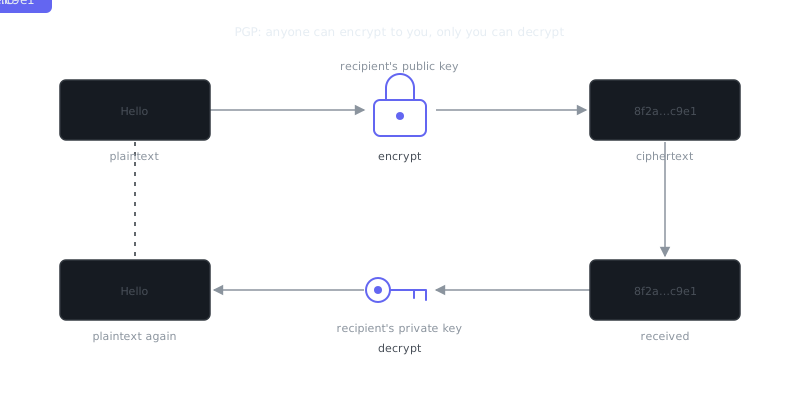
GPG uses asymmetric cryptography — a mathematically linked key pair consisting of a public key and a private key. Your public key can be shared freely; others use it to encrypt messages to you or verify your signatures. Your private key stays secret, and you use it to decrypt messages or sign data.
This model sits at the heart of the broader PGP encryption complete guide philosophy that OpenPGP formalizes. GPG extends it with a web of trust, letting users vouch for each other's identities without relying on a central certificate authority.
In practice, you'll use GPG to sign and verify Git commits, encrypt files and emails, authenticate software packages (this is common in Linux package managers), and protect sensitive communications between teams.
Generating Your GPG Key
Choosing Key Type and Length
Modern best practice is to use Ed25519 for signing keys and Cv25519 for encryption subkeys. These elliptic curve algorithms offer strong security with shorter keys and faster operations than RSA-4096. If you need interoperability with older systems, RSA-4096 still works fine.
gpg --full-generate-key
Select (9) ECC and ECC when prompted for key type, then choose Curve 25519. Set an expiration date — one to two years is a reasonable default. An expiry forces periodic review and limits your exposure if the key is ever compromised.
Setting a Strong Passphrase
Your private key is encrypted on disk using a passphrase. A weak one is a single point of failure. Use a random passphrase of at least 20 characters, ideally generated by a password manager. That passphrase is your primary defense in identity theft scenarios where an attacker gets filesystem access.
Verifying the Generated Key
gpg --list-keys --keyid-format LONG
Sample output:
pub   ed25519/3AA5C34371567BD2 2024-01-15 [SC] [expires: 2026-01-15]
      Key fingerprint = 1234 ABCD 5678 EF01 2345  6789 ABCD EF01 3AA5 C343
uid   [ultimate] Alice Example <[email protected]>
sub   cv25519/4BB6D45482678CE3 2024-01-15 [E] [expires: 2026-01-15]
The [SC] flags mean the primary key can Sign and Certify. The [E] subkey handles Encryption. That separation is intentional and important.
Key Architecture: Primary Keys and Subkeys
Why Subkeys Matter
A mature GPG setup separates your primary key (used only for certification) from subkeys you use day-to-day. Your primary key can live offline or on a hardware token. Subkeys can be rotated or revoked without losing your identity. And a compromised subkey doesn't touch your web of trust certifications.
To add subkeys to an existing key:
“Security is always excessive until it's not enough.”
— Robbie Sinclair
gpg --edit-key [email protected]
gpg> addkey
# Select key type, set expiration
gpg> save
Recommended Key Layout
| Key Type | Usage Flag | Stored | Expiry |
|---|---|---|---|
| Primary key | Certify (C) | Offline / hardware token | 5+ years or none |
| Signing subkey | Sign (S) | Daily machine | 1–2 years |
| Encryption subkey | Encrypt (E) | Daily machine | 1–2 years |
| Authentication subkey | Authenticate (A) | Hardware token | 1–2 years |
This layout is the foundation for using GPG with hardware security keys. For teams that need hardware-backed key storage, the Hardware security keys: YubiKey guide covers moving GPG subkeys onto a YubiKey, which makes private key extraction physically impossible.
Exporting, Backing Up, and Distributing Keys
Exporting Your Public Key
# ASCII-armored export for sharing
gpg --armor --export [email protected] > alice_public.asc

# Upload to a keyserver
gpg --keyserver hkps://keys.openpgp.org --send-keys 3AA5C34371567BD2
Backing Up Your Private Key
# Export private key — store this offline, encrypted storage only
gpg --armor --export-secret-keys [email protected] > alice_private_backup.asc

# Export secret subkeys only (for daily machine setup)
gpg --armor --export-secret-subkeys [email protected] > alice_subkeys.asc
Store the full private key export on an encrypted USB drive in a physically secure location. Never put it in cloud services or version control. The subkeys-only export is what you import on your workstation for everyday use.
Generating a Revocation Certificate
Do this immediately after key generation, before you ever need it:
gpg --output alice_revoke.asc --gen-revoke [email protected]
Store it alongside your private key backup. If your key is ever compromised or lost, importing this certificate to keyservers tells everyone the key should no longer be trusted.
Practical Usage: Signing, Encrypting, and Verifying
Signing Files and Git Commits
# Detached signature for a file
gpg --armor --detach-sign release-v1.0.tar.gz
# Produces release-v1.0.tar.gz.asc

# Verify a signature
gpg --verify release-v1.0.tar.gz.asc release-v1.0.tar.gz

# Sign a Git commit
git config --global user.signingkey 3AA5C34371567BD2
git config --global commit.gpgsign true
git commit -S -m "Signed release"
Signed Git commits show up on GitHub and GitLab with a "Verified" badge, giving downstream users confidence that commits came from the legitimate key holder. That's a direct defense against supply chain attacks.
Encrypting and Decrypting Files
# Encrypt a file for a recipient
gpg --armor --encrypt --recipient [email protected] sensitive.txt
# Produces sensitive.txt.asc

# Encrypt for multiple recipients
gpg --armor --encrypt \
  --recipient [email protected] \
  --recipient [email protected] \
  sensitive.txt

# Decrypt
gpg --decrypt sensitive.txt.asc > sensitive_decrypted.txt
Key Management Comparison
| Operation | Command | Notes |
|---|---|---|
| List public keys | gpg --list-keys |
Shows all keys in keyring |
| List private keys | gpg --list-secret-keys |
Confirms private key availability |
| Import a key | gpg --import key.asc |
Adds to local keyring |
| Delete a public key | gpg --delete-key <fingerprint> |
Must delete secret key first |
| Refresh from keyserver | gpg --refresh-keys |
Pulls revocation updates |
| Edit key trust | gpg --edit-key → trust |
Set to ultimate for own keys |
Key Rotation, Expiry, and Revocation
Handling Key Expiry
Extending an expiration date before it lapses is straightforward and won't invalidate existing signatures:
```bash gpg --edit-key [email protected] gpg> expire
Follow prompts to set new expiry
gpg> save
Re-publish the updated key
gpg --keyserver hkps://keys.
Frequently Asked Questions
What is a GPG key and why do I need one?
A GPG key is a pair of cryptographic keys — one public and one private — used to encrypt, decrypt, and sign data or messages. You need one to verify your identity, sign your Git commits, or securely exchange files and emails with others. Think of your public key as a lock you share freely, and your private key as the only key that opens it.
How do I generate my first GPG key?
Run gpg --full-generate-key in your terminal and follow the prompts — you'll choose a key type (RSA 4096 is a solid default), an expiration date, and a passphrase to protect your private key. The passphrase is important: it's the last line of defense if someone gets access to your key file. Once generated, you can view your keys with gpg --list-secret-keys.
What should I do if I lose my GPG private key or forget my passphrase?
Unfortunately, there's no way to recover a lost private key or forgotten passphrase — the encryption is designed to make that impossible. This is why you should export and back up your private key securely (gpg --export-secret-keys > backup.gpg) and store it somewhere safe like an encrypted drive. You should also generate a revocation certificate upfront with gpg --gen-revoke so you can publicly invalidate the key if it's ever compromised or lost.
Video Resources
Sources & Further Reading
- GnuPG Documentation — Manuals and how-tos for GPG key management and encryption.
- Wikipedia: Pretty Good Privacy — Background on PGP, OpenPGP and the web of trust.
- EFF Surveillance Self-Defense — Threat-model based guides from the Electronic Frontier Foundation.
- EFF — Digital rights organisation with security explainers.
- OWASP — Open standards and cheat sheets for application security.
- NIST Cybersecurity Framework — Reference framework for identifying, protecting and responding to threats.
- CISA — US cybersecurity agency guidance for individuals and organisations.