How to Create Strong Passwords That Actually Hold Up
Weak passwords remain one of the top causes of data breaches, with stolen credentials involved in over 80% of hacking incidents. This guide breaks down the science behind strong password creation and the practical steps you can take today. Learn how to build passwords that stand up to modern attack methods.
On this page
Introduction
Passwords guard virtually every digital account you own. And yet, despite decades of security warnings, weak passwords are still one of the top causes of data breaches. The 2023 Verizon Data Breach Investigations Report found stolen or weak credentials involved in over 80% of hacking-related breaches. So what does it actually take to create a password that holds up? This guide walks through how attackers work, what makes a password genuinely strong, and how to build habits that protect you without driving you crazy.
How Attackers Break Passwords
Knowing how attacks work makes it a lot easier to understand why certain advice exists.
Brute-Force and Dictionary Attacks
Brute-force attacks try every possible character combination until one works. Modern GPUs can test billions of combinations per second, which means short passwords get cracked in seconds regardless of how "complex" they look. Dictionary attacks are even faster — they run through massive lists of known words, common passwords, and previously leaked credentials. Tools like Hashcat and John the Ripper automate all of this.
Take Summer2024! as an example. It feels complex, but it follows a pattern attackers have already accounted for: common word, year, punctuation. It's on the list.
Credential Stuffing
When a service gets breached, attackers take those stolen credentials and test them across hundreds of other sites automatically. If you reuse passwords, a breach at some low-security forum can unlock your bank account. Password uniqueness matters just as much as password strength — maybe more.
Phishing and Social Engineering
No amount of cryptographic strength protects a password you hand over directly. Phishing emails, fake login pages, and phone pretexting extract credentials without cracking anything. Strong passwords limit the damage when theft happens, but you also need to recognize phishing attempts. These two defenses work together.
What Makes a Password Strong
Strength comes down to entropy — how unpredictable the password is. Entropy goes up with length and character variety, but length carries far more weight than most people realize.
Length Over Complexity
A 16-character lowercase passphrase is stronger than an 8-character mix of symbols and numbers. Here's what the numbers actually look like:
| Password | Length | Character Set | Possible Combinations | Estimated Crack Time (GPU) |
|---|---|---|---|---|
pass |
4 | 26 lowercase | ~456,000 | Instant |
P@ss1! |
6 | ~90 chars | ~531 billion | Seconds |
correct-horse |
13 | 26 lowercase + - |
~1.7 × 10¹⁸ | Thousands of years |
Tr0ub4dor&3 |
11 | ~90 chars | ~3.6 × 10²¹ | Still weaker than above |
mango-river-cloud-desk |
22 | 26 lowercase + - |
~10³¹+ | Effectively uncrackable |
mango-river-cloud-desk is easier to remember and harder to crack than a shorter "complex" password. This is exactly what NIST's updated password guidelines (SP 800-63B) now recommend: prioritize length over forced complexity rules.
Randomness
Human-chosen passwords are predictable. We naturally gravitate toward names, dates, keyboard patterns like qwerty, and character substitutions like 3 for e or @ for a — and attackers already account for all of it. Real randomness requires a tool, either physical dice (the diceware method) or a password manager's built-in generator.
Uniqueness
Every account gets its own password. Full stop. Credential stuffing becomes harmless when every site has a different one.
Practical Methods for Creating Strong Passwords
The Diceware Passphrase Method
Diceware generates passphrases by rolling physical dice and mapping the results to a word list. The output is both random and memorable — a rare combination.
- Download the EFF's large wordlist (7,776 words)
- Roll five dice for each word
- Look up the corresponding word
- String together 5-6 words for a strong passphrase
You might end up with something like clam-ivory-temple-funnel-orbit. Verifiably random, human-readable, and extremely high entropy.
Using a Password Manager
Password managers generate, store, and autofill your credentials. You memorize one strong master password and the manager handles everything else.
# Installing Bitwarden CLI (cross-platform)
npm install -g @bitwarden/cli

# Log in
bw login

# Generate a 20-character random password
bw generate --length 20 --uppercase --lowercase --number --special

# Generate a passphrase
bw generate --passphrase --words 5 --separator "-"
Good options include Bitwarden (open source, audited), 1Password, and KeePassXC if you want everything stored locally. Avoid relying on browser-built-in password managers for high-stakes accounts — they don't always have dedicated security models or breach alerting.
Hardware Security Keys
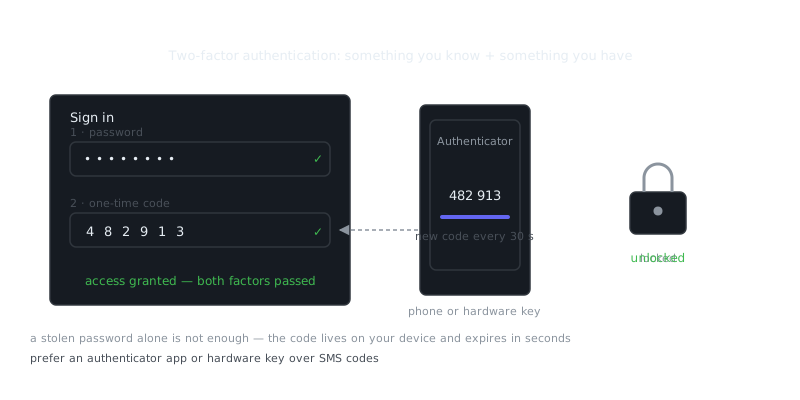
For accounts that support FIDO2/WebAuthn, pair your strong password with a hardware security key. A YubiKey gives you a physical second factor that can't be phished. Even if an attacker has your password, they can't get in without the physical device. This matters most for email accounts, which function as a recovery gateway for everything else. Hardware keys complement strong passwords; they don't replace them.
Password Management Best Practices
Master Password Rules
Your password manager's master password protects everything else, so it deserves extra care.
- Use at least a 6-word diceware passphrase
- Don't store it digitally — write it down and keep it physically secure
- Don't reuse it anywhere else
- Turn on multi-factor authentication for the password manager account itself
Rotation Policy
NIST no longer recommends rotating passwords on a fixed schedule. Forced rotation leads to predictable patterns like Password1 then Password2, plus user fatigue. Change a password when a service reports a breach, when you suspect compromise, or when you realize you've been reusing one.
Checking for Compromised Credentials
# Check if an email has appeared in known breaches using Have I Been Pwned API
curl "https://haveibeenpwned.com/api/v3/breachedaccount/[email protected]" \
  -H "hibp-apikey: YOUR_API_KEY"

# Check a password hash prefix (k-anonymity model — safe to use)
echo -n "yourpassword" | sha1sum | head -c 5
# Then query: https://api.pwnedpasswords.com/range/FIRST5CHARS
You can also check passwords directly through the Bitwarden or 1Password web vault interfaces, both of which flag known-compromised passwords in your stored credentials.
Integrating Passwords Into a Broader Security Posture
Strong passwords are one layer in a larger defense. They work best alongside a few other controls.
Multi-factor authentication (MFA) adds a second verification step. Authenticator apps like Authy or Aegis are more secure than SMS codes, which are vulnerable to SIM-swapping attacks.
Firewall configuration at the network level can limit credential-stuffing attempts by rate-limiting login endpoints and blocking known malicious IP ranges. At the application layer, account lockouts and CAPTCHA challenges slow down automated attacks significantly.
Malware protection matters because a keylogger on your device captures passwords before encryption even comes into play. Keep systems patched, avoid suspicious downloads, and run endpoint protection software. Understanding the main threats — keyloggers, trojans, spyware — helps you recognize the attack vectors that bypass password strength entirely.
Summary and Key Takeaways
“There are only two types of companies: those that have been hacked and those that will be.”
— Robert Mueller
Password security comes down to a handful of consistent principles that, once you automate them with a password manager, require almost no ongoing effort.
- Length beats complexity. Aim for 16+ characters. A long passphrase outperforms a short "complex" one every time.
- Randomness isn't optional. Human-chosen passwords are predictable. Use a generator or diceware.
- One password per account. Credential stuffing only works if you reuse passwords.
- Use a password manager. It removes the memory burden and generates credentials you couldn't reliably create by hand.
- Add hardware security keys for critical accounts. Email, password manager, and financial accounts deserve phishing-resistant MFA.
- Don't rotate on a schedule. Rotate when there's an actual reason — a breach, suspected compromise, or a discovered reuse.
Frequently Asked Questions
What makes a password strong?
A strong password is at least 12 characters long and combines uppercase and lowercase letters, numbers, and special characters like !, @, or #. Avoid using obvious words, your name, or simple sequences like '123456'. The more random and longer it is, the harder it is to crack.
Should I use the same password for multiple accounts?
No — reusing passwords means that if one account gets compromised, all your other accounts become vulnerable too. Use a unique password for each account, and consider a password manager like Bitwarden or 1Password to keep track of them without memorizing each one.
Is it safer to use a passphrase instead of a random password?
Yes, a passphrase — a string of four or more random words like 'correct-horse-battery-staple' — is both strong and easier to remember than a jumbled mix of characters. Just make sure the words are truly random and not a personal phrase someone could guess. Adding numbers or symbols between words makes it even stronger.
Video Resources
Sources & Further Reading
- Have I Been Pwned — Check whether an email or password appeared in a known breach.
- NIST Cybersecurity Framework — Reference framework for identifying, protecting and responding to threats.
- EFF — Digital rights organisation with security explainers.
- OWASP — Open standards and cheat sheets for application security.
- GnuPG Documentation — Manuals and how-tos for GPG key management and encryption.
- CISA — US cybersecurity agency guidance for individuals and organisations.
- Wikipedia: Pretty Good Privacy — Background on PGP, OpenPGP and the web of trust.