PGP Encryption: The Complete Guide to Securing Your Communications
PGP (Pretty Good Privacy) is one of the most trusted cryptographic systems for encrypting emails and sensitive files. Originally created in 1991, it uses asymmetric encryption to keep your data private. This guide walks you through how PGP works and how to implement it using GPG.
On this page
PGP (Pretty Good Privacy) is a cryptographic system for encrypting and signing digital communications. Phil Zimmermann created it in 1991, and it's still one of the most trusted ways to secure email and sensitive files. This guide covers how PGP works, how to set it up using GPG (its open-source counterpart), and where it fits into a real security strategy.
How PGP Works
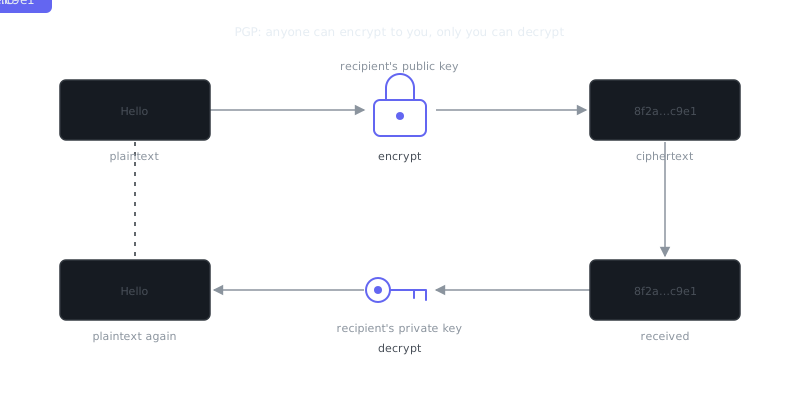
PGP uses asymmetric cryptography, which means it relies on two mathematically linked keys: a public key and a private key. You share your public key freely — anyone can use it to encrypt a message for you. Only your private key can decrypt it.
It also supports digital signatures. Sign a message with your private key, and recipients can verify that signature using your public key. That confirms both who wrote the message and that nothing was tampered with in transit.
The Encryption Flow
- Alice wants to send Bob an encrypted message.
- Alice gets Bob's public key from a keyserver or directly from Bob.
- Alice encrypts the message using Bob's public key.
- Bob decrypts it using his private key.
- If Alice also signs the message, Bob verifies the signature with Alice's public key.
This two-layer approach handles confidentiality and authenticity at the same time. It also works well alongside other security habits like learning to spot phishing attempts, since a valid PGP signature confirms sender identity in a way that forged email headers simply can't fake.
GPG Key Generation and Management
GPG (GNU Privacy Guard) is the free, open-source implementation of the OpenPGP standard. It runs on Linux, macOS, and Windows, and it's the practical tool you'll use day-to-day when working with PGP.
Generating a Key Pair
gpg --full-generate-key
GPG walks you through a few choices: key type (RSA and RSA is the standard default), key size (4096 bits is the right call for strong security), expiration date (always set one), and your name and email address.
Once generated, list your keys to confirm everything looks right:
gpg --list-keys
gpg --list-secret-keys
Exporting and Sharing Your Public Key
# Export to a file
gpg --armor --export [email protected] > publickey.asc

# Upload to a keyserver
gpg --keyserver keys.openpgp.org --send-keys YOUR_KEY_ID
Importing Someone Else's Key
# From a file
gpg --import theirkey.asc

# From a keyserver
gpg --keyserver keys.openpgp.org --recv-keys THEIR_KEY_ID
Key Trust and the Web of Trust
After importing a key, verify it actually belongs to who you think it does. The right way to do this is checking the fingerprint in person or through a trusted channel you already control. Once you've confirmed it, sign their key to mark it as trusted:
gpg --sign-key [email protected]
This builds what PGP calls a "web of trust" — a decentralized model where trust spreads through verified relationships rather than flowing from a central certificate authority. It puts more responsibility on you, but it also means no single entity can issue fraudulent certificates for your contacts.
Revoking a Key
If your private key gets compromised, revoke it immediately:
gpg --gen-revoke [email protected] > revoke.asc
gpg --import revoke.asc
gpg --keyserver keys.openpgp.org --send-keys YOUR_KEY_ID
One important habit: generate a revocation certificate when you first create your key pair, not after something goes wrong. Store it offline, somewhere separate from the private key itself.
Encrypting and Decrypting Files and Messages
Encrypting a File
# Encrypt for a recipient
gpg --encrypt --recipient [email protected] --armor document.txt

# Encrypt and sign in one step
gpg --encrypt --sign --recipient [email protected] --armor document.txt
This produces document.txt.asc, an ASCII-armored encrypted file that's safe to send over email or any text-based channel.
Decrypting
gpg --decrypt document.txt.asc
GPG prompts for your passphrase and outputs the plaintext. That's it.
Signing Without Encrypting
Sometimes the content can be public, but you still need people to know it came from you:
“There are only two types of companies: those that have been hacked and those that will be.”
— Robert Mueller
gpg --clearsign announcement.txt
This produces a file with the original text fully readable and the signature appended. Anyone can read it, and anyone can verify who wrote it.
PGP in Real-World Applications
| Use Case | What PGP Protects | Notes |
|---|---|---|
| Encrypted email | Message content from eavesdropping | Requires both parties to have keys |
| File transfer | File integrity and confidentiality | Works with any file type |
| Software distribution | Authenticity of release packages | Used by Linux distros, security tools |
| Code signing | Commit or tag authenticity in Git | GitHub supports GPG-signed commits |
| Secure messaging backup | Exported chat logs or documents | Encrypt before storing in cloud |
Most Linux distributions publish GPG-signed release files. When you verify a package signature before installing, you're already using PGP in practice:
# Verify a signed file
gpg --verify file.sig file.tar.gz
Git supports GPG-signed commits too, which gives your repository a verifiable chain of authorship:
git config --global user.signingkey YOUR_KEY_ID
git commit -S -m "Signed commit message"
git log --show-signature
PGP and Its Role in a Broader Security Strategy
PGP handles confidentiality and authenticity well, but it's one tool among many. Knowing what it doesn't do is just as important as knowing what it does.
What PGP Does Not Protect
Metadata is the big one. PGP encrypts message content, not the fact that you're communicating with someone, or when. Email headers — To, From, Subject, timestamps — stay visible.
Endpoint security is outside PGP's scope entirely. If your device is already compromised, an attacker can read your messages after decryption no matter how strong your keys are.
Network-layer privacy is a separate problem. PGP doesn't anonymize your traffic. For that you need tools like Tor or a well-configured VPN. A VPN encrypts your network traffic and masks your IP; PGP secures the content of specific messages or files. They cover different attack surfaces and work well together.
Phishing and Key Verification
PGP raises the bar against phishing significantly. A forged email from someone impersonating a colleague won't carry a valid PGP signature. If your team signs all sensitive communications, an unsigned message claiming urgency — a classic phishing tactic — becomes an immediate red flag.
The catch is this only works if you verify keys carefully before trusting them. Importing and trusting a key without checking the fingerprint defeats the whole point.
Key Security Best Practices
Use a strong, unique passphrase on your private key. Keep the private key off internet-connected systems where possible, or store it on a hardware token like a YubiKey. Set an expiration date and rotate keys periodically. Never share your private key with anyone. Store your revocation certificate somewhere separate from the key itself.
Comparison: PGP vs. Other Encryption Approaches
| Feature | PGP/GPG | S/MIME | Signal Protocol | TLS |
|---|---|---|---|---|
| Trust model | Web of trust / manual | Certificate authority | Central server | Certificate authority |
| Email support | Yes | Yes | No (messaging apps) | Transport only |
| File encryption | Yes | Limited | No | No |
| Key management | Manual | Managed by CA | Automatic | Managed by CA |
| Decentralized | Yes | No | No | No |
| Learning curve | High | Medium | Low | Transparent to user |
S/MIME is PGP's main competitor for email encryption. It uses certificate authorities for trust, which makes key distribution easier in enterprise environments but introduces a central point of failure. Signal's protocol is excellent for real-time messaging but wasn't designed for file encryption or asynchronous use cases where PGP shines.
Summary and Key Takeaways
PGP remains a foundational tool for securing digital communications, especially when you need provable authenticity and long-term confidentiality without depending on a third party to manage trust for you. It's not frictionless — key management takes real effort — but that tradeoff is exactly what gives it staying power in high-stakes contexts.
Frequently Asked Questions
What is PGP encryption and why would I need it?
PGP (Pretty Good Privacy) is a method for encrypting and signing data, most commonly used to secure emails and files so only the intended recipient can read them. It works by using a pair of keys: a public key you share with others to let them encrypt messages to you, and a private key you keep secret to decrypt those messages. You'd use it if you need to send sensitive information — like passwords, financial data, or private communications — without risk of interception.
How do I get started with PGP if I've never used it before?
The easiest way to start is by installing a tool like Gpg4win (Windows), GPG Suite (Mac), or GnuPG (Linux), which handle key generation and management for you. Once installed, you generate your key pair, share your public key with contacts or upload it to a public keyserver, and ask them to do the same so you can exchange encrypted messages. Most email clients like Thunderbird have plugins (such as Enigmail or built-in OpenPGP support) that make encrypting and decrypting messages nearly automatic.
What happens if I lose my private key or forget my passphrase?
Losing your private key or forgetting its passphrase means any messages encrypted to that key are permanently unreadable — there is no recovery option, which is by design. This is why creating a revocation certificate right after generating your key pair is critical; it lets you publicly invalidate the lost key so others stop using it to encrypt messages to you. Always back up your private key securely (e.g., encrypted storage or a printed paper backup kept offline) and use a passphrase you can reliably remember or store in a password manager.
Video Resources
Sources & Further Reading
- GnuPG Documentation — Manuals and how-tos for GPG key management and encryption.
- Wikipedia: Pretty Good Privacy — Background on PGP, OpenPGP and the web of trust.
- EFF Surveillance Self-Defense — Threat-model based guides from the Electronic Frontier Foundation.
- EFF — Digital rights organisation with security explainers.
- OWASP — Open standards and cheat sheets for application security.
- NIST Cybersecurity Framework — Reference framework for identifying, protecting and responding to threats.
- CISA — US cybersecurity agency guidance for individuals and organisations.