How to Prevent Identity Theft: Complete Security Guide
Identity theft affected over 1.1 million Americans in 2023, causing $10 billion in losses. Learn how thieves steal personal information and discover proven strategies to protect your social security number, financial accounts, and digital identity from fraud.
On this page
Identity theft happens when someone uses your personal information — a social security number, credit card details, login credentials — without your permission to commit fraud. The FTC reported over 1.1 million identity theft cases in 2023, with losses topping $10 billion. Knowing how thieves operate and taking some deliberate steps can protect your finances, your credit, and your reputation before damage is done.
This guide walks through the technical and behavioral strategies that actually work, from locking down your digital footprint to spotting social engineering before it fools you.
How Identity Thieves Actually Get In
Thieves don't need to be sophisticated. They have several reliable paths into your life, and most of them exploit habits you've probably never thought about.
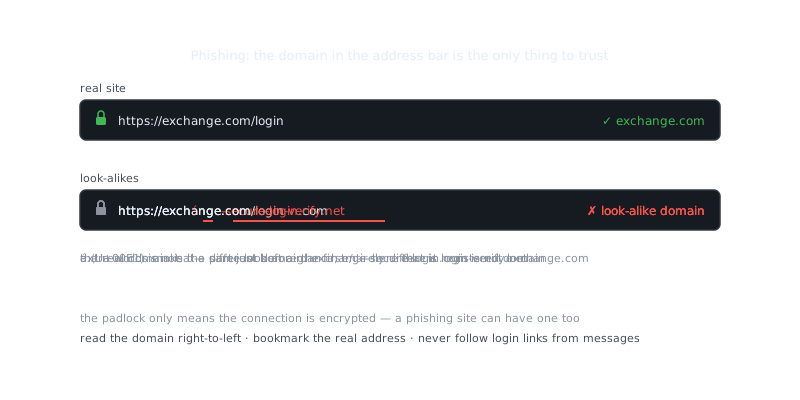
Phishing emails are still the most common entry point. They arrive disguised as messages from your bank, the IRS, or a service like Amazon or Netflix. The message creates panic — your account is suspended, there's suspicious activity, you need to verify something now — and that urgency pushes you to click before you think. That's the whole trick.
Corporate data breaches are a different animal entirely. When retailers, healthcare companies, or credit bureaus get hit, millions of records end up for sale on dark web marketplaces. Criminals buy those databases and run credential stuffing attacks, systematically trying stolen usernames and passwords across dozens of services. If you reuse passwords, one breach cascades into many.
Don't sleep on physical theft either. A stolen wallet, intercepted mail, or documents pulled from your recycling bin can give a thief everything they need. A single utility bill carries your name, address, and account number — enough to open accounts or initiate service transfers in your name.
Social engineering attacks go after your psychology, not your software. Someone impersonates IT support, a company executive, or a government official to get you to hand over information directly. These attacks work precisely because they bypass your technical defenses. They rely on authority and urgency instead.
Locking Down Your Digital Identity
Strong, unique passwords for every account are non-negotiable. Password managers like Bitwarden, 1Password, or KeePassXC generate and store complex passwords so you don't have to remember them. A solid password runs at least 16 characters and mixes uppercase, lowercase, numbers, and symbols.
# Generate a secure random password using openssl
openssl rand -base64 32

# Generate a memorable passphrase using diceware method
shuf -n 6 /usr/share/dict/words | tr '\n' '-'
Multi-factor authentication is your next line of defense. Even if someone steals your password, they can't get into an account that requires an authenticator app (Google Authenticator, Authy) or a hardware key (YubiKey, Titan). Avoid SMS-based MFA when you can. SIM swapping attacks let criminals convince your mobile carrier to transfer your number to a device they control, which means those text codes can be intercepted.
Keep your software updated. It's boring advice, but it matters — the 2017 Equifax breach exposed 147 million records by exploiting a vulnerability that had a patch sitting available for months before the attack. Enable automatic updates for your operating system, browser, and apps.
Encryption protects your data when devices get lost or stolen. Turn on full-disk encryption on your laptop and phone (BitLocker on Windows, FileVault on macOS, LUKS on Linux). Stick to HTTPS-only browsing and verify SSL certificates before entering anything sensitive.
# Enable firewall on Ubuntu/Debian
sudo ufw enable
sudo ufw default deny incoming
sudo ufw default allow outgoing
sudo ufw allow ssh

# Check firewall status
sudo ufw status verbose
Firewall configuration blocks unauthorized network access. Set it to deny incoming connections by default and only allow what you need. On your home router, disable UPnP, change the default admin password, and use WPA3 for your wireless network.
“Security is always excessive until it's not enough.”
— Robbie Sinclair
Catching Problems Early With Active Monitoring
The faster you catch identity theft, the less damage it does. Checking your credit reports regularly is one of the most effective things you can do. Pull reports from all three bureaus — Equifax, Experian, and TransUnion — at least quarterly. Federal law gives you one free report from each bureau per year through AnnualCreditReport.com, so stagger them every four months for continuous coverage.
A credit freeze is one of your strongest tools and it's completely free. Unlike credit lock services that bureaus sell as paid subscriptions, freezes are legally protected and prevent anyone from opening new accounts in your name. Freeze all three bureaus and only lift them temporarily when you're actually applying for credit.
Set up real-time alerts on every bank and credit card account you have. You want to know about every transaction, balance change, and login attempt as it happens. Thieves often test stolen card numbers with small purchases — a few dollars — before running larger charges.
| Monitoring Method | Cost | Detection Speed | Coverage |
|---|---|---|---|
| Credit report checks | Free | Monthly to quarterly | New accounts, inquiries |
| Credit monitoring service | $10-30/month | Real-time | Credit changes, dark web scans |
| Bank transaction alerts | Free | Real-time | Unauthorized transactions |
| Credit freeze | Free | Preventive | Blocks new account opening |
| Identity theft insurance | $5-25/month | Reactive | Recovery assistance, reimbursement |
Watch beyond your bank accounts too. Search your name online periodically. Check your Social Security, IRS, and state unemployment accounts for any unauthorized access. Medical identity theft is easy to miss — it shows up as unexpected insurance claims or unfamiliar entries buried in your health records.
Recognizing and Blocking Social Engineering
How do you defend yourself against someone who's trying to manipulate you? Start by learning the playbook they use.
Artificial urgency is the most common lever. The attacker claims that immediate action will prevent account closure, legal consequences, or financial loss. Legitimate organizations give you time to think, offer multiple contact options, and never demand instant decisions.
Always verify independently. If someone calls claiming to be from your bank and asks to confirm account details, hang up and call the number printed on your card or statement. Attackers can spoof caller ID to display real company phone numbers, so the number on your screen proves nothing on its own.
Look at what you share on social media. Public profiles that show your birthday, hometown, schools, pet names, and family members hand attackers answers to the most common security questions. They piece together fragments from multiple sources to impersonate you convincingly or bypass account recovery systems.
Be skeptical of unsolicited contact. Your bank won't email you asking you to verify your account by clicking a link. The IRS contacts you by postal mail, not phone calls demanding immediate payment. Tech support doesn't cold-call about infections on your computer. When something feels unexpected, verify it through official channels before doing anything else.
Watch for pretexting too — fabricated scenarios designed to build trust before extracting information. Someone might pose as a new HR employee needing data for a "database update" or a vendor confirming an invoice. Treat any request that bypasses your normal procedures as a red flag, regardless of how plausible the story sounds.
Physical Security and Document Management
Secure handling of physical documents matters more than most people realize. Shred bank statements, credit offers, medical records, and utility bills before throwing them away. Cross-cut shredders are more secure
Frequently Asked Questions
What is identity theft and how does it happen?
Identity theft is when someone steals your personal information — like your Social Security number, credit card details, or login credentials — to impersonate you or commit fraud. It commonly happens through phishing emails, data breaches, stolen mail, or malware on your devices. Attackers use this information to open accounts, make purchases, or file taxes in your name.
How can I protect my personal information online?
Use strong, unique passwords for each account and enable two-factor authentication wherever possible. Avoid sharing sensitive information over email or on unsecured websites, and be cautious about what you post on social media. Keeping your software and antivirus tools up to date also helps block many common attack methods.
How do I know if my identity has been stolen?
Common warning signs include unexpected charges on your bank statements, unfamiliar accounts on your credit report, or bills for services you never signed up for. You might also get denied for credit unexpectedly or receive IRS notices about duplicate tax filings. Checking your credit report regularly at annualcreditreport.com is one of the easiest ways to catch problems early.
Video Resources
Sources & Further Reading
- CISA — US cybersecurity agency guidance for individuals and organisations.
- Krebs on Security — Investigative reporting on breaches, fraud and malware.
- Have I Been Pwned — Check whether an email or password appeared in a known breach.
- EFF — Digital rights organisation with security explainers.
- OWASP — Open standards and cheat sheets for application security.
- NIST Cybersecurity Framework — Reference framework for identifying, protecting and responding to threats.
- GnuPG Documentation — Manuals and how-tos for GPG key management and encryption.