Defending Against Social Engineering Attacks
Social engineering attacks exploit human psychology rather than technical vulnerabilities. Attackers manipulate people into sharing credentials, clicking malicious links, or granting unauthorized access through deception and trust.
On this page
Social engineering attacks don't need to find a flaw in your firewall. They find a flaw in you. An attacker convinces an employee to share credentials, click a malicious link, or wave someone through a secure door — not by hacking, but by exploiting the fact that people are trusting, helpful, and occasionally distracted.
That's what makes these attacks so hard to stop. You can patch software, but you can't patch human nature.
Defending against them requires a completely different mindset than traditional security. Firewalls and antivirus software do nothing against an attacker who talks their way past your front desk. Social engineering defense runs on awareness, clear policies, and verification habits. Organizations deal with phishing emails every single day. Individuals field scam calls and texts constantly. Understanding how these attacks work — and building practical habits to counter them — makes a real difference.
Common Social Engineering Techniques
Phishing and Spear Phishing
Phishing emails impersonate legitimate senders to trick you into handing over credentials or downloading malware. A generic attempt might warn you that your bank account has been suspended and push you toward a fake login page. Spear phishing is more dangerous because it's personal — the attacker has done their homework.
An attacker who spends 20 minutes on LinkedIn can craft an email that appears to come from your CFO, references an active project, matches the executive's writing style, and requests an urgent wire transfer. Without a verification procedure in place, a lot of finance staff would comply without questioning it.
Pretexting and Impersonation
Pretexting means building a believable cover story to extract information. The attacker calls your IT helpdesk posing as a remote employee who lost their laptop and needs a password reset. They've researched just enough about the company to sound like they belong there.
Physical impersonation takes this into the real world. Someone wearing a delivery uniform and carrying packages can tailgate through a secure entrance while employees hold the door out of basic courtesy. Once inside, they've got access to workstations, can plant hardware keyloggers, and can walk out with devices nobody noticed were missing.
Baiting and Quid Pro Quo
Baiting exploits curiosity in a simple, effective way. An attacker drops a few USB drives labeled "Executive Salary Data 2024" in the parking lot or lobby. Employees who plug them in to satisfy their curiosity unknowingly install malware. Digital versions of this use enticing download links for software, movies, or documents.
Quid pro quo attacks offer something in return for your cooperation. A fake IT support caller tells you they're resolving a reported issue and needs your password to finish the fix. You want the problem solved, so you give it to them.
Building Organizational Defenses
Security Awareness Training
Annual compliance videos don't cut it. Regular, scenario-based training gives employees a chance to actually recognize attacks before they encounter real ones. Simulated phishing campaigns are particularly useful because they show you exactly where gaps exist and who needs more support.
Good training teaches people to check sender addresses carefully and notice urgency or grammatical oddities in emails. It builds the habit of verifying requests through a separate channel before sharing anything sensitive. It also creates a culture where reporting suspicious activity is encouraged, not punished — because fear-based approaches just make people hide their mistakes instead of flagging them.
If your organization is seeing high failure rates on simulated phishing tests, the answer is better training, not consequences. Punishing employees drives incidents underground.
Verification Procedures
A mandatory callback procedure kills most social engineering attacks outright. Before processing a wire transfer, password reset, or sensitive data request, your employees should hang up, look up the requester's contact information in your internal directory, and call them back on that number — not the one the caller provided.
# Example verification workflow for IT helpdesk
# When receiving password reset request:

1. Record caller details (name, department, claimed issue)
2. End the call
3. Look up employee in directory (do not use caller-provided contact)
4. Call back using directory number
5. Verify identity with security questions
6. Process request only after confirmation
The same logic applies to physical access. Reception staff should never wave someone in based on their claim to have an appointment. They verify through internal systems or contact the employee the visitor claims to be meeting.
“There are only two types of companies: those that have been hacked and those that will be.”
— Robert Mueller
Layered Access Controls
Technical controls back up your human defenses. Multi-factor authentication (MFA) means a stolen password alone isn't enough — the attacker still can't get in without that second factor. It's one of the highest-value security steps you can take.
Keep access scoped tightly to what each role actually needs. A compromised marketing account shouldn't be able to reach financial systems or customer databases. Network segmentation works the same way — separating guest WiFi, employee networks, and production systems means an attacker who gets initial access can't freely move through everything. Combined with firewall rules that restrict traffic between segments, you end up with multiple barriers rather than one.
Individual Defense Strategies
Email and Communication Hygiene
Before you click anything, take a few seconds to actually look at the email. Legitimate organizations don't ask for passwords, credit card numbers, or social security numbers over email. Unexpected attachments and links deserve suspicion by default.
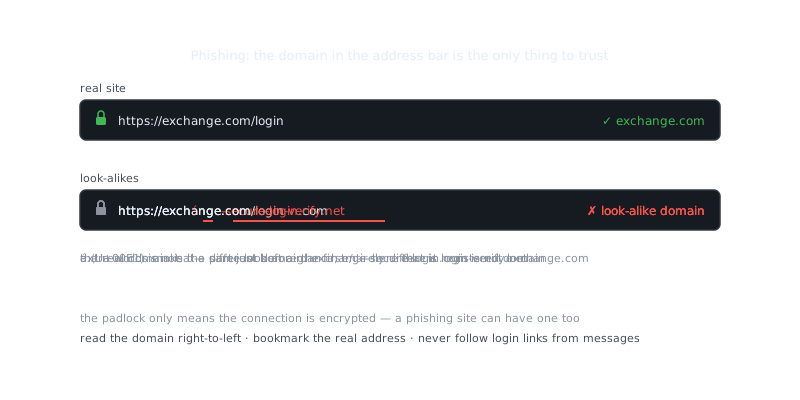
Hover over any link before clicking it. A phishing email might display "yourbank.com" as the link text while the actual URL points to "yourbank-secure-login.malicious-site.com." When something feels off, go directly to the website by typing the address yourself rather than following any link.
# Verify sender authenticity by examining email headers
# In most email clients: View > Message > Raw Source

Return-Path: <[email protected]>
From: "Your Bank" <[email protected]>
Reply-To: [email protected]

# The Return-Path and Reply-To reveal the true sender
# Legitimate emails from yourbank.com would match across all fields
Phone and SMS Vigilance
Caller ID is trivially easy to spoof. No bank, government agency, or legitimate company calls you demanding immediate action on your account. If a call feels off, hang up and call the organization back using a number from their official website.
SMS phishing has grown steadily as email filters have improved. Messages about undeliverable packages, accounts that need verification, or prizes waiting to be claimed all follow the same pattern: they push you toward a fraudulent website. Just delete them.
Physical Security Awareness
Don't hold doors open for people you don't recognize at secure facilities. Real employees and legitimate visitors understand security procedures and won't take offense at being asked to badge in properly. If you see someone tailgating, report it.
Shred documents before throwing them away. Dumpster diving is still surprisingly effective because people discard bank statements, medical records, and corporate documents intact. A cross-cut shredder costs around $30 to $60 and makes reconstruction essentially impossible.
Incident Response and Recovery
Recognizing Compromise
The faster you catch it, the less damage gets done. Watch for unexpected password reset notifications, accounts accessed from locations you don't recognize, money moved without your authorization, colleagues receiving suspicious emails that appear to come from you, or unknown devices showing up on your network.
Organizations need to make it safe for employees to report when they think they've fallen for something. Early reporting is what makes incident response work — it's the difference between containing a breach quickly and finding out about it three months later.
Immediate Response Actions
When you realize you've been compromised:
# Personal account compromise response

1. Change your password immediately on the affected account
2. Change passwords on any account sharing the same password
3. Enable MFA if not already active
4. Review recent account activity and flag anything suspicious
5. Notify your bank if financial information was exposed
6. Report the incident to your IT/security team if work accounts are involved
7. Monitor credit reports if personal identifying information was shared
Speed matters here. Every minute of delay gives the attacker more time to move through your accounts, exfiltrate data, or lock you out entirely. Don't wait to be sure — act on suspicion and sort out the details after you've changed your credentials.
Frequently Asked Questions
What is social engineering and why should I be worried about it?
Social engineering is when attackers manipulate people into revealing sensitive information or taking harmful actions, rather than hacking systems directly. It works because it exploits human psychology — things like trust, urgency, and helpfulness — which makes it effective even against well-secured systems. Anyone with an email address or phone number can be a target.
How can I tell if an email or phone call is a social engineering attack?
Watch for red flags like unexpected urgency, requests for passwords or sensitive data, and messages that pressure you to act before thinking. Legitimate organizations almost never ask for your credentials via email or phone. When in doubt, hang up or close the email and contact the organization directly using a number or address you find yourself.
What is the most important thing I can do to protect myself from social engineering?
The single most effective habit is to verify before you act — always confirm the identity of anyone requesting sensitive information or access, especially if the request feels urgent or out of the ordinary. Training yourself to pause and question unexpected requests breaks the psychological momentum attackers rely on. Most social engineering attacks fail when the target simply slows down and asks one extra question.
Video Resources
Sources & Further Reading
- CISA — US cybersecurity agency guidance for individuals and organisations.
- Krebs on Security — Investigative reporting on breaches, fraud and malware.
- Have I Been Pwned — Check whether an email or password appeared in a known breach.
- EFF — Digital rights organisation with security explainers.
- OWASP — Open standards and cheat sheets for application security.
- NIST Cybersecurity Framework — Reference framework for identifying, protecting and responding to threats.
- GnuPG Documentation — Manuals and how-tos for GPG key management and encryption.