Market, Limit, and Stop Orders: A Complete Guide
Every trade begins with an order, but the type you place determines how, when, and at what price it executes. Understanding market, limit, and stop orders is fundamental to controlling risk and improving execution quality across all markets.
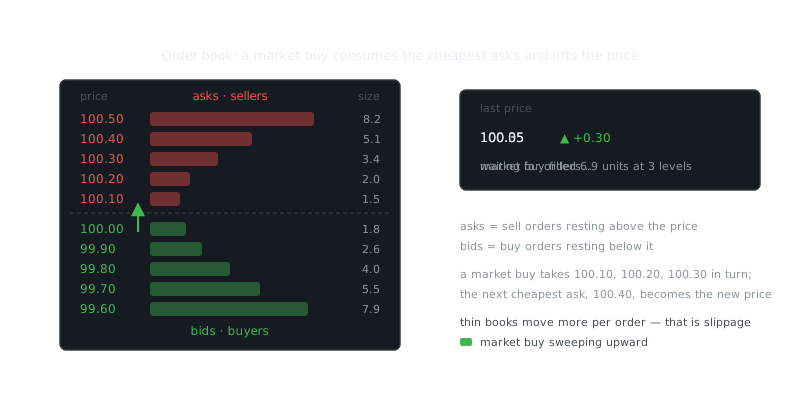
Every trade starts with an order. But the type of order you place determines how, when, and at what price that trade actually executes — and that difference matters more than most new traders realize. Market, limit, and stop orders are the foundation of trade mechanics across stocks, futures, forex, and crypto markets.
“The trend is your friend until the end when it bends.”
— Ed Seykota
New traders tend to default to market orders without thinking about the cost. Experienced traders layer limit and stop orders to automate entries, protect profits, and cut losses while they're away from their screens. The order type you choose directly affects slippage, fill probability, and whether your strategy performs the same way in live trading as it did in backtests.
Market Orders
A market order tells your broker or exchange to execute immediately at the best available price. When you buy, you pay the current ask. When you sell, you get the current bid. Speed and fill certainty take priority over price control.
In liquid markets, this works fine. If you're buying a large-cap stock with millions of shares trading daily, the gap between the quoted price and your actual fill will be tiny — often fractions of a cent. The order executes in milliseconds.
The real danger is slippage during volatile conditions. If you place a market order while a stock is gapping up on news, you might buy well above the last quoted price. In illiquid markets or low-volume altcoins, a market order can walk through multiple price levels and leave you with a terrible average fill. During flash crashes, market orders have executed 10% or more away from the pre-order quote.
Market orders also have a specific problem with stop-loss strategies. If you use a market order as your stop-loss, you risk getting flushed out at panic-bottom prices during a brief volatility spike, only to watch the stock recover minutes later.
When to Use Market Orders
Reach for market orders when immediate execution matters more than saving a few cents on slippage: you're exiting a position moving hard against you, you're entering during a confirmed breakout where hesitation costs more than slippage, or you're trading highly liquid instruments during normal market hours.
Avoid them during the first and last minutes of a session, around major economic releases, in pre-market or after-hours sessions with thin liquidity, and when trading small-caps or low-volume crypto. These are exactly the conditions where market orders bite you.
Limit Orders
A limit order sets the maximum price you'll pay when buying, or the minimum you'll accept when selling. It only executes at your specified price or better. A buy limit at $50 fills at $50 or lower. A sell limit at $50 fills at $50 or higher. Simple.
What you gain in price control, you give up in fill certainty. If the market never reaches your limit price, your order sits there unfilled. In fast-moving markets, waiting for your exact price sometimes means missing the trade entirely. That's the trade-off you're making.
When you place a limit order, it rests on the order book as passive liquidity. Market makers and high-frequency traders earn the bid-ask spread by doing exactly this — placing limit orders on both sides. Retail traders who use limit orders effectively become liquidity providers, often getting better prices than traders who cross the spread with market orders.
Limit Order Mechanics and Time-in-Force
Exchanges match orders by price-time priority. At any given price level, whoever placed their limit order first gets filled first. That queue position matters at round numbers or popular technical levels where hundreds of orders may be stacked.
Time-in-force instructions control how long your order stays active. GTC (Good-Till-Canceled) keeps it live until filled or canceled, sometimes up to 90 days. DAY orders expire at the end of the session. IOC (Immediate-or-Cancel) fills whatever quantity is available right now and cancels the rest. FOK (Fill-or-Kill) executes the entire order at once or cancels it completely.
A day trader would typically use DAY orders to avoid overnight exposure. A swing trader building a position might place GTC limit orders below the current price and wait for a pullback over several days.
Practical Example
Say you're buying a stock quoted at $50.25 bid and $50.30 ask. A market order costs you $50.30 right now. A limit order at $50.25 joins the bid queue. If someone sells into your bid, you save five cents per share — that's $50 saved on a 1,000-share position. But if the stock rallies without pulling back to $50.25, your order never fills and you miss the move entirely.
This matters a lot when backtesting trading strategies. Backtests that assume limit orders fill at favorable prices tend to overestimate performance. Realistic backtests model partial fills and missed entries, especially in momentum strategies where below-market limit orders frequently go unfilled.
Stop Orders
Stop orders stay dormant until price hits a specified trigger level. A stop-loss protects profits or limits losses by automatically exiting your position when price moves against you. A stop-entry triggers when price confirms a breakout or breakdown.
Once price touches the stop price, the order converts into either a market order (stop-market) or a limit order (stop-limit). The stop price is just the trigger — what happens after that depends on which subtype you're using.
Stop-Market Orders
When a stop-market triggers, it becomes a market order and executes immediately at the best available price. You're guaranteed to get out, but you have no control over the price you get.
If you own a stock at $50 and place a stop-market at $48, the order triggers when price touches $48. In a normal decline, you might fill at $47.95. If the stock gaps down on bad news overnight, you might fill at $45 or lower, because there are no buyers between $48 and $45.
Stop-Limit Orders
A stop-limit converts into a limit order when triggered. You set two prices: the stop price that activates the order, and a limit price that represents the worst fill you'll accept. You get price protection, but you risk not getting filled at all if price blows through your limit.
Here's a concrete example: you own stock at $50 and set a stop-limit with a $48 stop and a $47 limit. When price hits $48, a sell limit at $47 activates. If price cascades from $48 to $46 without pausing, your order may never fill, leaving you holding a losing position with no exit.
Stop-limit orders work well in stable markets with predictable volatility. During earnings announcements, FOMC decisions, or sudden news events where gaps are common, they're genuinely risky.
Trailing Stops
A trailing stop maintains a fixed distance from the highest price reached on a long position (or the lowest on a short). As price moves in your favor, the stop follows. When price reverses by the trailing amount, the stop triggers.
Say you buy a stock at $50 and set a $2 trailing stop. If price rallies to $55, the stop moves up to $53. If price then falls to $53, you're out. The stop never moves down — it only ratchets higher as new highs form.
Trailing stops automate profit protection without you watching a screen all day. They work best in trending markets and poorly in choppy conditions where normal volatility shakes you out prematurely.
Order Type Comparison
| Order Type | Execution Priority | Price Control | Fill Certainty | Best Use Case |
|---|---|---|---|---|
| Market | Immediate | None | High | Urgent exits, liquid markets |
| Limit | When price reached | Full | Low to Medium | Patient entries, profit targets |
| Stop-Market | After trigger | None | High after trigger | Automated stop-losses |
| Stop-Limit | After trigger | Partial | Low to Medium | Controlled exits, range-bound markets |
Frequently Asked Questions
What is the difference between a market order and a limit order?
A market order buys or sells a stock immediately at the best available current price, so it fills fast but you don't control the exact price you get. A limit order lets you set the maximum price you're willing to pay when buying, or the minimum you'll accept when selling, and the order only executes if the market reaches that price.
When would I use a stop order instead of a limit order?
A stop order is designed to protect you from big losses or lock in gains — once the stock hits your chosen stop price, it triggers a market order to buy or sell automatically. It's useful when you want to set a safety net and walk away, without having to watch the market constantly.
Is a market order always the fastest way to buy a stock?
Yes, a market order is the quickest way to get into or out of a position because it executes immediately at whatever price is available. The tradeoff is that in fast-moving or low-volume markets, the price you actually pay can differ from the last price you saw, a difference called slippage.
Video Resources
Sources & Further Reading
- Investopedia — Reference definitions and explainers for markets and trading.
- Investopedia: Technical Analysis — Indicator-by-indicator guides with worked examples.
- TradingView — Charting platform with community education and indicator scripts.
- CoinGecko — Price history, volume and market capitalisation data.
- BabyPips School — Free structured course on chart reading and risk management.
- Glassnode Academy — On-chain metrics explained, from active addresses to realised cap.
- Wikipedia: Technical analysis — History, methods and the academic debate around technical analysis.