Uniswap Tutorial: A Complete Guide to Decentralized Trading on Ethereum
Uniswap is the leading decentralized exchange on Ethereum, letting you swap tokens and earn fees without a central intermediary. This tutorial breaks down how Uniswap works and walks you through using it safely, whether you're a first-timer or looking to provide liquidity. Get up to speed on the DEX that powers much of DeFi's trading volume.
On this page
Uniswap is the most widely used decentralized exchange (DEX) on Ethereum, letting anyone swap tokens, provide liquidity, and earn fees without touching a centralized intermediary. Since launching in 2018, it's processed hundreds of billions in trading volume and become the backbone of DeFi's liquidity infrastructure. This guide walks you through how Uniswap works, how to use it safely, and how to participate as a liquidity provider.
How Uniswap Works: The Automated Market Maker Model
Traditional exchanges match buyers with sellers using an order book. Uniswap throws that model out entirely and replaces it with an Automated Market Maker (AMM) — a smart contract that holds reserves of two tokens and prices them algorithmically.
The Constant Product Formula
Uniswap V2 runs on a simple invariant:
x * y = k
Here, x and y are the reserves of two tokens, and k is a constant. When you buy token Y with token X, you're adding X to the pool and pulling Y out, which shifts the ratio and moves the price. The bigger your trade relative to the pool size, the worse your price impact.
Uniswap V3 refined this by introducing concentrated liquidity, which lets liquidity providers (LPs) put capital to work within specific price ranges instead of spreading it across the entire curve. The efficiency gains are substantial — a V3 position can be up to 4000x more capital-efficient than V2 in certain configurations.
Fee Tiers
V3 introduced multiple fee tiers so you can match your position to the volatility of the assets you're working with:
| Fee Tier | Best For | Example Pair |
|---|---|---|
| 0.01% | Stable-to-stable swaps | USDC/USDT |
| 0.05% | Pegged assets with low volatility | WBTC/ETH |
| 0.30% | Standard token pairs | ETH/DAI |
| 1.00% | Exotic or low-liquidity tokens | New/niche tokens |
Pick the wrong fee tier when adding liquidity and you'll find yourself competing against pools with better pricing — fewer trades route through yours, and your fee income drops accordingly.
Swapping Tokens on Uniswap
Step-by-Step: Making a Swap
- Go to app.uniswap.org and connect a wallet (MetaMask, Coinbase Wallet, or any WalletConnect-compatible wallet).
- Select the input token and the token you want to receive.
- Enter the amount. Uniswap shows you the expected output, price impact, and minimum received after slippage.
- Set your slippage tolerance — 0.5% works fine for liquid pairs; volatile or low-liquidity tokens may need 1–3%.
- Confirm the transaction in your wallet.
Understanding Slippage and Price Impact
Slippage tolerance defines the maximum gap between the quoted price and what actually executes. Set it too low and your transactions will fail during volatile markets. Set it too high and you're opening yourself up to MEV (Miner Extractable Value) attacks — specifically sandwich attacks, where a bot spots your pending transaction in the mempool, front-runs it to push the price, then back-runs it to pocket the difference.
A few practical ways to cut your MEV exposure: use a private RPC endpoint like Flashbots Protect, keep slippage tight (0.5% or below for major pairs), and split large trades across multiple transactions instead of doing them all at once.
MEV isn't unique to Uniswap either. Protocols like Compound see heavy bot activity around liquidation events, where bots race to be first to liquidate undercollateralized positions.
Providing Liquidity on Uniswap V3
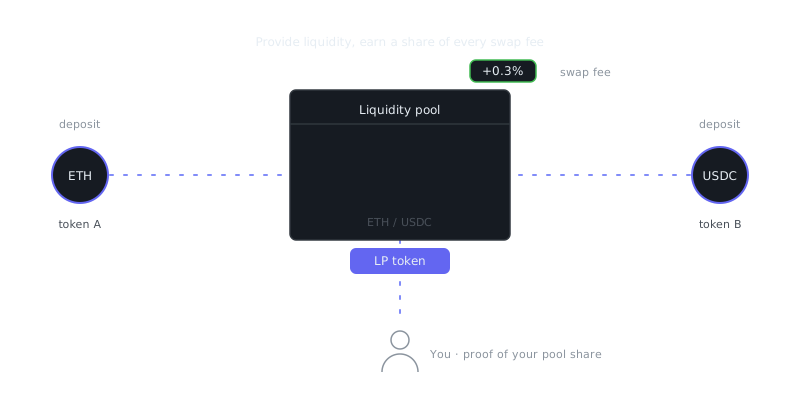
When you provide liquidity on V3, you earn a share of trading fees proportional to your contribution within an active price range. It's not passive income in the traditional sense, though — it comes with real risks that need active attention.
“Decentralized finance is the future of money.”
— Unknown
Setting a Price Range
Adding liquidity in V3 means picking a lower and upper price bound. You only earn fees while the market price sits inside that range. Once the price drifts outside, your position goes idle and becomes fully composed of whichever token is moving away — this is called being out of range.
Narrow ranges earn more fees per dollar when they're active, but they fall out of range more often. Wide ranges behave more like a V2 position — steadily earning fees but with far less capital efficiency. Neither is universally better; it depends on your outlook for the pair.
Impermanent Loss
Impermanent loss (IL) kicks in when the price ratio of your two tokens shifts after you deposit. The further prices diverge, the larger the loss. Say ETH doubles after you deposit an ETH/USDC position — you end up with less total value than if you'd just held both tokens outright.
Here's a rough reference for how IL scales:
| Price Change (one asset) | Impermanent Loss |
|---|---|
| 1.25x | ~0.6% |
| 1.5x | ~2.0% |
| 2x | ~5.7% |
| 4x | ~20.0% |
For stable pairs like USDC/USDT, IL is basically a non-issue. For volatile pairs, your fees need to outrun IL for the position to be worth it — that's the central trade-off of any LP strategy, and there's no way around it.
Adding Liquidity: Example
# Using the Uniswap V3 SDK (Node.js)
npm install @uniswap/v3-sdk @uniswap/sdk-core ethers
import { Pool, Position, nearestUsableTick } from '@uniswap/v3-sdk';
import { Token, CurrencyAmount } from '@uniswap/sdk-core';

// Define tokens
const USDC = new Token(1, '0xA0b86991...', 6, 'USDC');
const WETH = new Token(1, '0xC02aaA39...', 18, 'WETH');

// Create a position with a ±10% price range around current price
const position = Position.fromAmount0({
  pool: currentPool,
  tickLower: nearestUsableTick(currentTick - 1000, tickSpacing),
  tickUpper: nearestUsableTick(currentTick + 1000, tickSpacing),
  amount0: CurrencyAmount.fromRawAmount(USDC, '1000000000'), // 1000 USDC
  useFullPrecision: true,
});
Yield Farming with Uniswap Positions
Uniswap LP positions can plug into yield farming strategies to stack returns on top of swap fees. Since each V3 LP position is an ERC-721 token (an NFT), third-party protocols can accept them as collateral or stake them to earn governance token rewards.
A few common approaches worth knowing about: some projects bootstrap liquidity by rewarding LPs with their own tokens on top of swap fees — check the "Pools" tab on Uniswap for any active incentive programs. Auto-compounding vaults like Arrakis Finance or Gamma Strategies automatically rebalance and reinvest your V3 fees, so you don't have to babysit the position. You can also deposit LP tokens into Compound-style lending protocols to borrow against your position and redeploy that capital elsewhere, though this introduces liquidation risk on top of everything else.
One thing people underestimate: gas costs. On Ethereum mainnet, frequently rebalancing a V3 position can easily consume more in fees than you earn. Uniswap runs on Arbitrum, Optimism, Polygon, and Base too, where transaction costs are a fraction of mainnet — often the smarter place to experiment with active LP strategies.
Security Considerations and Common Mistakes
Smart Contract Risk
Uniswap's core contracts have been audited thoroughly and battle-tested with billions in liquidity over several years. The real risk isn't Uniswap itself — it's the tokens you interact with. Malicious tokens show up in two common forms.
Honeypots let you buy but block you from selling, trapping your funds. Fee-on-transfer tokens take a cut on every transfer, which causes swaps to fail or behave unexpectedly unless you adjust your slippage settings to account for it. Before swapping any unfamiliar token, it's worth running the contract address through a tool like Token Sniffer or checking it on Etherscan to see if anything looks off.
Frequently Asked Questions
What is Uniswap and how does it work?
Uniswap is a decentralized exchange (DEX) that lets you swap cryptocurrencies directly from your wallet without signing up or creating an account. It uses an automated market maker (AMM) model, meaning trades are executed against liquidity pools rather than matched with other buyers and sellers. This means you stay in control of your funds at all times, unlike centralized exchanges.
What do I need to start using Uniswap?
You need a Web3 wallet like MetaMask, some ETH or another supported token to swap, and a small amount of ETH to cover gas fees. Once your wallet is set up and funded, you just visit app.uniswap.org, connect your wallet, and you can start swapping right away. Make sure you're on the correct network, since Uniswap supports Ethereum, Polygon, Arbitrum, and several other chains.
What are gas fees and why do they cost so much on Uniswap?
Gas fees are payments you make to compensate the network validators who process your transaction on the blockchain. On Ethereum, these fees can get expensive during periods of high network activity because block space is limited and users compete to get their transactions included. To save on fees, you can try swapping during off-peak hours or use Uniswap on a Layer 2 network like Arbitrum or Optimism, where fees are significantly lower.
Video Resources
Sources & Further Reading
- Uniswap Docs — Protocol documentation for the leading automated market maker.
- Finematics — Educational explainers on DeFi mechanisms with diagrams.
- DeFi Llama — Total value locked and protocol analytics across chains.
- Ethereum.org: DeFi — Official introduction to decentralised finance on Ethereum.
- Aave Docs — Lending protocol documentation, risk parameters and governance.
- Compound Docs — Documentation for the Compound money market protocol.
- Lido Docs — Liquid staking protocol documentation.