Corporate Surveillance and How to Take Back Your Privacy
Every app you install and every site you visit generates data that corporations collect, analyze, and sell. From tracking pixels to device fingerprinting, the surveillance infrastructure is vast — but not unavoidable. This guide breaks down how corporate tracking works and the practical steps you can take to limit your exposure.
On this page
Introduction
Every app you install, every website you visit, and every purchase you make generates data. Corporations collect it systematically — through tracking pixels, device fingerprinting, behavioral analytics, and third-party data brokers — to build detailed profiles used for advertising, risk assessment, and resale. This isn't a fringe concern. The global data broker industry is worth over $300 billion, and Acxiom alone claims profiles on over 2.5 billion people.
Knowing how corporate surveillance works is the first step toward limiting your exposure. What follows covers the primary tracking mechanisms and the practical countermeasures you can apply today.
How Corporate Surveillance Works
Data Collection at the Source
Every digital interaction generates metadata. When you use a free app, the revenue model is almost always your behavioral data. Facebook's pixel sits embedded on millions of third-party websites and reports your browsing activity back to Meta even when you're not logged in. Google's ad network does the same thing across most of the web.
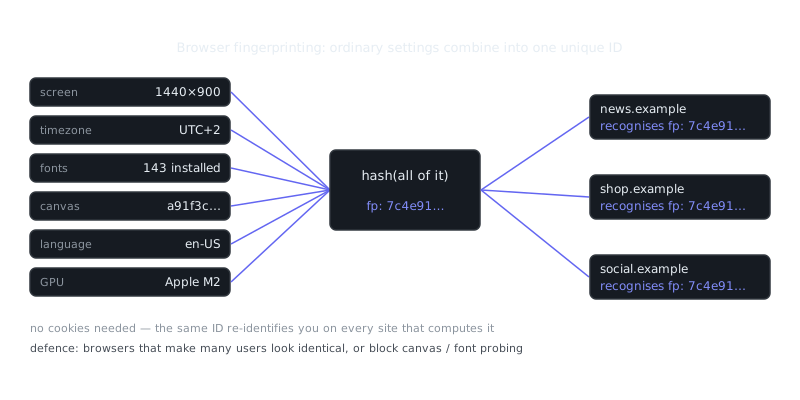
Beyond advertising, a few collection methods are worth understanding on their own. Device fingerprinting combines your browser version, screen resolution, installed fonts, and GPU characteristics into a near-unique identifier that persists across sessions without needing cookies. Location data is another — mobile apps routinely request "precise location" permissions, sell that data to brokers, who then aggregate your movement patterns and sell them to insurers, employers, and government contractors. Purchase history rounds it out: loyalty programs and payment processors correlate your transaction records across merchants whether you realize it or not.
Data Brokers and Aggregation
Individual data points become powerful in aggregate. Data brokers buy records from retailers, public databases, social platforms, and app developers, then merge everything into unified profiles. Those profiles get sold openly to background check services, hedge funds, political campaigns, and law enforcement.
Companies like LexisNexis, Equifax (well beyond credit reporting), and Spokeo operate largely outside public awareness, yet they hold data most people would consider deeply private: health inferences, financial stress indicators, relationship status, political affiliation. You didn't sign up for any of it.
The Threat Model: What Are You Actually Protecting Against?
Before doing anything else, define your threat model. A journalist protecting sources has completely different needs than someone who just wants fewer targeted ads. Overkill creates friction you'll eventually abandon; underpreparing leaves real gaps.
| Threat Level | Profile | Primary Concerns | Recommended Measures |
|---|---|---|---|
| Low | General consumer | Ad targeting, data broker profiles | Browser hardening, opt-outs, VPN |
| Medium | Professional / activist | Employer monitoring, doxxing, account compromise | Compartmentalization, hardened OS, strong OpSec |
| High | Journalist / whistleblower | State-adjacent corporate actors, legal exposure | Whonix/Tails, air-gapped devices, physical security |
| Critical | Source protection | Targeted surveillance, covert data requests | Full anonymization stack, in-person meetups only |
Most people sit somewhere in the low-to-medium range. The countermeasures below are organized with that in mind.
Browser and Network Hardening
Browser Configuration
Firefox with a hardened configuration is the practical baseline for most users. Start with these changes in about:config:
privacy.resistFingerprinting = true
privacy.firstparty.isolate = true
network.cookie.cookieBehavior = 5
geo.enabled = false
media.peerconnection.enabled = false  // Disables WebRTC IP leaks
Install uBlock Origin in medium mode and Privacy Badger. Avoid Chrome for anything privacy-sensitive. Its architecture is built to serve Google's data collection interests, and even with extensions installed, it leaks more than Firefox does.
VPNs: What They Do and Don't Do
A VPN shifts your network trust from your ISP to your VPN provider. It hides your traffic from your ISP and masks your IP from websites, but it doesn't make you anonymous. Your VPN provider can log your activity, and your browser fingerprint, login sessions, and behavioral patterns still identify you regardless.
Pick a provider with an audited no-logs policy — Mullvad and ProtonVPN are the current benchmarks — and pay with cash or Monero if anonymity actually matters to you.
Tor and Whonix for Higher Threat Levels
For stronger anonymity, Tor routes your traffic through three encrypted relays, making traffic analysis significantly harder. Whonix takes this further by running two virtual machines: a Gateway that routes all traffic through Tor, and a Workstation isolated from the network entirely. Even if malware compromises the Workstation, it can't learn your real IP address because it has no direct network access.
# Basic Whonix setup verification inside Workstation VM
curl https://check.torproject.org/api/ip
# Should return {"IsTor":true, ...}
Whonix fits medium-to-high threat scenarios well. For critical use cases, combine it with a live OS like Tails on dedicated hardware.
“Privacy is not something that I'm merely entitled to, it's an absolute prerequisite.”
— Marlon Brando
Account Hygiene and Data Minimization
Reducing Your Data Broker Footprint
Opt-out requests work, but they require persistence. Services like DeleteMe automate submissions to major brokers, though manual removal from the largest ones tends to be more reliable. The key targets are people-search sites like Spokeo, Whitepages, BeenVerified, and Intelius, enterprise brokers like Acxiom, LexisNexis, and Equifax Information Services, and your state's voter registration if it's publicly accessible.
The process repeats itself because brokers re-acquire data after removal. Treat it as a quarterly maintenance task, not a one-time fix.
Compartmentalization
Use separate browsers or browser profiles for different activities. One profile stays logged into Google for productivity work, a hardened profile handles general browsing, and Tor Browser covers anything sensitive. The most common way compartmentalization breaks down is cross-contamination — logging into a personal account while researching something sensitive collapses the separation immediately.
Use unique email addresses for different services too. SimpleLogin and AnonAddy generate aliases that forward to your real address, so you can identify which service leaked your address and revoke it without touching your primary email.
Social Engineering and Human-Layer Attacks
Technical controls alone aren't enough. Social engineering targets the human layer that surveillance and fraud both depend on.
Readers who want a second opinion can check a short breakdown.
Corporate surveillance sometimes gets augmented this way: a data broker might not have your phone number, but a spoofed customer service call could trick you into confirming it. Phishing campaigns targeting employees extract credentials that give corporations or their contractors access to internal systems they have no business reaching.
A few practical defenses hold up consistently. Verify unexpected contact through a second channel — call back on a published number, not the one that called you. Treat unsolicited urgency as a red flag, because legitimate organizations don't demand immediate action under threat. Don't volunteer information to confirm identity requests either; a real service already has your data and should verify themselves to you, not the other way around. For accounts that matter, use hardware security keys like a YubiKey. SMS-based two-factor authentication is vulnerable to SIM swapping, which is just a social engineering attack on carrier customer service.
Physical Security and Privacy
Digital privacy doesn't exist independently of physical security. Cameras, RFID readers, and Bluetooth beacons in retail environments track movement and dwell time. License plate readers operated by private companies like Vigilant Solutions log vehicle locations and sell the data commercially.
Faraday bags for devices when they're not in use prevent passive location tracking via Bluetooth and cellular. Cash payments break the transaction-level data trail that card payments create. Awareness of your physical environment matters too — coworking spaces, coffee shops, and open offices are common venues for shoulder surfing and casual observation, so position your screen accordingly.
For high-sensitivity conversations, leave all devices in another room. Modern smartphones can be compelled to produce historical location data and, in some configurations, ambient audio through legal requests to the manufacturer.
Physical security also ties directly to account security. A lost unlocked phone is a complete breach of every account on it. Use a PIN of at least 8 digits rather than biometrics alone — biometrics can be legally compelled in ways a PIN generally can't — and enable full-disk encryption.
Summary and Key Takeaways
Corporate surveillance is systematic, largely legal, and built into the default state of most consumer technology. Avoiding it entirely isn't realistic. Reducing your exposure meaningfully is.
Key takeaways:
- Define your threat model first. Countermeasures should match actual risks, not theoretical worst cases.
- Browser fingerprinting and behavioral tracking persist beyond cookies. Resist fingerprinting at the browser level, not just through cookie management.
Frequently Asked Questions
What is corporate surveillance and why should I care about it?
Corporate surveillance is when companies collect data about your online behavior, purchases, location, and habits — usually to build detailed profiles used for targeted advertising or sold to third parties. It happens quietly in the background through apps, websites, and devices you use every day. Most people don't realize how much data is being collected, which can affect your privacy, security, and even the prices you're shown online.
How do companies track me online and what can I do to stop it?
Companies track you using tools like cookies, tracking pixels, device fingerprinting, and login data from services like Google or Facebook embedded across millions of sites. You can reduce this by using a privacy-focused browser like Firefox or Brave, installing an ad/tracker blocker like uBlock Origin, and regularly clearing cookies. Enabling 'Do Not Track' and reviewing app permissions on your phone also helps limit how much data gets collected.
Are free apps and services safe to use, or are they spying on me?
Free apps and services often fund themselves by collecting and monetizing your personal data — as the saying goes, if you're not paying for the product, you are the product. This doesn't mean you have to avoid them entirely, but it's worth reading the privacy policy and checking what permissions an app requests before installing it. Choosing apps with clear privacy commitments, or paid alternatives with no-tracking policies, is a practical way to reduce exposure.
Video Resources
Sources & Further Reading
- Tor Project — Official site of the Tor network and Tor Browser.
- Tor Browser Manual — Setup, security levels, bridges and troubleshooting.
- EFF Surveillance Self-Defense — Threat-model based guides from the Electronic Frontier Foundation.
- Privacy Guides — Independent recommendations for privacy-respecting tools.
- Security in a Box — Digital security guides for activists and journalists.
- Tails Documentation — Official documentation for the amnesic live operating system.
- Whonix Documentation — Wiki for the Tor-based Whonix operating system.