How the Tor Network Works: A Complete Guide
The Tor network routes your internet traffic through multiple encrypted layers, making it extremely difficult to trace your online activity. Originally developed for the U.S. military, Tor now protects millions from surveillance, censorship, and tracking.
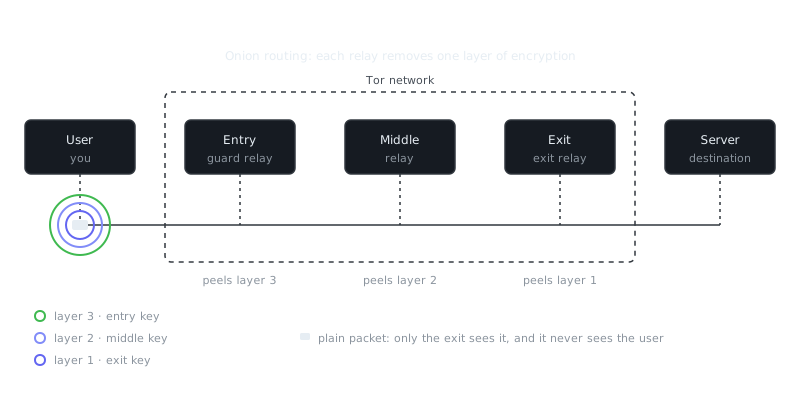
Try it: send a packet through Tor
Your message is wrapped in three layers of encryption. Each relay removes one layer and only learns the next hop; the exit sees the message but not who sent it.
On this page
Tor routes your internet traffic through multiple encrypted layers, making it extremely difficult for anyone to trace your online activity back to you. Originally developed by the U.S. Naval Research Laboratory, Tor (The Onion Router) now protects millions of users worldwide — journalists, activists, and ordinary people who need privacy from surveillance, censorship, or tracking.
“The Internet is a surveillance state.”
— Bruce Schneier
Understanding how Tor works reveals both its strengths and its real limits. It doesn't just hide your IP address. It fundamentally changes how your data travels across the internet, separating your identity from your destination through a distributed network of volunteer-operated servers.
The Three-Hop Architecture
Every time you connect through Tor, your traffic bounces through three randomly selected relay nodes before reaching its destination. That's what creates the separation between who you are and what you're accessing.
Your request first passes through an entry guard (also called a guard node), then a middle relay, and finally an exit node that connects to the actual site. Each relay only knows its immediate neighbors. The entry guard knows your real IP but not your destination. The exit node knows your destination but has no idea who you are. No single point sees the full picture.
The encryption works in layers, exactly like an onion. Your Tor client wraps your request in three nested layers before it ever leaves your device. The outer layer uses the entry guard's public key, the middle layer uses the middle relay's public key, and the inner layer uses the exit node's public key. Each relay peels off one layer, reads only the next hop's address, and passes the rest along. By the time traffic reaches the exit node, nobody in that chain knows both your identity and your destination.
Circuit Lifetime and Rotation
Tor builds a new circuit roughly every ten minutes. This rotation stops long-term traffic analysis from correlating your activity over time. Your entry guard is an exception — it stays consistent for two to three months. That's intentional. If your entry point changed constantly, an attacker running malicious relays would have a much better chance of becoming both your entry and exit point at the same time, which would break your anonymity entirely.
Onion Services: Hidden Destinations
Onion services extend Tor's protection to the server itself, not just the client. These sites use .onion addresses and never expose their real IP address to anyone connecting to them.
When you visit an onion service, both you and the server independently build circuits through the Tor network. Those circuits meet at a rendezvous point, and neither side learns where the other is located. That design protects whistleblowing platforms, censorship-resistant news sites, and services operating in places where exposure could mean serious consequences.
The addresses look like random strings because they're derived directly from the service's public key. A version 3 onion address is 56 characters long:
thisisanexamplev3onionaddressxxxxxxxxxxxxxxxxx.onion
This makes them self-authenticating. The address itself proves you're connected to the genuine service, which sidesteps the kind of certificate authority impersonation attacks that plague the regular web.
What Tor Protects (And What It Doesn't)
Tor gives you real, robust protection against network surveillance and traffic analysis. But it's not a complete privacy solution on its own, and treating it as one gets people into trouble.
Network-Level Protection
Tor hides your IP address from every website you visit. It hides your browsing destinations from your ISP and network administrator. Anyone watching your local network sees only that you're using Tor — not which sites you're visiting, not what you're reading.
That's meaningful protection. It defeats the kind of targeted surveillance that starts with your internet connection.
What Requires Additional Protection
Tor doesn't protect everything automatically, and knowing the gaps matters.
Application-level data: Log into Facebook through Tor and Facebook still knows who you are. Tor separates your network identity from your destination, but the moment you authenticate with a service, you've reconnected them.
Browser fingerprinting: Websites collect data about your browser version, screen resolution, installed fonts, and dozens of other system details. Tor Browser includes serious defenses against this, but using any other browser with Tor leaves you exposed. Your browser's fingerprint can identify you even without an IP address.
Metadata inside files: Documents, images, and PDFs carry hidden metadata — author names, GPS coordinates, editing history. Tor routes the file safely through the network, but it doesn't touch what's inside. Strip metadata before sharing anything sensitive, using tools like MAT2 or ExifTool.
Physical security: If someone seizes your device while Tor Browser is open, your current circuits and recent history may still be sitting in memory. Tor protects your network traffic, not your local machine. Full-disk encryption, clean shutdown procedures, and secure device storage all play a separate role that Tor can't cover.
Tor vs. VPNs vs. Encrypted Messaging
These tools solve different problems. Using the wrong one for a given threat doesn't make you safer, it just gives you false confidence.
| Feature | Tor | VPN | Encrypted Messaging Apps |
|---|---|---|---|
| Hides IP from destination | Yes | Yes | N/A (not a network tool) |
| Hides destination from ISP | Partially* | Yes | N/A |
| Decentralized | Yes | No | Varies |
| Protects against provider | Yes | No | Varies |
| Speed | Slow (3+ hops) | Fast (1 hop) | N/A |
| Best use case | Anonymity, censorship resistance | Privacy from ISP, geo-blocking | Message confidentiality |
*Tor hides which sites you visit, but your ISP can still see that you're using Tor.
VPNs shift trust from your ISP to the VPN provider. That provider sees everything Tor's exit node would see: your destinations, timing, and traffic patterns. They offer privacy from your local network, but not anonymity from the VPN company itself or from authorities who can compel them to hand over logs.
Signal, WhatsApp, and Wire protect message contents with end-to-end encryption, but the service provider still sees metadata — who messaged whom, when, and how often. Tor can anonymize your network connection to a messaging service, but it doesn't replace encryption inside the conversation itself.
The practical combination looks like this: use Signal for message confidentiality, access it through Tor for network anonymity, and strip metadata from any files before you share them.
Running Tor: Basic Usage
Tor Browser is the easiest starting point. It's a modified Firefox with Tor built in, fingerprinting defenses enabled, and sane privacy defaults out of the box.
Installing and Connecting
Download from torproject.org and verify the signature before running anything:
# On Linux, verify the download
gpg --verify tor-browser-linux64-*.tar.xz.asc

# Extract and run
tar -xf tor-browser-linux64-*.tar.xz
cd tor-browser/
./start-tor-browser.desktop
The browser connects to Tor automatically. If you're in a censored region, built-in bridges give you unlisted entry points that censors haven't blocked yet.
Command-Line Usage
To route other applications through Tor, install the standalone daemon:
# Debian/Ubuntu
sudo apt install tor

# macOS with Homebrew
brew install tor

# Start the service
sudo systemctl start tor
Tor listens on localhost port 9050 as a SOCKS5 proxy. Point your applications at that proxy to push their traffic through the network:
# Test with curl
curl --socks5-hostname 127.0.0.1:9050 https://check.torproject.org

# Route SSH through Tor
ssh -o ProxyCommand='nc -x 127.0.0.1:9050 %h %p' [email protected]
The --socks5-hostname flag ensures
Frequently Asked Questions
What is the Tor network and why do people use it?
Tor (The Onion Router) is a free network that hides your internet activity by routing your traffic through a series of volunteer-run servers around the world. People use it to browse the web privately, avoid tracking, and access content without revealing their real IP address. It's popular with journalists, activists, and anyone who wants stronger online privacy.
How does Tor actually hide my identity when I browse?
Tor wraps your data in multiple layers of encryption and sends it through at least three relays before it reaches its destination — each relay only knows the previous and next hop, never the full path. This layered approach is why it's called 'onion' routing, since each relay peels away one layer of encryption like an onion. The final relay (the exit node) sends your request to the website, which only sees that relay's IP, not yours.
Is Tor completely anonymous and safe to use?
Tor significantly improves your privacy, but it's not perfect or foolproof. Your anonymity can be compromised if you log into personal accounts, download files, or if the exit node is monitored, since that last hop is unencrypted. For the best protection, use Tor Browser (which is pre-configured for safety) and avoid sharing any personal information while browsing.
Video Resources
Sources & Further Reading
- Tor Project — Official site of the Tor network and Tor Browser.
- Tor Browser Manual — Setup, security levels, bridges and troubleshooting.
- Wikipedia: Onion routing — How layered encryption routing works, with history.
- EFF Surveillance Self-Defense — Threat-model based guides from the Electronic Frontier Foundation.
- Privacy Guides — Independent recommendations for privacy-respecting tools.
- Security in a Box — Digital security guides for activists and journalists.
- Tails Documentation — Official documentation for the amnesic live operating system.