How Multifactor Authentication Works and Why You Need It
A password alone is no longer sufficient protection. Multifactor authentication (MFA) requires multiple independent credentials before granting access, protecting against phishing, breaches, and keyloggers. This guide explains how MFA works and how to implement it effectively.
On this page
Passwords alone don't cut it anymore. Even a strong, randomly generated one can be stolen through phishing, leaked in a database breach, or grabbed by a keylogger. Multifactor authentication (MFA) fixes this by demanding more than one independent credential before letting anyone in. Here's how it works, what your options are, and how to actually use it.
What Multifactor Authentication Is
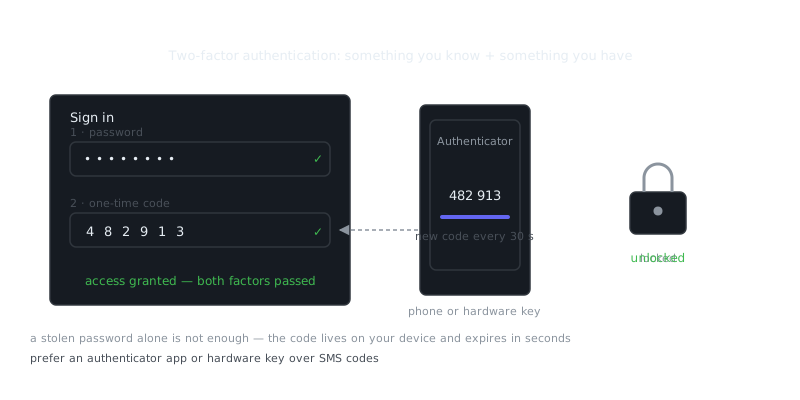
MFA requires two or more distinct types of evidence to verify who you are. These fall into three categories: something you know (a password, a PIN), something you have (a phone, a hardware key), and something you are (a fingerprint, your face). To qualify as true MFA, the factors need to come from different categories. Requiring a password and a security question doesn't count — both are knowledge factors.
The most common setup pairs a password with a time-based one-time password (TOTP) from an authenticator app or an SMS message. You type your password, and the system asks for a six-digit code that expires in 30 seconds. An attacker who steals your password still can't get in without your phone.
That layered approach turns authentication from a single point of failure into something that requires multiple simultaneous compromises. Even if your password shows up in a dark web leak, the credential alone won't open your account.
Authentication Factors in Detail
Knowledge Factors
Passwords, PINs, and security question answers all fall here. Their effectiveness depends entirely on complexity and uniqueness. Reuse a password across multiple services, and it becomes a master key the moment any one of those services gets breached.
Security questions have mostly fallen out of favor, and for good reason. Your mother's maiden name or the street you grew up on can often be found through public records or a quick look at your social media — hardly a secret.
Possession Factors
These require something physical or digital you actually hold. Hardware security keys like YubiKeys are the strongest option here. They're USB or NFC devices that store cryptographic keys and can't be remotely duplicated. When you authenticate, the key performs a cryptographic challenge-response that proves its presence without sending any secret that could be intercepted.
Authenticator apps like Google Authenticator or Authy generate TOTP codes from a shared secret stored on your device. SMS codes work but are the weakest possession factor — a SIM-swapping attack can redirect your messages to someone else's phone in minutes. Push notifications to a registered device are better than SMS because they use encrypted channels and often require biometric confirmation before approving.
Inherence Factors
Fingerprints, facial recognition, iris scans, voice patterns — these verify biological characteristics. Smartphones have made biometrics accessible to most people, though quality varies across implementations. The better systems store biometric templates in secure hardware enclaves, so even if your device is compromised, the underlying biometric data can't be reconstructed.
Behavioral biometrics — typing patterns, mouse movements, even gait analysis — are an emerging area that can provide continuous authentication rather than a single check at login.
MFA Methods Compared
| Method | Security Level | Convenience | Phishing Resistance | Cost |
|---|---|---|---|---|
| SMS codes | Low | High | No | Free |
| Authenticator app (TOTP) | Medium | High | No | Free |
| Push notifications | Medium-High | Very High | Partial | Free |
| Hardware security key | Very High | Medium | Yes | $20-$70 |
| Biometrics (device) | Medium-High | Very High | Yes | Included with device |
| Biometrics (enterprise) | High | High | Yes | $500-$5000+ |
Phishing resistance matters more than most people realize. A sophisticated phishing site can act as a proxy — capturing your password and TOTP code in real time and forwarding them to the real service before your code expires. Hardware security keys using FIDO2/WebAuthn avoid this entirely by cryptographically verifying the site's identity. A proxy attack simply doesn't work against them.
Implementing MFA as a User
Start with accounts that protect the most critical assets: email, banking, cloud storage, and your password manager. Email deserves particular attention because it's the recovery mechanism for almost everything else. Get into someone's inbox and you can reset passwords across their entire digital life.
For the strongest protection, use hardware security keys as your primary method and an authenticator app as a backup. Register two keys so you're not locked out if you lose one. Store your backup codes somewhere secure and separate from your primary devices — a password manager or an encrypted file works well.
Avoid SMS-based MFA when better options exist, but if it's your only choice, use it anyway. It's better than nothing. And if you're stuck with SMS, call your mobile carrier and ask about adding a PIN to your account to block SIM-swapping.
When you set up an authenticator app, save the QR code or setup key somewhere safe. You'll need it to restore your codes if you lose your device. Some apps offer encrypted cloud backup, which balances convenience and security reasonably well.
Example: Setting Up TOTP with a Linux System Account
MFA isn't just for web services. You can protect local system access too:
# Install Google Authenticator PAM module
sudo apt install libpam-google-authenticator

# Run the setup tool
google-authenticator

# Follow prompts to generate QR code and backup codes
# Select time-based tokens (y)
# Update .google_authenticator file (y)
# Disallow multiple uses (y)
# Allow 3 time steps for clock skew (y)
# Enable rate limiting (y)
Then configure PAM to require the code:
Some readers prefer the format used at Torzon Review's write-up.
# Edit /etc/pam.d/sshd
sudo nano /etc/pam.d/sshd

# Add this line at the top
auth required pam_google_authenticator.so

# Edit /etc/ssh/sshd_config
sudo nano /etc/ssh/sshd_config

# Set these values
ChallengeResponseAuthentication yes
UsePAM yes

# Restart SSH
sudo systemctl restart sshd
This setup requires both a password and a TOTP code for SSH access — a meaningful security upgrade for any remotely accessible system.
Enterprise MFA Deployment
Organizations face a different challenge than individual users. The solution needs to scale across thousands of people with varying devices, different levels of technical comfort, and legacy systems that may not support modern authentication protocols at all.
Adaptive authentication offers a practical middle ground. Instead of requiring MFA on every single login, the system evaluates risk signals — IP address, device fingerprint, time of day, behavioral patterns — and only steps up to additional authentication when something looks off. Normal logins from a known device stay frictionless. Unusual access attempts get challenged.
Legacy applications that can't support MFA directly can be fronted with an authentication proxy, or accessed through a VPN that requires MFA at the network layer. That extends protection without touching every application individually.
“The only secure computer is one that's unplugged, locked in a safe, and buried 20 feet under the ground in a secret location.”
— Dennis Hughes
Account recovery needs careful thought. MFA dramatically cuts unauthorized access, but it also raises the odds that legitimate users lock themselves out. Recovery procedures need to balance security with usability — requiring help desk verification or manager approval prevents someone from bypassing MFA entirely through a weak self-service recovery flow.
Frequently Asked Questions
What is multifactor authentication and why do I need it?
Multifactor authentication (MFA) is a security method that requires you to prove your identity in two or more ways before accessing an account — for example, entering a password and then a code sent to your phone. It adds an extra layer of protection so that even if someone steals your password, they still can't get in without that second factor. Most security experts recommend enabling it on any account that supports it, especially email and banking.
What are the different types of factors used in MFA?
MFA factors fall into three categories: something you know (like a password or PIN), something you have (like your phone or a hardware key), and something you are (like a fingerprint or face scan). Common examples include a one-time code sent via SMS, an authenticator app like Google Authenticator, or a physical USB security key. Using factors from two different categories makes your account significantly harder to compromise.
Is MFA completely secure, or can it still be hacked?
MFA is much more secure than a password alone, but it's not completely foolproof. Attackers can use tactics like SIM swapping to intercept SMS codes, or phishing pages that trick you into entering your one-time code in real time. Using an authenticator app or a hardware security key instead of SMS codes provides stronger protection against these kinds of attacks.
Video Resources
Sources & Further Reading
- Tor Project — Official site of the Tor network and Tor Browser.
- Tor Browser Manual — Setup, security levels, bridges and troubleshooting.
- Wikipedia: Onion routing — How layered encryption routing works, with history.
- Yubico Documentation — Official guides for YubiKey setup and use.
- NIST Cybersecurity Framework — Reference framework for identifying, protecting and responding to threats.
- EFF — Digital rights organisation with security explainers.
- OWASP — Open standards and cheat sheets for application security.