VPN Configuration and Setup: A Complete Security Guide
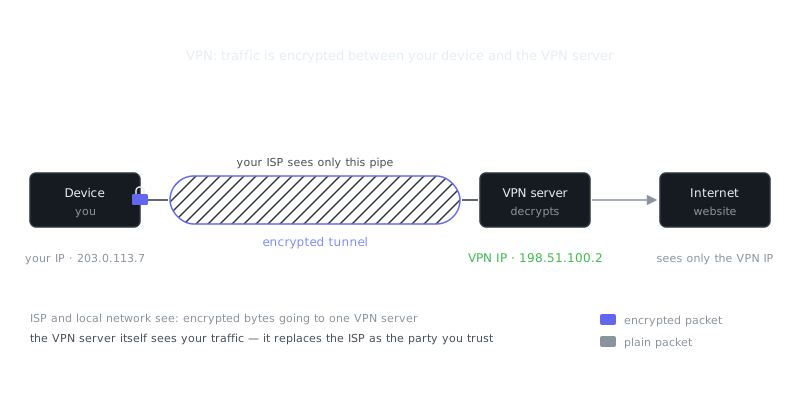
A VPN creates an encrypted tunnel between your device and a remote server, masking your IP address and protecting data from interception. This guide covers VPN protocols, configuration methods, and security best practices for remote work, sensitive communications, and site-to-site connectivity.
On this page
A Virtual Private Network creates an encrypted tunnel between your device and a remote server, masking your IP address and keeping your data away from anyone trying to intercept it. Whether you're securing remote work, protecting sensitive communications, or connecting two office networks, getting your VPN configured correctly is one of the most important things you can do for network security.
This guide walks through VPN protocols, setup methods, and the security practices that actually matter.
Understanding VPN Protocols
Your protocol choice shapes everything: speed, security, and what devices can connect. There's no single right answer, but some options are clearly better than others.
OpenVPN
OpenVPN has been the go-to choice for serious VPN deployments for years. It uses SSL/TLS for key exchange and runs over either UDP (faster) or TCP (more reliable). Because it's open source, it gets regular security audits and runs on practically every platform you'd care about.
A basic OpenVPN server config sets up your network parameters:
port 1194
proto udp
dev tun
ca ca.crt
cert server.crt
key server.key
dh dh2048.pem
server 10.8.0.0 255.255.255.0
push "redirect-gateway def1 bypass-dhcp"
push "dhcp-option DNS 8.8.8.8"
keepalive 10 120
cipher AES-256-GCM
auth SHA256
user nobody
group nogroup
persist-key
persist-tun
status openvpn-status.log
verb 3
This sets up a tunnel on 10.8.0.0/24, pushes DNS settings down to clients, and uses AES-256-GCM encryption. That last part matters — GCM is significantly faster than the older CBC modes on modern hardware.
WireGuard
WireGuard is the newer kid on the block, and it's genuinely impressive. The entire codebase is around 4,000 lines, compared to OpenVPN's 70,000+. Less code means a smaller attack surface and easier security auditing. It uses Curve25519 for key exchange, ChaCha20 for encryption, and Poly1305 for authentication — all modern, well-vetted choices.
The server config is refreshingly simple:
[Interface]
Address = 10.0.0.1/24
ListenPort = 51820
PrivateKey = <server-private-key>
PostUp = iptables -A FORWARD -i wg0 -j ACCEPT; iptables -t nat -A POSTROUTING -o eth0 -j MASQUERADE
PostDown = iptables -D FORWARD -i wg0 -j ACCEPT; iptables -t nat -D POSTROUTING -o eth0 -j MASQUERADE

[Peer]
PublicKey = <client-public-key>
AllowedIPs = 10.0.0.2/32
On mobile devices, WireGuard often runs 3-4x faster than OpenVPN while using less battery. That's not a small difference.
IPsec/IKEv2
IPsec with IKEv2 is where enterprise environments and mobile scenarios converge. IKEv2's MOBIKE extension lets you switch between WiFi and cellular without dropping the tunnel — incredibly useful for laptops that roam between networks constantly.
Because IPsec operates at the network layer, it's faster than SSL-based VPNs. The tradeoff is configuration complexity. If you're going this route, strongSwan is the implementation most people reach for, and it's solid when set up correctly.
VPN Protocol Comparison
| Protocol | Speed | Security | Mobile Support | NAT Traversal | Complexity |
|---|---|---|---|---|---|
| OpenVPN | Good | Excellent | Good | Excellent | Moderate |
| WireGuard | Excellent | Excellent | Excellent | Good | Low |
| IPsec/IKEv2 | Very Good | Excellent | Excellent | Good | High |
| L2TP/IPsec | Fair | Good | Good | Poor | Moderate |
| PPTP | Good | Weak | Excellent | Fair | Low |
PPTP is in that table for historical context only. Don't use it for anything that requires real security — its encryption has been thoroughly broken.
Setting Up a Personal VPN Server
Running your own VPN server gives you complete control over your data. You're not trusting some third-party provider's privacy policy. A $5/month cloud instance is plenty of horsepower for personal use.
Initial Server Preparation
Once you've spun up a Ubuntu 22.04 server, update it and open the right firewall ports:
apt update && apt upgrade -y
ufw allow 51820/udp
ufw allow 22/tcp
ufw enable
WireGuard Installation and Configuration
Install WireGuard and generate your keys:
apt install wireguard -y
cd /etc/wireguard
umask 077
wg genkey | tee server_private.key | wg pubkey > server_public.key
wg genkey | tee client_private.key | wg pubkey > client_public.key
Create /etc/wireguard/wg0.conf using the server configuration from earlier, swapping in your generated keys. Then turn on IP forwarding:
echo "net.ipv4.ip_forward=1" >> /etc/sysctl.conf
sysctl -p
Start everything up:
systemctl enable wg-quick@wg0
systemctl start wg-quick@wg0
Client Configuration
Generate a client config file that users can import directly into the WireGuard app:
[Interface]
PrivateKey = <client-private-key>
Address = 10.0.0.2/32
DNS = 1.1.1.1

[Peer]
PublicKey = <server-public-key>
Endpoint = your-server-ip:51820
AllowedIPs = 0.0.0.0/0
PersistentKeepalive = 25
AllowedIPs = 0.0.0.0/0 routes all traffic through the VPN. If you want split-tunneling instead — where only specific networks go through the tunnel — replace that with the relevant subnets: AllowedIPs = 10.0.0.0/8, 192.168.0.0/16.
Enterprise VPN Deployment
Enterprise setups need more than basic connectivity. You're dealing with authentication, logging, access control, and compliance requirements that don't exist when you're just protecting your own browsing.
Multi-Factor Authentication
Adding MFA cuts credential compromise risk dramatically. OpenVPN supports PAM modules, which means you can integrate TOTP apps or hardware security keys like YubiKeys. Hardware tokens are phishing-resistant by design — the same reason they're used for workstation logins applies equally to VPN access.
Tell OpenVPN to require both a certificate and a one-time password:
plugin /usr/lib/openvpn/openvpn-plugin-auth-pam.so openvpn
Then configure PAM in /etc/pam.d/openvpn to require both password and OTP validation.
Certificate Management
Once you've got multiple users, sharing keys stops making sense. Stand up a proper PKI with Easy-RSA or a commercial certificate authority and issue individual client certificates:
./easyrsa init-pki
./easyrsa build-ca nopass
./easyrsa gen-req client1 nopass
./easyrsa sign-req client client1
For certificate lifetimes, 90-180 days limits your exposure if a cert gets compromised. Yes, it creates more administrative work, but that's the honest tradeoff.
Network Segmentation
Just because someone connected to your VPN doesn't mean they need access to everything on your network. Lock down what VPN clients can actually reach:
# Allow VPN clients to access only specific servers
iptables -A FORWARD -i wg0 -d 192.168.1.10 -p tcp --dport 443 -j ACCEPT
iptables -A FORWARD -i wg0 -d 192.168.1.20 -p tcp --dport 22 -j ACCEPT
iptables -A FORWARD -i wg0 -j DROP
Least-privilege access isn't just a buzzword here. If a VPN credential gets stolen, these rules determine how much damage an attacker can actually do.
Security Hardening
A VPN is only as secure as its configuration. A few critical settings separate a properly secured deployment from one that just looks secure.
DNS Leak Prevention
If your DNS queries leave the VPN tunnel, your browsing activity is visible even though your traffic isn't. Configure the VPN to push DNS servers to clients, then verify nothing is leaking to your ISP's resolvers:
# Test for DNS leaks
dig +short myip.opendns.com @resolver1.opendns.com
The IP that comes back should be your VPN server's address. If it's your local IP, you have a leak.
Kill Switch Implementation
What happens when your VPN connection drops unexpectedly? Without a kill switch, your device falls back to your regular internet connection and starts sending unencrypted traffic. On Linux, you can prevent that with iptables:
# Block all traffic except through VPN
iptables -A OUTPUT -o wg0 -j ACCEPT
iptables -A OUTPUT -o lo -j ACCEPT
iptables -A OUTPUT -j DROP
Perfect Forward Secrecy
PFS makes sure that if someone compromises your current keys, they can't use them to decrypt past traffic. OpenVPN handles this through tls-crypt combined with regular key renegotiation:
tls-crypt ta.key
reneg-sec 3600
“The only secure computer is one that's unplugged, locked in a safe, and buried 20 feet under the ground in a secret location.”
— Dennis Hughes
Generate the ta.key file with openvpn --genkey --secret ta.key and distribute it to clients alongside their certificates. It adds a second layer of authentication on top of your PKI.
Frequently Asked Questions
What is a VPN and why do I need one?
A VPN (Virtual Private Network) encrypts your internet connection and routes it through a secure server, hiding your IP address and protecting your data from eavesdroppers. It's especially useful on public Wi-Fi networks like those in cafes or airports where attackers could intercept your traffic. Many people also use VPNs to access content restricted to certain regions.
How do I set up a VPN on my device?
Most VPN providers offer a dedicated app you simply download, install, and log into — no technical knowledge required. If you prefer a manual setup, you can go to your device's network settings and add a VPN connection using credentials provided by your VPN service. Either way, once connected you just tap or click 'Connect' and your traffic is automatically protected.
Is using a VPN completely safe and private?
A VPN significantly improves your privacy, but it doesn't make you anonymous — your VPN provider can still see your traffic, so choosing a trustworthy provider with a no-logs policy matters. It also won't protect you from malware, phishing sites, or weak passwords, so it should be one part of a broader security approach. Look for providers that have been independently audited to back up their privacy claims.
Video Resources
Sources & Further Reading
- EFF — Digital rights organisation with security explainers.
- OWASP — Open standards and cheat sheets for application security.
- NIST Cybersecurity Framework — Reference framework for identifying, protecting and responding to threats.
- GnuPG Documentation — Manuals and how-tos for GPG key management and encryption.
- CISA — US cybersecurity agency guidance for individuals and organisations.
- Have I Been Pwned — Check whether an email or password appeared in a known breach.
- Wikipedia: Pretty Good Privacy — Background on PGP, OpenPGP and the web of trust.