Network Security Fundamentals: Protecting Connected Systems
Network security protects data in transit, systems at rest, and the infrastructure connecting them. Every device that touches a network becomes a potential entry point for attackers. This guide covers the core concepts, tools, and practices that form the foundation of network security.
On this page
Network security is about protecting data while it moves, systems while they sit idle, and the infrastructure tying everything together. Every device on a network — a laptop, a printer, an IoT sensor — is a potential door for attackers. If you're building, managing, or just using connected systems, understanding how networks fail (and how to stop them from failing) matters more than most people realize.
“There are only two types of companies: those that have been hacked and those that will be.”
— Robert Mueller
This article walks through the core concepts, tools, and practices you need to understand.
Understanding Network Threats
Most network attacks exploit one of three things: flaws in protocols, sloppy configurations, or people making mistakes. Here are the threats you'll run into most often.
Man-in-the-Middle (MitM) attacks happen when an attacker slips between two communicating parties. On an open Wi-Fi network, they can capture unencrypted traffic, steal session tokens, or inject malicious content into pages you're browsing. HTTPS encrypts the channel and largely neutralizes this, but only if you actually pay attention to certificate warnings instead of clicking past them.
Denial of Service (DoS) attacks flood systems with traffic until they can't function. The distributed version — DDoS — amplifies this by recruiting thousands of compromised devices to pile on at once. Modern DDoS attacks can hit hundreds of gigabits per second, which is enough to knock major services offline.
Packet sniffing captures network traffic for analysis. Admins use it for legitimate troubleshooting all the time, but attackers use the same technique to harvest credentials, API keys, and anything else traveling over unencrypted connections.
Port scanning maps out what services a target system is running. Tools like Nmap let attackers identify exposed services quickly, then focus on anything running outdated software or weak configs.
# Example Nmap scan (for authorized security testing only)
nmap -sV -p- 192.168.1.1

# Check open ports on your own system
netstat -tuln
Network Defense Layers
No single control will protect you. Effective security layers multiple defenses so that when one fails, another catches what slipped through.
Firewalls
Firewalls filter traffic based on rules you define. A stateless firewall looks at each packet in isolation, blocking or allowing based on IP addresses, ports, and protocols. A stateful firewall understands context — it knows a reply packet belongs to an existing conversation, not a new inbound connection.
Next-generation firewalls (NGFW) go further by inspecting application-layer traffic. They can block malicious payloads hiding inside HTTP requests or other legitimate-looking protocols, even on ports you've explicitly allowed.
# Basic iptables firewall rule (Linux)
# Allow incoming SSH from specific subnet
iptables -A INPUT -p tcp -s 10.0.1.0/24 --dport 22 -j ACCEPT

# Drop all other incoming connections
iptables -A INPUT -j DROP

# Allow established connections to continue
iptables -A INPUT -m state --state ESTABLISHED,RELATED -j ACCEPT
Network Segmentation
Segmentation splits your network into isolated zones. A breach in one zone doesn't automatically spread to everything else. Most organizations break things up something like this:
- DMZ (Demilitarized Zone): public-facing servers kept away from internal systems
- Internal network: employee workstations and file servers
- Management network: infrastructure control systems
- Guest network: visitor devices with zero access to internal resources
VLANs create this logical separation on the same physical hardware. A properly configured VLAN stops devices in one group from seeing traffic in another, even when they're sharing the same switch.
Intrusion Detection and Prevention
Intrusion Detection Systems (IDS) watch network traffic for suspicious patterns and alert you when something looks wrong. They don't stop attacks on their own. Intrusion Prevention Systems (IPS) take it a step further and actively terminate malicious connections.
Signature-based detection matches traffic against a database of known attack patterns. Anomaly-based detection learns what normal looks like and flags anything that deviates. A database server suddenly opening hundreds of outbound connections is a good example of the kind of thing that should trigger an alert.
Encryption and VPNs
Encryption turns readable data into ciphertext that's useless without the right key. Different layers of the network handle encryption differently.
TLS (Transport Layer Security) protects web traffic, email, and API calls. That HTTPS in your browser means TLS is encrypting the connection between you and the server. TLS 1.3 is the version you want — it's faster and more secure than anything older.
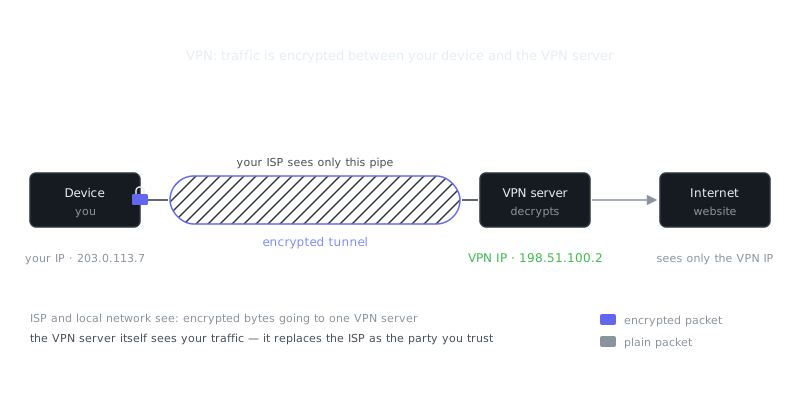
VPNs (Virtual Private Networks) create encrypted tunnels through untrusted networks. Remote workers use them to reach corporate resources securely over the internet. Getting VPN configuration right means balancing security, performance, and compatibility across your devices.
VPN Configuration and Setup
A site-to-site VPN links two networks together. A remote-access VPN connects individual devices to a network. Your protocol choice matters more than most people think:
| Protocol | Encryption | Speed | Use Case |
|---|---|---|---|
| WireGuard | ChaCha20 | Fastest | Modern deployments, mobile |
| OpenVPN | AES-256 | Moderate | Cross-platform, highly configurable |
| IPsec | AES-256 | Fast | Site-to-site, enterprise |
| IKEv2 | AES-256 | Fast | Mobile devices, auto-reconnect |
# WireGuard VPN configuration example (server)
[Interface]
Address = 10.0.0.1/24
ListenPort = 51820
PrivateKey = <server-private-key>

[Peer]
PublicKey = <client-public-key>
AllowedIPs = 10.0.0.2/32
When picking a VPN solution, look at whether it supports split tunneling (routing only specific traffic through the VPN), a kill switch (blocking internet access if the VPN drops), and what the provider actually logs. A VPN that records your connection metadata doesn't give you the privacy you might think it does.
Authentication and Access Control
You have to correctly identify users and devices before you let them anywhere near your network.
Network Access Control (NAC) systems check device compliance before granting access. A laptop running outdated antivirus might land in a restricted VLAN until it meets your policy requirements.
802.1X authentication requires credentials before a device gets network access at all, whether it's wired or wireless. It replaces the old assumption that plugging in an Ethernet cable means you're trusted.
Multi-factor authentication (MFA) asks for more than just a password — typically a time-based code, a hardware token, or a biometric check. Even if an attacker steals someone's password, MFA stops them cold because the password alone isn't enough.
Password Security
Weak passwords are still the most common way attackers get in. Password managers solve this by generating and storing unique, complex passwords for every service you use, eliminating credential reuse across accounts.
| Feature | Bitwarden | 1Password | KeePassXC |
|---|---|---|---|
| Cloud sync | Yes | Yes | Manual |
| Zero-knowledge | Yes | Yes | N/A (local) |
| Open source | Yes | No | Yes |
| Hardware key support | Yes | Yes | Yes |
| Family sharing | Yes | Yes | No |
Cloud-synced managers are convenient but require trusting the provider's encryption implementation. Local managers like KeePassXC put you in complete control, at the cost of managing your own sync across devices. Neither is wrong — it depends on your threat model.
Monitoring and Incident Response
How fast you detect a breach determines how bad it gets. Teams that spot a compromise within hours contain the damage. Those that take months to notice often face catastrophic data loss.
Security Information and Event Management (SIEM) systems pull in logs from firewalls, servers, applications, and endpoints, then correlate events across all of them. That's how you catch attacks that no single log source would reveal on its own. One failed login is noise. Ten thousand failed logins from different IP addresses targeting the same account is a credential stuffing attack in progress.
# Example: Monitor fa
Frequently Asked Questions
What is a firewall and do I really need one?
A firewall is a security system that monitors and controls incoming and outgoing network traffic based on predefined rules. It acts as a barrier between your trusted internal network and untrusted external networks like the internet. Yes, you need one — most operating systems include a built-in firewall, and you should make sure it's enabled.
What is the difference between HTTP and HTTPS?
HTTP (HyperText Transfer Protocol) sends data between your browser and a website in plain text, meaning anyone intercepting the traffic can read it. HTTPS adds a layer of encryption using TLS/SSL, so the data is scrambled and unreadable to anyone who intercepts it. Always look for the padlock icon in your browser's address bar before entering sensitive information like passwords or payment details.
Why is using public Wi-Fi risky, and how can I stay safe?
Public Wi-Fi networks are often unencrypted, which means other people on the same network can potentially intercept your traffic using tools that require little technical skill. Attackers can also set up fake hotspots with convincing names to trick you into connecting. To stay safe, avoid accessing sensitive accounts on public Wi-Fi, and use a VPN to encrypt your connection when you have no other option.
Video Resources
Sources & Further Reading
- EFF — Digital rights organisation with security explainers.
- OWASP — Open standards and cheat sheets for application security.
- NIST Cybersecurity Framework — Reference framework for identifying, protecting and responding to threats.
- GnuPG Documentation — Manuals and how-tos for GPG key management and encryption.
- CISA — US cybersecurity agency guidance for individuals and organisations.
- Have I Been Pwned — Check whether an email or password appeared in a known breach.
- Wikipedia: Pretty Good Privacy — Background on PGP, OpenPGP and the web of trust.