How to Recognize Phishing Attacks: A Practical Guide
Phishing exploits human psychology rather than technical vulnerabilities, making it one of the most effective attack vectors today. This guide covers the patterns, indicators, and systematic techniques you need to identify phishing attempts before they succeed.
On this page
Phishing remains one of the most effective attack vectors in cybersecurity, not because it exploits complex technical vulnerabilities, but because it exploits human psychology. You don't need to be a security expert to fall for it — you just need to be in a hurry, slightly stressed, or caught off guard. Understanding how these attacks work and how to spot them is a foundational skill for anyone online, whether you're an individual user or part of an enterprise security team.
What Is Phishing?
At its core, phishing is a deception play. An attacker pretends to be someone you trust — your bank, your employer, a delivery service — and tries to get you to hand over credentials, click a malicious link, or take some action that benefits them.
The term covers more ground than most people realize. Email phishing is the classic form: mass campaigns sent to thousands of addresses hoping a percentage bites. Spear phishing is the targeted version, where attackers research you specifically before reaching out. Smishing does the same thing over SMS, vishing over phone calls. Clone phishing takes a real email you've received and replaces its links with malicious ones before resending it.
The common thread is deception. Why bother breaking your encryption when they can just convince you to hand over the keys?
Anatomy of a Phishing Attack
Most phishing attempts follow a predictable structure. Once you recognize the pattern, individual attacks become much easier to spot.
The Lure
This is the hook — the message designed to make you react before you think. It might be a fake security alert claiming your account's been compromised, an invoice from a vendor you work with, a package delivery failure with a tracking link, or a message from a "colleague" asking you to authorize a wire transfer.
Whatever form it takes, the goal is the same: trigger an emotional response — urgency, fear, curiosity — fast enough that you act before your critical thinking kicks in.
The Payload
Once you engage, the payload activates. That could be a credential-harvesting page that's nearly identical to a legitimate login, a malicious file attachment disguised as a PDF or Office document, a link that silently installs malware through a browser exploit, or a form collecting financial data directly.
The Exfiltration
After the payload does its job, the attacker collects what they came for — credentials, session tokens, financial data — and uses it directly or sells it on criminal marketplaces. By the time you notice anything, the damage is usually already done.
How to Identify Phishing Attempts
Gut instinct alone isn't enough. What actually works is applying the same checks consistently, every time.
Inspect the Sender Address
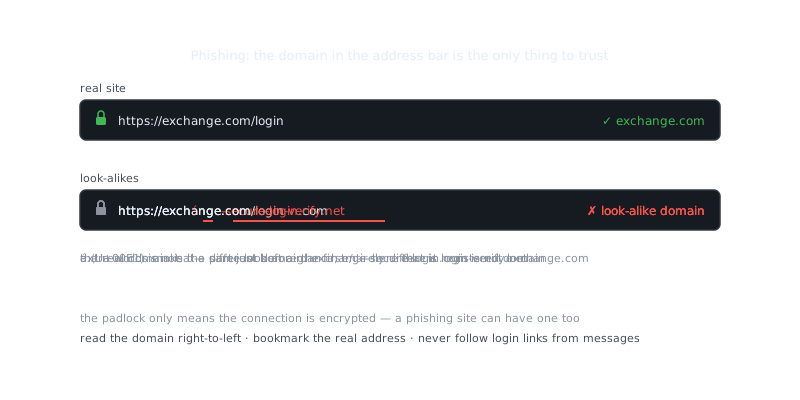
Display names can be set to anything. A message that appears to come from "PayPal Support" might actually originate from [email protected] — that's a numeral 1 substituting the letter l, a technique called homoglyph substitution. It looks right at a glance and that's the whole point.
Always check the actual sending address. Look for mismatched domains between the display name and the real domain, lookalike domains using hyphens or extra words, and free email providers like Gmail or Yahoo on communications that should come from corporate addresses.
Analyze Links Before Clicking
Hover over any link to preview the destination URL before you click it. On mobile, press and hold to inspect. If something still seems off, you can dig further from the command line.
# Check redirect chains without opening a browser
curl -sI "https://suspicious-link.example.com" | grep -i location

# Check domain registration age — recently registered domains are a major red flag
whois suspicious-link.example.com | grep -i "creation date"
A domain registered two weeks ago that's impersonating a major bank? Almost certainly malicious. Legitimate organizations don't operate from freshly registered domains.
Evaluate the Request Being Made
Here's a reliable heuristic: legitimate organizations don't ask you to do weird things. They don't request your password over email, ask you to bypass normal authentication to "verify your account," demand immediate action under threat of suspension, or request payment in gift cards, wire transfers, or cryptocurrency.
If any of those patterns appear, treat the message as suspicious — regardless of how professional it looks.
“The only secure computer is one that's unplugged, locked in a safe, and buried 20 feet under the ground in a secret location.”
— Dennis Hughes
Check for Technical Indicators
Email headers contain metadata that can reveal spoofing attempts. Most email clients let you view raw headers, and a few specific fields tell you a lot.
# Key headers to examine:
Received: from        # The actual originating server
Return-Path:          # Where bounces go — should match the sender domain
DKIM-Signature:       # Cryptographic signature from the sending domain
Authentication-Results: spf=pass dkim=pass dmarc=pass
A failed SPF, DKIM, or DMARC check means the email didn't pass domain authentication. That's a strong indicator of spoofing and worth taking seriously.
Phishing Vectors Comparison
Not all phishing channels carry the same risks or offer the same detection cues.
| Vector | Spoofing Difficulty | Detection Cues | Common Targets |
|---|---|---|---|
| Medium | Headers, domain inspection, link preview | Credentials, financial data | |
| SMS (Smishing) | Low | No header data, short URLs, urgency | Banking, package delivery |
| Voice (Vishing) | High | Caller ID spoofing, scripted pressure | Enterprises, IT help desks |
| Social Media | Low | Cloned profiles, DM-based links | General users, crypto holders |
| QR Code | High | No visible URL before scanning | Physical locations, invoices |
QR code phishing — sometimes called "quishing" — is becoming more common precisely because people don't think to scrutinize a QR code the way they would a suspicious link. You scan it, and the malicious URL is already loading before you've had a chance to evaluate anything.
Phishing in High-Stakes Contexts
Crypto and Financial Targets
Attacks targeting cryptocurrency holders are particularly aggressive because transactions are irreversible. There's no fraud department to call. Attackers impersonate hardware wallet vendors, exchanges, and support teams, and they're patient about it.
Common tactics include fake wallet recovery pages that harvest seed phrases, impersonation of Ledger, Trezor, or exchange support staff, and fake airdrop claims that require connecting your wallet to a malicious contract. If someone phishes your seed phrase, they have permanent access to your funds. This is exactly why cold storage and air-gapped devices matter — an attacker can't drain a wallet they can't reach.
Corporate Spear Phishing
Targeted attacks against employees usually start with reconnaissance. An attacker studies a company's org chart on LinkedIn, identifies the CFO and a finance employee, then sends an email impersonating the CFO instructing that employee to authorize a wire transfer. This is called Business Email Compromise (BEC), and it costs businesses billions annually.
Defending against it requires out-of-band verification for any financial request that arrives by email — meaning you pick up the phone and call the actual person using a number you already have, not one provided in the email. Pair that with a well-configured password manager to keep credentials separated, and hardware security keys (FIDO2/WebAuthn) as a second factor. Unlike TOTP codes, hardware keys bind authentication to the legitimate domain, so a phishing site simply can't use them.
Building Phishing Resistance
Recognition skills reduce your risk. They don't eliminate it. You need technical controls that hold up even when an attack slips past your defenses.
Use Hardware-Based Multi-Factor Authentication
Time-based one-time passwords (TOTP) can be phished in real time through adversary-in-the-middle proxies — the attacker just relays your code to the real site before it expires. Hardware keys using FIDO2 don't have this problem. They bind authentication to the legitimate domain, so even if you enter your credentials on a phishing site, the key will refuse to authenticate against a different origin.
Enable Email Authentication on Your Domain
If you run a domain, configure SPF, DKIM, and DMARC records to prevent attackers from spoofing your domain against your own users or partners.
# Example DNS records for anti-spoofing
TXT  @           "v=spf1 include:_spf.google.com ~all"
TXT  _dmarc      "v=DMARC1; p=quarantine; rua=mailto:[email protected]"
A p=reject DMARC policy is the strongest setting. It prevents unauthenticated mail from reaching recipients at all, rather than just flagging it.
Train for Skepticism, Not Just Awareness
Security awareness training that only teaches people to "look for red flags" creates false confidence. What actually works is simulating real phishing attempts against your users, measuring click rates, and using failures as teachable moments — without punishment. Platforms like KnowBe4 and Proofpoint run these simulations at scale and have solid data on what moves the needle.
Key Takeaways
Phishing works by combining technical deception with psychological pressure. Defending against it takes both systematic inspection habits and layered technical controls — neither one alone is enough.
A few things worth keeping in mind: always verify the actual sender domain, not just the display name. Hover over links before clicking them. Be skeptical of any message that demands immediate action or asks for information a legitimate organization wouldn't request by email. And whenever possible, use hardware-based MFA instead of TOTP — it's one of the few controls that holds up even when a user gets fooled.
Frequently Asked Questions
What is a phishing attack and how does it work?
A phishing attack is when a cybercriminal sends a fake email, text, or message that looks like it's from a trusted source — like your bank or a popular website — to trick you into clicking a link or entering personal information. The goal is usually to steal your password, credit card number, or other sensitive data. Once you interact with the fake site or download an attachment, the attacker captures your information.
How can I tell if an email is a phishing attempt?
Look for red flags like urgent or threatening language, mismatched sender email addresses (e.g., [email protected] instead of paypal.com), and generic greetings like 'Dear Customer' instead of your name. Hover over any links before clicking to see if the actual URL matches the displayed text. Legitimate companies rarely ask you to provide passwords or sensitive data via email.
What should I do if I accidentally clicked a phishing link?
Don't panic — immediately disconnect from the internet, change the passwords for any accounts you may have entered on the fake site, and enable two-factor authentication where possible. Run a virus or malware scan on your device to check for anything that may have been installed. If financial information was involved, contact your bank right away to monitor or freeze your accounts.
Video Resources
Sources & Further Reading
- CISA — US cybersecurity agency guidance for individuals and organisations.
- Krebs on Security — Investigative reporting on breaches, fraud and malware.
- Have I Been Pwned — Check whether an email or password appeared in a known breach.
- EFF — Digital rights organisation with security explainers.
- OWASP — Open standards and cheat sheets for application security.
- NIST Cybersecurity Framework — Reference framework for identifying, protecting and responding to threats.
- GnuPG Documentation — Manuals and how-tos for GPG key management and encryption.